-------------------------------------------------------------------------------
Thoughts Astray
-------------------------------------------------------------------------------
So, I was looking at these Infocom text adventures which uses the classic AmigaDOS blue and white and tested one called Plundered Hearts. How about that female gaze? Can you feel it?
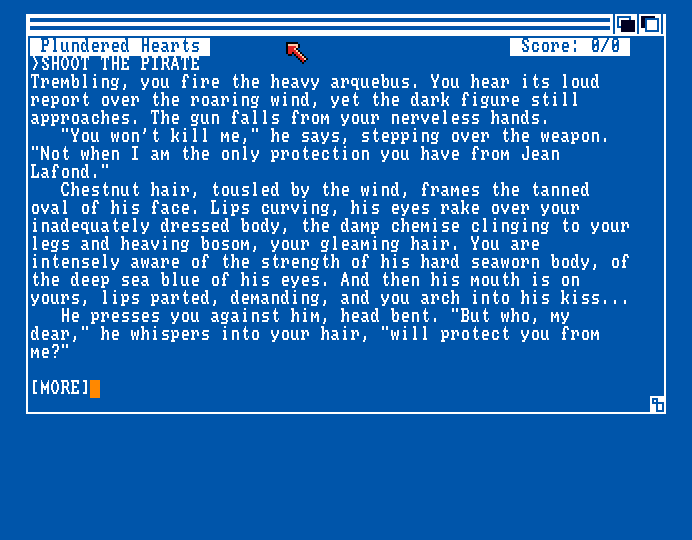
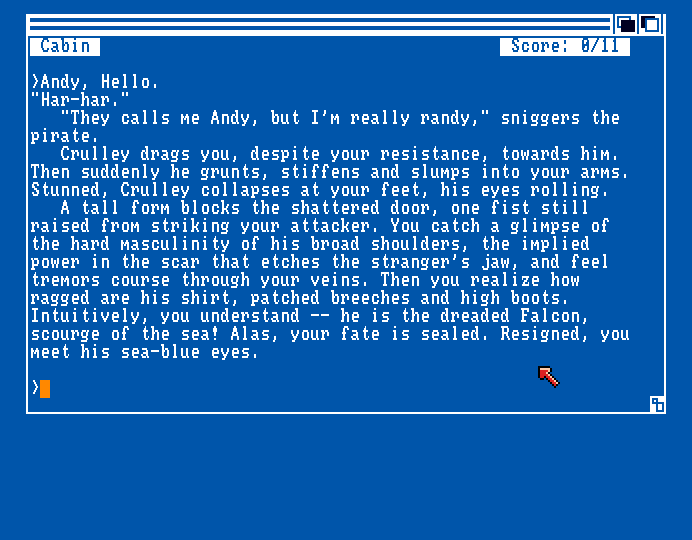 Cough Cough--Anyways, I wonder if text adventures ever used dictionary compression, because it seems easy enough to do and should reduce file size quite a bit, though it would probably only be worth it for large texts--not so much for small scripts and configs, or anything that's frequently partially loaded and modified.
I was thinking one could map some of the ascii or ISO-8859 non-english characters (0-31 & 128+) to 128 common words and word endings, then escape 224+ with a follow up byte for 32*256=8192 word segments or full common words, and names.
wwwwwwwwwwwwwwww
wwwwwwwwwwwwwwww
!"#$%&'()*+,-./ 32+
0123456789:;<=>?
@ABCDEFGHIJKLMN
OPQRSTUVWXYZ[]^_
`abcdefghijklmno
pqrstuvwxyz{|}~d
wwwwwwwwwwwwwwww 128+
wwwwwwwwwwwwwwww
wwwwwwwwwwwwwwww
wwwwwwwwwwwwwwww
wwwwwwwwwwwwwwww
wwwwwwwwwwwwwwww
eeeeeeeeeeeeeeee 224+
eeeeeeeeeeeeeeec
Examples of word endings / suffixes:
-er -ed -ing -ity -less -ly -ical -ish -ism -ist -oid -ment -tion -ion -ant -wise
-ness -ant -able -ible -ful -like -ual -ess -hood -ise -ize -ic [tab longdash enter etc]
...though I'm not sure how handy these are on their own. How would Amplify, Amplified, Amplifying Amplification be stored? Silly, Silliness. Scarce, Scarcer, Scarcest, Scarceness, Scarcely, Scarcity. I suspect one would need to overwrite/replace one character somehow, or use multiple entries. The packer could start by subtracting the suffix and look for a match in the dictionary for the rest? Subtracting -> Subtract. Works great for some words at least. The dictionary would get huge if all forms had to be stored. Also somehow needs to be done for plural forms and s endings. Forms -> Form. Specials -> Special. Dances -> Dance.
Common 2+ letter words in English are (here not sorted in a practical way):
the be to of and in that have it for not on with he as you
do at this but his by from they we she or an will my one all
would there their what so up out if about who get which go me when make
can like time no just him know take people into year your good some could them
see other than then now look only come its over think also back after use two
how our work first well way even new want because any these give day most us
number part group child company government important young different
point problem fact public woman week right big old great small hand
life high early few own long world tell. Has and had are not that common?
I guess the drawback with this compression method is that you need to keep a large dictionary on disk and in RAM (in the 64KB range probably). Every (de)compression program takes up space though and back in the Amiga days you'd need it on disk in one way or another. Nowadays gif, jpeg and zip readers just exist in the background.
The compression scaler for this method might be size * 0.33, but then the dictionary takes up space, possibly negating much of the gains.
...If one were designing a late terminal-era computer back in the '80s, one could put this dictionary and index lut into a 64K ROM, and also include programming syntax words... providing an alternative or supplement to the tokenization used in e.g. BASIC.
With a display ASIC, one could even make ...hardware accelerated text! :O
File format could be named .pet, Packed English Text or somesuch. Dictionary Integrated Compressed Text?
I'd probably arrange the words in the 32 escape tables alphabetically and by length for easier crunching/packing... using an index for search.
Sub-sorting by word length would speed up search and reduce the need for storing word length & addresses for the dict entry offsets and the dict could be a linear string.
Nibble interlude:
Storing the dictionary letters as 8-bit for just a-z would be wasteful, but faster I suppose (no bit operations). If the dictionary is stored in 5-bit (32 chars, like a-z + diacritics), then it would be 0.625 the size, fitting 1.6 times the words. If using all 8 bits, then perhaps 3 could be used for something and masked off, but I'm not sure what. One option could be to use the more convenient 4-bit nibbles, and use only 15 letters (EISA RNTO LCUD PMG\), with \ as an escape character for the rare ones (hbyf vkwz xqjé üï-'), bUT hOw MANy wORDS uSE ONLy ThE MORE COMMON LETTERS? This would unfortunately make it difficult to sort and step through entries by word length as a 4-letter word won't use the same amount of bits. "uSE" would be \ u S E, i.e. four nibbles. I suppose one could keep track of two different word length's though. When packing one could easily figure out that "\uSE" is four nibbles based on the characters (the packer would treat the \ as a letter).
Compression efficiency for this nibble method might be... equal to or slightly better than 5-bit? "\hO\w" uses 20 bits, or 15 bits in 5-bit. "COMMON" uses 24 bits, and 30 in 5-bit (48 in 8-bit). I think the main advantage of nibbles is the even data alignment, even though letter count is messed up a bit.
I'm not sure how practical text nibbles would be for use in flowing single-case text as the format might make predicting length difficult and some characters might sit or slide across byte boundaries, like A\ b\ bA (ABBA). It's okay for archiving text tags though. I don't think expanding into another escape nibble is a good idea no matter how it's done as any time you have to step up to 8 or more bits the efficiency is lots.
/End interlude.
Spaces in the text could be automatically inserted (or not if punctuation follows. Initial capital could be automatic too and a control character could do all caps, and maybe even other text effects like italic, bold, underline and reserved stuff. I kinda wish there was a .book format by the way. No one really made a compact and well tailored format for it.
As an example, "panties" could be stored as [EscChar 252] [15th entry in table] = "pant" + [EscChar 8 (no-space suffix)] "ies". When packing, it's probably easier to identify first letter, word length, and ending/suffix.
The average word length in english is just below 5 letters. With my compression many common two to four letter words (plus space!) would be a single byte (a compression of 0.33, 0.25, 0.2), and longer words would be two or three bytes. Compression would probably be 2+1 bytes, just like panties, so likely a compression of <0.5 - 0.20 for longer words. Worst case the word doesn't exist and had to be stored using the regular a-z range.
How big could the savings be, practically speaking? A RoyalRoad (online fiction) chapter is around 2500 words, and lets miltiply that with 6 (5 plus 1 space) to get character count. That's 15000 bytes. Successful stories easily go on for hundreds of chapters. An Amiga MF2DD floppy can store 880KB, or 901120 bytes, minus some for the file system stuff. Less than 60 chapters.
If we compress we'll need space for a dictionary and depacker. Let's say 800000 remain. But now we could store perhaps three times as much in that space, so 5000 bytes per chapter, giving us 160 chapters. It'd be about the performance of .tar.gz (a generic compression algo widely used on linux system).
A book / novel is around 80000 words * (5+1) for characters. 480000. Maybe 160K compressed, plus 100K for the dict and depacker. This compression format would stop being useful at some point, assuming the dictionary and depacker isn't OS or ROM integrated.
Diacritics could go in one of the tables, or be held as-is in words if the dict stores characters in 8-bit ISO-8859, or some could go in the uncommon nibble if that method is used.
Regular special characters like +-*/& and numbers go in the regular ISO-8859 positions I suppose. There's not much point in compressing numbers, but I suppose it could be supported with an escape character somewhat long non-decimal numbers--there's no point in compressing smaller numbers like due to the cost of the escape character plus the number in some binary (byte, word, double word?).
The advantage of compressing numbers would only come into play if dealing with e.g. a large spreadsheet-like file or big-number-dump. These also tend to contain decimal numbers of course.
Text compression would be less useful for something like a database with often uique names of things... Paradroid, Psygnosis, Populous. I suppose one feature could be to leave the last table of 256 entries reserved for file-specific words, like character names, companies, or fantasy towns, or descriptive database entry tags similar to XML. The dictionary could be a sort of library file, and then the custom entries go in the .pet file header (could be less than 256).
...
Another superficially simpler idea is to just use the non 0-31 and 128-255 range mostly as word fragments and use no dictionary. This means going though all words, finding the most common word fragments and try to extract the best building blocks... I suspect this is how some compression algos already work though some might not be able to stream out the data in neat order.
Anyways, to unpack using this method, you'd just have a table where character 156 = "the", which can then be combine with a plain "n" or "m", making "then", "they" and "them" two bytes, and "other" three. The packer would need to be somewhat smart though, or know how to split up words by using a... well, dictionary. The advantage is that the unpacker is super simple to make and takes up very little disk space. A table of a few hundred bytes for the fragments it'll spit out. I suspect some common words might not compress well at all as <160 fragments won't be enough. If you expand beyond, you're probably still dealing with 3 letter fragments but already use two bytes due to the escape character.
...
Also, I think ASCII is just as bad as EBCDIC. It's wasteful, unstructured and American-PC centric. I don't think a character table should contain any cursor manipulation commands aside from tab and new line, and possibly overprint. No bells. One escape character (for jumping between tables and other stuff) is enough and the rest could be visible text. The ASCII-based ISO-8859 series is needlessly divided up because 0-31 and 127-160 is mostly wasted and the sets kind of contain a rearranged overlap the same diacritic latin characters. Honestly it feels like the whole diacritic situation is a bit of a stick in the wheel... if only there was a good overprint solution for rendering, but on 8-bit systems that's troublesome.
It would've been nice if there had been characters only for programming, such as data separation, statement separation, variable types, tag brackets, hex, extension. Well, the ASCII table DOES have separators--but without visible glyphs. We made glyphs for math, but never adapted them into something used for programming, so now programming languages use an inconsistent cludge of 0x#&\{:} and other characters you might want to use in variable names and filenames. The main advantage with that approach is that the characters immediately accessible on some keyboards, though they're often behind shift, alt or both on Swedish keyboards. As a leftie who can't use the numpad I'd rather have a leftie numpad layer (as indicated by my various keyboard concepts), and a programming pad with special characters. Also, I don't think backslash should be a thing used other than for drawing. [ConcludeCharacter]Opine / /Opine.
-------------------------------------------------------------------------------
Testing Text
-------------------------------------------------------------------------------
Cough Cough--Anyways, I wonder if text adventures ever used dictionary compression, because it seems easy enough to do and should reduce file size quite a bit, though it would probably only be worth it for large texts--not so much for small scripts and configs, or anything that's frequently partially loaded and modified.
I was thinking one could map some of the ascii or ISO-8859 non-english characters (0-31 & 128+) to 128 common words and word endings, then escape 224+ with a follow up byte for 32*256=8192 word segments or full common words, and names.
wwwwwwwwwwwwwwww
wwwwwwwwwwwwwwww
!"#$%&'()*+,-./ 32+
0123456789:;<=>?
@ABCDEFGHIJKLMN
OPQRSTUVWXYZ[]^_
`abcdefghijklmno
pqrstuvwxyz{|}~d
wwwwwwwwwwwwwwww 128+
wwwwwwwwwwwwwwww
wwwwwwwwwwwwwwww
wwwwwwwwwwwwwwww
wwwwwwwwwwwwwwww
wwwwwwwwwwwwwwww
eeeeeeeeeeeeeeee 224+
eeeeeeeeeeeeeeec
Examples of word endings / suffixes:
-er -ed -ing -ity -less -ly -ical -ish -ism -ist -oid -ment -tion -ion -ant -wise
-ness -ant -able -ible -ful -like -ual -ess -hood -ise -ize -ic [tab longdash enter etc]
...though I'm not sure how handy these are on their own. How would Amplify, Amplified, Amplifying Amplification be stored? Silly, Silliness. Scarce, Scarcer, Scarcest, Scarceness, Scarcely, Scarcity. I suspect one would need to overwrite/replace one character somehow, or use multiple entries. The packer could start by subtracting the suffix and look for a match in the dictionary for the rest? Subtracting -> Subtract. Works great for some words at least. The dictionary would get huge if all forms had to be stored. Also somehow needs to be done for plural forms and s endings. Forms -> Form. Specials -> Special. Dances -> Dance.
Common 2+ letter words in English are (here not sorted in a practical way):
the be to of and in that have it for not on with he as you
do at this but his by from they we she or an will my one all
would there their what so up out if about who get which go me when make
can like time no just him know take people into year your good some could them
see other than then now look only come its over think also back after use two
how our work first well way even new want because any these give day most us
number part group child company government important young different
point problem fact public woman week right big old great small hand
life high early few own long world tell. Has and had are not that common?
I guess the drawback with this compression method is that you need to keep a large dictionary on disk and in RAM (in the 64KB range probably). Every (de)compression program takes up space though and back in the Amiga days you'd need it on disk in one way or another. Nowadays gif, jpeg and zip readers just exist in the background.
The compression scaler for this method might be size * 0.33, but then the dictionary takes up space, possibly negating much of the gains.
...If one were designing a late terminal-era computer back in the '80s, one could put this dictionary and index lut into a 64K ROM, and also include programming syntax words... providing an alternative or supplement to the tokenization used in e.g. BASIC.
With a display ASIC, one could even make ...hardware accelerated text! :O
File format could be named .pet, Packed English Text or somesuch. Dictionary Integrated Compressed Text?
I'd probably arrange the words in the 32 escape tables alphabetically and by length for easier crunching/packing... using an index for search.
Sub-sorting by word length would speed up search and reduce the need for storing word length & addresses for the dict entry offsets and the dict could be a linear string.
Nibble interlude:
Storing the dictionary letters as 8-bit for just a-z would be wasteful, but faster I suppose (no bit operations). If the dictionary is stored in 5-bit (32 chars, like a-z + diacritics), then it would be 0.625 the size, fitting 1.6 times the words. If using all 8 bits, then perhaps 3 could be used for something and masked off, but I'm not sure what. One option could be to use the more convenient 4-bit nibbles, and use only 15 letters (EISA RNTO LCUD PMG\), with \ as an escape character for the rare ones (hbyf vkwz xqjé üï-'), bUT hOw MANy wORDS uSE ONLy ThE MORE COMMON LETTERS? This would unfortunately make it difficult to sort and step through entries by word length as a 4-letter word won't use the same amount of bits. "uSE" would be \ u S E, i.e. four nibbles. I suppose one could keep track of two different word length's though. When packing one could easily figure out that "\uSE" is four nibbles based on the characters (the packer would treat the \ as a letter).
Compression efficiency for this nibble method might be... equal to or slightly better than 5-bit? "\hO\w" uses 20 bits, or 15 bits in 5-bit. "COMMON" uses 24 bits, and 30 in 5-bit (48 in 8-bit). I think the main advantage of nibbles is the even data alignment, even though letter count is messed up a bit.
I'm not sure how practical text nibbles would be for use in flowing single-case text as the format might make predicting length difficult and some characters might sit or slide across byte boundaries, like A\ b\ bA (ABBA). It's okay for archiving text tags though. I don't think expanding into another escape nibble is a good idea no matter how it's done as any time you have to step up to 8 or more bits the efficiency is lots.
/End interlude.
Spaces in the text could be automatically inserted (or not if punctuation follows. Initial capital could be automatic too and a control character could do all caps, and maybe even other text effects like italic, bold, underline and reserved stuff. I kinda wish there was a .book format by the way. No one really made a compact and well tailored format for it.
As an example, "panties" could be stored as [EscChar 252] [15th entry in table] = "pant" + [EscChar 8 (no-space suffix)] "ies". When packing, it's probably easier to identify first letter, word length, and ending/suffix.
The average word length in english is just below 5 letters. With my compression many common two to four letter words (plus space!) would be a single byte (a compression of 0.33, 0.25, 0.2), and longer words would be two or three bytes. Compression would probably be 2+1 bytes, just like panties, so likely a compression of <0.5 - 0.20 for longer words. Worst case the word doesn't exist and had to be stored using the regular a-z range.
How big could the savings be, practically speaking? A RoyalRoad (online fiction) chapter is around 2500 words, and lets miltiply that with 6 (5 plus 1 space) to get character count. That's 15000 bytes. Successful stories easily go on for hundreds of chapters. An Amiga MF2DD floppy can store 880KB, or 901120 bytes, minus some for the file system stuff. Less than 60 chapters.
If we compress we'll need space for a dictionary and depacker. Let's say 800000 remain. But now we could store perhaps three times as much in that space, so 5000 bytes per chapter, giving us 160 chapters. It'd be about the performance of .tar.gz (a generic compression algo widely used on linux system).
A book / novel is around 80000 words * (5+1) for characters. 480000. Maybe 160K compressed, plus 100K for the dict and depacker. This compression format would stop being useful at some point, assuming the dictionary and depacker isn't OS or ROM integrated.
Diacritics could go in one of the tables, or be held as-is in words if the dict stores characters in 8-bit ISO-8859, or some could go in the uncommon nibble if that method is used.
Regular special characters like +-*/& and numbers go in the regular ISO-8859 positions I suppose. There's not much point in compressing numbers, but I suppose it could be supported with an escape character somewhat long non-decimal numbers--there's no point in compressing smaller numbers like due to the cost of the escape character plus the number in some binary (byte, word, double word?).
The advantage of compressing numbers would only come into play if dealing with e.g. a large spreadsheet-like file or big-number-dump. These also tend to contain decimal numbers of course.
Text compression would be less useful for something like a database with often uique names of things... Paradroid, Psygnosis, Populous. I suppose one feature could be to leave the last table of 256 entries reserved for file-specific words, like character names, companies, or fantasy towns, or descriptive database entry tags similar to XML. The dictionary could be a sort of library file, and then the custom entries go in the .pet file header (could be less than 256).
...
Another superficially simpler idea is to just use the non 0-31 and 128-255 range mostly as word fragments and use no dictionary. This means going though all words, finding the most common word fragments and try to extract the best building blocks... I suspect this is how some compression algos already work though some might not be able to stream out the data in neat order.
Anyways, to unpack using this method, you'd just have a table where character 156 = "the", which can then be combine with a plain "n" or "m", making "then", "they" and "them" two bytes, and "other" three. The packer would need to be somewhat smart though, or know how to split up words by using a... well, dictionary. The advantage is that the unpacker is super simple to make and takes up very little disk space. A table of a few hundred bytes for the fragments it'll spit out. I suspect some common words might not compress well at all as <160 fragments won't be enough. If you expand beyond, you're probably still dealing with 3 letter fragments but already use two bytes due to the escape character.
...
Also, I think ASCII is just as bad as EBCDIC. It's wasteful, unstructured and American-PC centric. I don't think a character table should contain any cursor manipulation commands aside from tab and new line, and possibly overprint. No bells. One escape character (for jumping between tables and other stuff) is enough and the rest could be visible text. The ASCII-based ISO-8859 series is needlessly divided up because 0-31 and 127-160 is mostly wasted and the sets kind of contain a rearranged overlap the same diacritic latin characters. Honestly it feels like the whole diacritic situation is a bit of a stick in the wheel... if only there was a good overprint solution for rendering, but on 8-bit systems that's troublesome.
It would've been nice if there had been characters only for programming, such as data separation, statement separation, variable types, tag brackets, hex, extension. Well, the ASCII table DOES have separators--but without visible glyphs. We made glyphs for math, but never adapted them into something used for programming, so now programming languages use an inconsistent cludge of 0x#&\{:} and other characters you might want to use in variable names and filenames. The main advantage with that approach is that the characters immediately accessible on some keyboards, though they're often behind shift, alt or both on Swedish keyboards. As a leftie who can't use the numpad I'd rather have a leftie numpad layer (as indicated by my various keyboard concepts), and a programming pad with special characters. Also, I don't think backslash should be a thing used other than for drawing. [ConcludeCharacter]Opine / /Opine.
-------------------------------------------------------------------------------
Testing Text
-------------------------------------------------------------------------------
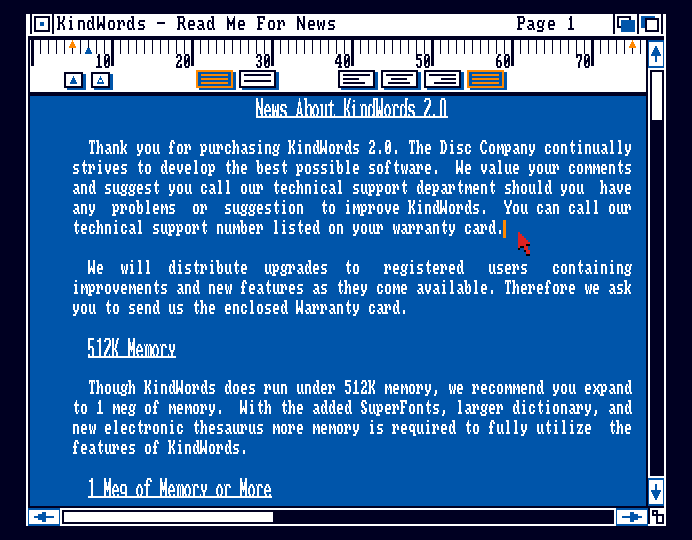 KindWords with the Kickstart 1.3 serif Topaz.
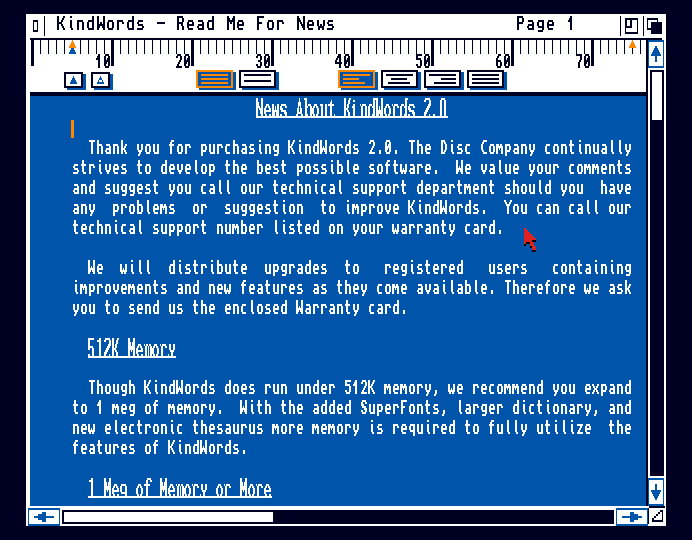 KindWords gets the sans Topaz with Kickstart 3.0.
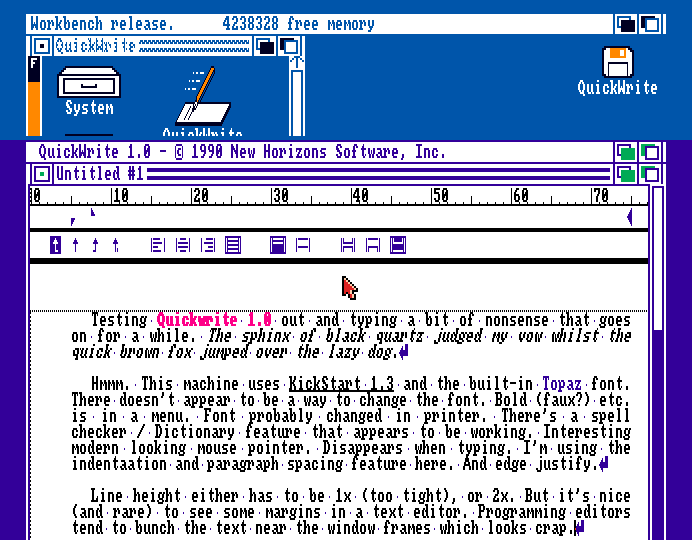 QuickWrite. As you can see, these text editors have sort of modern features, but the Amiga back then used a bit of a cludge of ROM and disk pixel fonts. Not happy with how underline sticks too close to the text, or the lack of line spacing fine tuning. The Amiga didn't have a character display so technically it can line space and scroll however it likes.
At a glance, it seems the Atari ST actually had cleaner looking word processors.
QuickWrite. As you can see, these text editors have sort of modern features, but the Amiga back then used a bit of a cludge of ROM and disk pixel fonts. Not happy with how underline sticks too close to the text, or the lack of line spacing fine tuning. The Amiga didn't have a character display so technically it can line space and scroll however it likes.
At a glance, it seems the Atari ST actually had cleaner looking word processors.
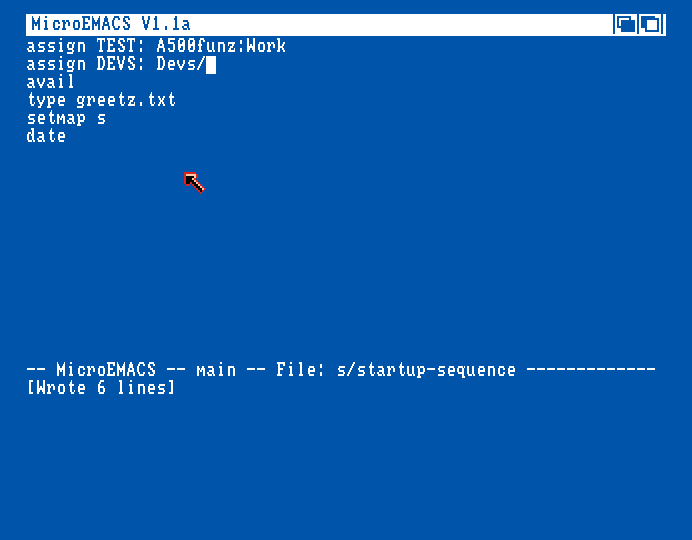 This copy of MicroEmacs (found on a Workbench floppy) insists in starting in "letterbox" NTSC resolution and it's kind of annoying. PAL is so much better but I'm not sure if there are actually PAL and NTSC versions... and if there are, the .adf downloads don't really say. Sometimes you can't drag the window down to 256 pixels. Oh, wait, I found a V1.3 version that does start in PAL height, and also uses a smaller version of the Topaz font, apparently inherited from the mode AmigaDOS runs in.
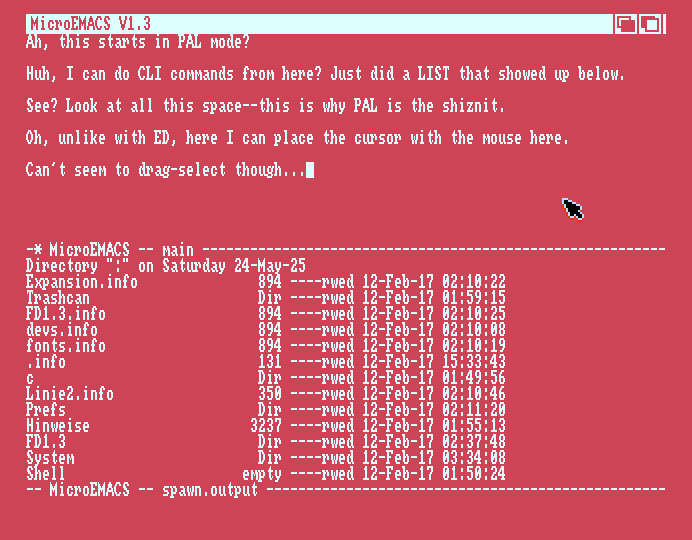
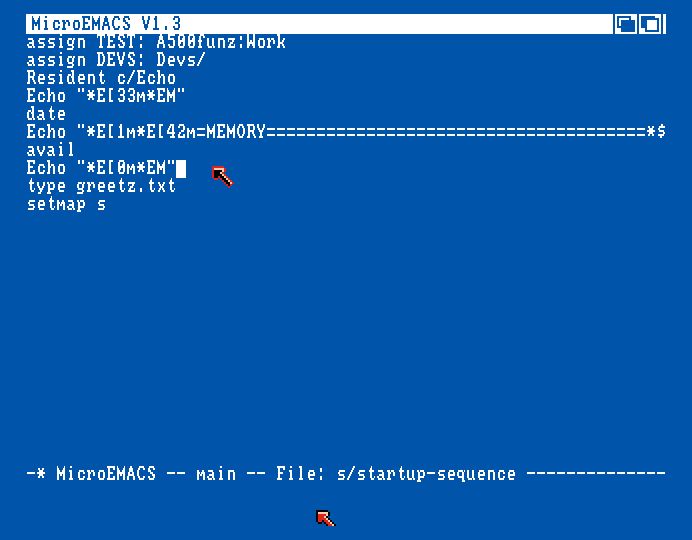 Hah-? Double mouse cursors??? Fooling around with Escape characters here. Starting it from another disk does indeed change font size. Not getting Residents to stay resident on this disk... is it because I initialized from WB1.2?
-------------------------------------------------------------------------------
Wishlist for a Text Editor:
-------------------------------------------------------------------------------
> Mouse selection and text dragging, repeated clicks and/or key+click to select words, sentences, paragraphs.
> Syntax highlighting (can load a short list with words and chars in different colour groups).
> Miniature spellchecker for common words like "the", "definitely", "bureaucrat", "cemetery", e before i except after c, uh, "fiery", and maybe grammar stuff like "could care less", missing contraction marks. Maybe like 100-200 entries.
> Three copybuffers with preview of the first characters.
> ...and Copy to / Paste from RAM: (either selection or full document).
> Setting margins (no text near window edges thanks!) and auto-word wrap.
> Baking to justified text for neat display elsewhere (export?).
> Conversion from linebreak'd text back to continious.
> Space stripper.
> Custom fonts, including variable-width.
> Line-height setting, and not just single or double. Probably in pixels.
> Ascii-tabs or customized space-tabs settings. Maybe even a tabpos top ruler (not saved with document).
> Box selection mode (dragging with mouse works more like a selection box in fixed-width no-tabs mode).
> Custom colours (WB 4 colour or 8 colour mode is fine).
> Undo, Cut, Copy, Paste, Find-Replace etc. as usual.
> Optional line numbers in margins (not part of document).
> Cursor X,Y position (column and line).
> Basic jump menu for moving the cursor and view.
> Character and word count (not realtime).
> Uppercasing, Lowercasing and Capping words (like in MicroEmacs).
> Integrate column-based SORT? (could just use SORT on a copy in RAM:)
> Proper Load/Save dialog.
> Import/Export option like:
LFCR 10-13 stuff.
Custom character table shuffling.
Preview load (<1024 characters.)
Ignore <32 and >126 range.
> Could simplifiy GUI code by using a .cfg file or big blob dialog for settings (rather than splitting up).
< I Don't care about UTF.
< Don't care about macros.
< No need for bookmarking cursor positions. If I were to implement something like that it'd be for code, so I'd probably do it via a comment scanning system as it won't matter that it's visible and the editor could perhaps index the entries by scanning and rescanning for e.g anchors. e.g. "REM Initilaize Stuff @Init@" and then the editor spots and puts that Init in a jump menu.
Additionally, it might make sense to have a micro/config text editor that's just a window that you can cursor around in, and a help bar with some key commands for saving. ED comes close but has some odd features like block manipulation, columns, find-replace (neither of these are useful when editing short configs), line join/insert commands (J D I) for doing what enter and backspace should do.
WB's EDIT is a line editor--doesn't show the whole file. Instead you step through lines and apply various effects by typing stuff like %%%#### or D22 28 to delete that line range. Or to insert text: I something something Z W. EDIT might be useful for specific tasks but it probably just confused regular Amiga users. It was probably derived from some era where they didn't have nice text displays, mice or computer memory.
-------------------------------------------------------------------------------
Ideas for WB's Notepad
-------------------------------------------------------------------------------
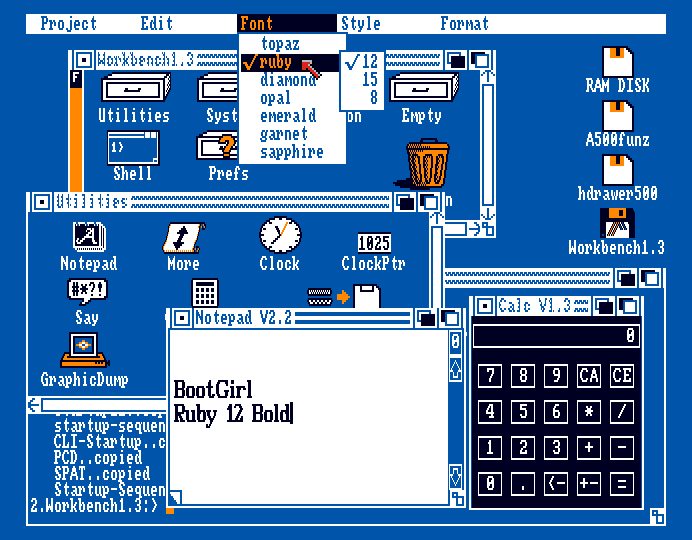
I'd get rid of most of the features for this, and instead format it a bit like single-player social media, i.e. short form messages to self that are chronological and can be deleted or promoted. 128 characters or so. This could be notes of some AmigaDOS syntax, a ToDo, etc. Posting a note saves it to disk (along with a date stamp), so it's not like a text editor where you go up in a menu and save the whole notebook. Oh, it could work as a diary too. It would run in a Workbench window and be quite compact.
Hah-? Double mouse cursors??? Fooling around with Escape characters here. Starting it from another disk does indeed change font size. Not getting Residents to stay resident on this disk... is it because I initialized from WB1.2?
-------------------------------------------------------------------------------
Wishlist for a Text Editor:
-------------------------------------------------------------------------------
> Mouse selection and text dragging, repeated clicks and/or key+click to select words, sentences, paragraphs.
> Syntax highlighting (can load a short list with words and chars in different colour groups).
> Miniature spellchecker for common words like "the", "definitely", "bureaucrat", "cemetery", e before i except after c, uh, "fiery", and maybe grammar stuff like "could care less", missing contraction marks. Maybe like 100-200 entries.
> Three copybuffers with preview of the first characters.
> ...and Copy to / Paste from RAM: (either selection or full document).
> Setting margins (no text near window edges thanks!) and auto-word wrap.
> Baking to justified text for neat display elsewhere (export?).
> Conversion from linebreak'd text back to continious.
> Space stripper.
> Custom fonts, including variable-width.
> Line-height setting, and not just single or double. Probably in pixels.
> Ascii-tabs or customized space-tabs settings. Maybe even a tabpos top ruler (not saved with document).
> Box selection mode (dragging with mouse works more like a selection box in fixed-width no-tabs mode).
> Custom colours (WB 4 colour or 8 colour mode is fine).
> Undo, Cut, Copy, Paste, Find-Replace etc. as usual.
> Optional line numbers in margins (not part of document).
> Cursor X,Y position (column and line).
> Basic jump menu for moving the cursor and view.
> Character and word count (not realtime).
> Uppercasing, Lowercasing and Capping words (like in MicroEmacs).
> Integrate column-based SORT? (could just use SORT on a copy in RAM:)
> Proper Load/Save dialog.
> Import/Export option like:
LFCR 10-13 stuff.
Custom character table shuffling.
Preview load (<1024 characters.)
Ignore <32 and >126 range.
> Could simplifiy GUI code by using a .cfg file or big blob dialog for settings (rather than splitting up).
< I Don't care about UTF.
< Don't care about macros.
< No need for bookmarking cursor positions. If I were to implement something like that it'd be for code, so I'd probably do it via a comment scanning system as it won't matter that it's visible and the editor could perhaps index the entries by scanning and rescanning for e.g anchors. e.g. "REM Initilaize Stuff @Init@" and then the editor spots and puts that Init in a jump menu.
Additionally, it might make sense to have a micro/config text editor that's just a window that you can cursor around in, and a help bar with some key commands for saving. ED comes close but has some odd features like block manipulation, columns, find-replace (neither of these are useful when editing short configs), line join/insert commands (J D I) for doing what enter and backspace should do.
WB's EDIT is a line editor--doesn't show the whole file. Instead you step through lines and apply various effects by typing stuff like %%%#### or D22 28 to delete that line range. Or to insert text: I something something Z W. EDIT might be useful for specific tasks but it probably just confused regular Amiga users. It was probably derived from some era where they didn't have nice text displays, mice or computer memory.
-------------------------------------------------------------------------------
Ideas for WB's Notepad
-------------------------------------------------------------------------------
I'd get rid of most of the features for this, and instead format it a bit like single-player social media, i.e. short form messages to self that are chronological and can be deleted or promoted. 128 characters or so. This could be notes of some AmigaDOS syntax, a ToDo, etc. Posting a note saves it to disk (along with a date stamp), so it's not like a text editor where you go up in a menu and save the whole notebook. Oh, it could work as a diary too. It would run in a Workbench window and be quite compact.
 -------------------------------------------------------------------------------
Ideas for Calculators
-------------------------------------------------------------------------------
The calculators on computers rarely take advantage of... computing and just mirror tabletop calculators and their display constraints. I'd like to see...
1> A compact CALC command line program that only does simple math, e.g. CALC (193-37)*LAST. just for when you're already in Shell and need an offset but starting up a full calculator is too much friction. Something like this most likely existed but I thought I'd mention it.
2> Here I'd like to see something a bit more advanced than a typical table calculator, but simpler than a highscool calculator. There are certain features which aren't too complicated to add, such as better memory/variable buttons, ratio/scale memory, copy-paste, multi-line entry (and history), with parenthesis (7-segment table calculators can't easily do this with their cheap displays), squares and cubes, 1/x, % view, setting decimals, modulo/rest.
-------------------------------------------------------------------------------
Ideas for Calculators
-------------------------------------------------------------------------------
The calculators on computers rarely take advantage of... computing and just mirror tabletop calculators and their display constraints. I'd like to see...
1> A compact CALC command line program that only does simple math, e.g. CALC (193-37)*LAST. just for when you're already in Shell and need an offset but starting up a full calculator is too much friction. Something like this most likely existed but I thought I'd mention it.
2> Here I'd like to see something a bit more advanced than a typical table calculator, but simpler than a highscool calculator. There are certain features which aren't too complicated to add, such as better memory/variable buttons, ratio/scale memory, copy-paste, multi-line entry (and history), with parenthesis (7-segment table calculators can't easily do this with their cheap displays), squares and cubes, 1/x, % view, setting decimals, modulo/rest.
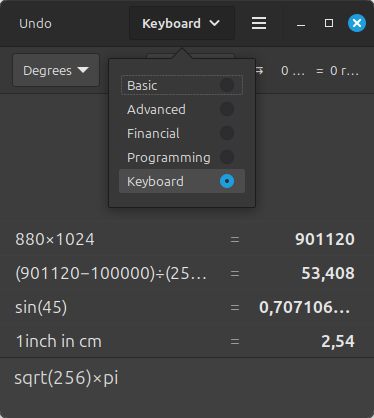 The Linux Mint Calculator is actually really nice with various modes. Here I can just type in stuff and I get a history log and even suggestions for conversions. The Financial mode doesn't seem to have the account buttons I saw on the 1980s Japanese landscape format calculators. The programming mode can do decimal, hex, and binary. A conversion thing for metrics to feet and miles might be nice to have and it's a relatively simple thing to code.
3> Speaking of BASIC, I often use it for calculations. After the C64 era accessible BASIC disappeared but it really is quite userfriendly. Not even something like a Raspberry Pi with Python gets close. So, I'd like to see a simplified version of BASIC that can do stuff like plots and whatnot in a little sandboxed environment that freezes when ubfocused. BASIC interpreters don't need much space since they ran on computers with <32KB ROM in 1980.
-------------------------------------------------------------------------------
Help
-------------------------------------------------------------------------------
Linux's "man" is quite handy, but it should perhaps be called HELP. I suppose it could look for a text file in a help/documentation dir, then load it. New software could put stuff in that dir when installing onto HD. Though, I don't like when programs spread out all over the place, so instead I would use a registry with links to the install location, and the help file resides there. The Amiga's ASSIGN system already helps a bit here.
Hover over help text is nice, but should go in a footer or header, or possibly the title bar. I don't like having pop-up stuff obscuring the view. Makes me feel I have to "park" the mouse.
-------------------------------------------------------------------------------
Speech Synth
-------------------------------------------------------------------------------
This feature was removed some time after 1.3, perhaps due to some licensing issue. It was called Say in WB1.3 that I used and it had a somewhat awkward interface. In WB1.1 there may or may not have been a thing called Announce or SpeechToy and had a neat little GUI with a Macintish face.
The Linux Mint Calculator is actually really nice with various modes. Here I can just type in stuff and I get a history log and even suggestions for conversions. The Financial mode doesn't seem to have the account buttons I saw on the 1980s Japanese landscape format calculators. The programming mode can do decimal, hex, and binary. A conversion thing for metrics to feet and miles might be nice to have and it's a relatively simple thing to code.
3> Speaking of BASIC, I often use it for calculations. After the C64 era accessible BASIC disappeared but it really is quite userfriendly. Not even something like a Raspberry Pi with Python gets close. So, I'd like to see a simplified version of BASIC that can do stuff like plots and whatnot in a little sandboxed environment that freezes when ubfocused. BASIC interpreters don't need much space since they ran on computers with <32KB ROM in 1980.
-------------------------------------------------------------------------------
Help
-------------------------------------------------------------------------------
Linux's "man" is quite handy, but it should perhaps be called HELP. I suppose it could look for a text file in a help/documentation dir, then load it. New software could put stuff in that dir when installing onto HD. Though, I don't like when programs spread out all over the place, so instead I would use a registry with links to the install location, and the help file resides there. The Amiga's ASSIGN system already helps a bit here.
Hover over help text is nice, but should go in a footer or header, or possibly the title bar. I don't like having pop-up stuff obscuring the view. Makes me feel I have to "park" the mouse.
-------------------------------------------------------------------------------
Speech Synth
-------------------------------------------------------------------------------
This feature was removed some time after 1.3, perhaps due to some licensing issue. It was called Say in WB1.3 that I used and it had a somewhat awkward interface. In WB1.1 there may or may not have been a thing called Announce or SpeechToy and had a neat little GUI with a Macintish face.
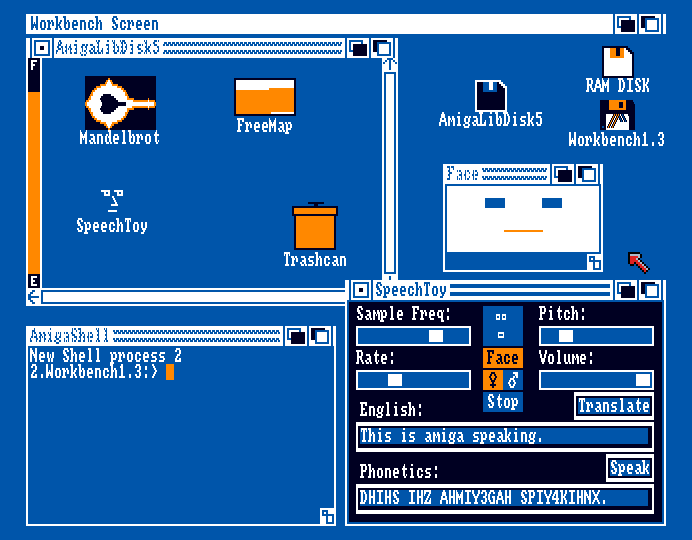 WB1.2 had a neat Mac-like trashcan but this one on Fish Disk 005 is from 1.1 and... kind of looks like trash. SpeechToy crashes for me, along with other stuff on the disk. In 1.3, say is integrated into the OS and you can redirect output to it using e.g.
TYPE s/startup-sequence to SPEAK:
LIST ram: to SPEAK: NODATES
But the voice is difficult to understand and more of a curosity.
-------------------------------------------------------------------------------
Thoughts on Floptical Disks
-------------------------------------------------------------------------------
I was browsing some old Amiga mags and saw the Floptical (21/20 MB floppy disk) again. Unlike similar 3.5" disks, the Floptical disks look nearly identical to MF2HDs (same metal hatch and the drive also has a head for MF2HD). The only difference seems to be the corner having an (f) logo instad of the HD one, and it has the write tab on the right (which might mean that an MF2DD disk might be seen as a write enabled Floptical disk by the drive). I briefly considered Floptical disks for one of my fantasy projects as 21 MB would be kind of nice, but for reasons to be revealed, I think it'd be best to avoid them.
The optical in Floptical seems to mean that the drive uses an optical sensor for track detection, allowing for higher track density. The drive head is moved mechanically, producing the typical drive sound, but can fine tune moves using an electromagnet... which beep-whines a bit, so it doesn't produce the same kind of sound a regular drive does.
Disk tracks were laid down using laser etching rather than mechanical stamping, likely making disk production more expensive. The premium floptical disks were also checked in the factory (as selling bad ones would be a no-no), increasing costs further.
The drives had a separate R/W head for MF2HDs. The drive had to be carefully calibrated and I'm guessing that they pushed density over safety. The sound, cost and density is why I'd shy away from them. Even the MF2HD 1.44 MBs seem less reliable than the Amiga's 880 KB disks in my experience.
Setting up a manufacturing and distribution structures for noname floptical disks probably didn't make much sense given the small window of exposure/opportunity (early '90s), so I think only branded disks exist.
100MB ZIP disks came out a few years later and were quite affordable. I still got my drive and a handful of disks. Only used it for backups before I got a CDRW and affordable external HDs. The ZIP disk spins and whirrs so I don't like it.
Anyways, I became curious about the prices and found some ads in the Norwegian Amiga Forum, 1993 #1. Roughly translated from Norsk Krona to Euro (not inflation adjusted, but this is more for price comparison):
- A noname MF2DD floppy was €0.4 then (x2 for brand).
- A regular MF2DD drive was €80.
- A Floptical drive was €450-550 (=12500 DDs???).
- Just one disk was €20 (50 DDs = 44000KB).
- Setup probably also required SCSI card for €250.
Even assuming a halved price from economy of scale, price per MB wouldn't have been great.
Honestly, looking at the type of files I dealt with on the Amiga, >880KB was rarely needed. Text files and source code used kilobytes. You'd fit dozens of IFFs on a disk as you didn't deal much with 24-bit formats, but 4-8-16-32 colour sprites and tiles. Audio samples could eat a bit of disk space, but tracker modules are still much smaller than MP3s the same way a let's-play video recording is larger than the game.
Some games and utility disks would pack data or fragment it into many files, which is why floppy disks sometimes seemed a bit slow (even modern games like Minecraft loads a bit slowly due to asset fragmentation, json and such). In general, everything saved kind of quickly on the Amiga, and you could copy protect, airgap data nicely. With smaller disks the contents would also fit on a label, which might not have been the case with a messy all-eggs-in-one-basket 20MB disk.
Hindsighting at FMV and bad renders, it wasn't really super useful early on. I'd rather install to HD.
Looking in Amiga Format 1994 #1, I see 2.5" internal IDEs for the 600/1200:
60 MB ...£139
80 MB ...£179
120 MB ...£229
170 MB ...£270
In the same ad...
Floptical A2000 Kit ...£289
Floptical A500 External ...£389
(+ SCSI card for £129)
If you were a regular guy, getting games on floppies or a CD ROM then installing to HD worked well enough.
If you like me worked in DTP (on Macs) in the mid '90s, then something like the 100+ MB Syquest made more sense for delivery. Later on, jazdrive or CDRW replaced that. And then USB sticks (flash mem).
I also did some video production on the Amiga 4000 with Scala but don't remember using any large files for that other than those on the internal HD.
One thing which I noticed looking through old Amiga Format magazines is that... to me at least, there's not much "retro" value in the 1997-2000 stuff, just awkward prerendered graphics, PC ports, boring Doom and shitty early 3D stuff, a mess of accelerator cards, dumb DTP font effects, uninteresting utility software. Everything looks a bit dated and inferior, without that distinct Amiga character. The halcyon years were centered around 1988-93 for me.
WB1.2 had a neat Mac-like trashcan but this one on Fish Disk 005 is from 1.1 and... kind of looks like trash. SpeechToy crashes for me, along with other stuff on the disk. In 1.3, say is integrated into the OS and you can redirect output to it using e.g.
TYPE s/startup-sequence to SPEAK:
LIST ram: to SPEAK: NODATES
But the voice is difficult to understand and more of a curosity.
-------------------------------------------------------------------------------
Thoughts on Floptical Disks
-------------------------------------------------------------------------------
I was browsing some old Amiga mags and saw the Floptical (21/20 MB floppy disk) again. Unlike similar 3.5" disks, the Floptical disks look nearly identical to MF2HDs (same metal hatch and the drive also has a head for MF2HD). The only difference seems to be the corner having an (f) logo instad of the HD one, and it has the write tab on the right (which might mean that an MF2DD disk might be seen as a write enabled Floptical disk by the drive). I briefly considered Floptical disks for one of my fantasy projects as 21 MB would be kind of nice, but for reasons to be revealed, I think it'd be best to avoid them.
The optical in Floptical seems to mean that the drive uses an optical sensor for track detection, allowing for higher track density. The drive head is moved mechanically, producing the typical drive sound, but can fine tune moves using an electromagnet... which beep-whines a bit, so it doesn't produce the same kind of sound a regular drive does.
Disk tracks were laid down using laser etching rather than mechanical stamping, likely making disk production more expensive. The premium floptical disks were also checked in the factory (as selling bad ones would be a no-no), increasing costs further.
The drives had a separate R/W head for MF2HDs. The drive had to be carefully calibrated and I'm guessing that they pushed density over safety. The sound, cost and density is why I'd shy away from them. Even the MF2HD 1.44 MBs seem less reliable than the Amiga's 880 KB disks in my experience.
Setting up a manufacturing and distribution structures for noname floptical disks probably didn't make much sense given the small window of exposure/opportunity (early '90s), so I think only branded disks exist.
100MB ZIP disks came out a few years later and were quite affordable. I still got my drive and a handful of disks. Only used it for backups before I got a CDRW and affordable external HDs. The ZIP disk spins and whirrs so I don't like it.
Anyways, I became curious about the prices and found some ads in the Norwegian Amiga Forum, 1993 #1. Roughly translated from Norsk Krona to Euro (not inflation adjusted, but this is more for price comparison):
- A noname MF2DD floppy was €0.4 then (x2 for brand).
- A regular MF2DD drive was €80.
- A Floptical drive was €450-550 (=12500 DDs???).
- Just one disk was €20 (50 DDs = 44000KB).
- Setup probably also required SCSI card for €250.
Even assuming a halved price from economy of scale, price per MB wouldn't have been great.
Honestly, looking at the type of files I dealt with on the Amiga, >880KB was rarely needed. Text files and source code used kilobytes. You'd fit dozens of IFFs on a disk as you didn't deal much with 24-bit formats, but 4-8-16-32 colour sprites and tiles. Audio samples could eat a bit of disk space, but tracker modules are still much smaller than MP3s the same way a let's-play video recording is larger than the game.
Some games and utility disks would pack data or fragment it into many files, which is why floppy disks sometimes seemed a bit slow (even modern games like Minecraft loads a bit slowly due to asset fragmentation, json and such). In general, everything saved kind of quickly on the Amiga, and you could copy protect, airgap data nicely. With smaller disks the contents would also fit on a label, which might not have been the case with a messy all-eggs-in-one-basket 20MB disk.
Hindsighting at FMV and bad renders, it wasn't really super useful early on. I'd rather install to HD.
Looking in Amiga Format 1994 #1, I see 2.5" internal IDEs for the 600/1200:
60 MB ...£139
80 MB ...£179
120 MB ...£229
170 MB ...£270
In the same ad...
Floptical A2000 Kit ...£289
Floptical A500 External ...£389
(+ SCSI card for £129)
If you were a regular guy, getting games on floppies or a CD ROM then installing to HD worked well enough.
If you like me worked in DTP (on Macs) in the mid '90s, then something like the 100+ MB Syquest made more sense for delivery. Later on, jazdrive or CDRW replaced that. And then USB sticks (flash mem).
I also did some video production on the Amiga 4000 with Scala but don't remember using any large files for that other than those on the internal HD.
One thing which I noticed looking through old Amiga Format magazines is that... to me at least, there's not much "retro" value in the 1997-2000 stuff, just awkward prerendered graphics, PC ports, boring Doom and shitty early 3D stuff, a mess of accelerator cards, dumb DTP font effects, uninteresting utility software. Everything looks a bit dated and inferior, without that distinct Amiga character. The halcyon years were centered around 1988-93 for me.