-------------------------------------------------------------------------------
FS-UAE on Linux Mint Tutorial
-------------------------------------------------------------------------------
Typing this in May 2025, it wasn't long ago that I salvaged an old Windows 11 laptop by adding an NVME drive and installing Linux Mint, allowing it to dual boot from the separate device. While Linux is the more usable OS, Amiga Workbench is really where it's at, so I used the Software Manager to install FS-UAE. Now, FS-UAE is not WinUAE, but something more streamlined--something more intended for launching games and a variety of customized configurations. Still, it's less of a hassle than setting up wine for WinUAE, so here we are.
The FS-UAE version that got installed on my system had a problem with the optional Launcher not finding the FS-UAE emulator (the install from Linux Mint's Software Manager didn't even include the Launcher, perhaps for a reason). Now, the Launcher is only used to set up the .config file that the emulator uses, so it isn't strictly needed. I only needed it to generate my initial .config file. There's a list of the option on GitHub (other web pages aren't well structured).
To start the emulator from the terminal, type fs-uae and the path to a configuration file.
fs-uae ~/Documents/FS-UAE/Configurations/A500work.fs-uae
On Linux, ~/ is the same as /home/JaneSmith/ i.e. you don't need to know your computer profile name. FS-UAE's $HOME variable represents this too, but from within the config file. If fs-uae isn't provided with a path in terminal, I believe a default config or one hidden in .config/fs-uae/ will be used. I haven't tried it--it's a hidden folder and I have multiple configs anyways.
The Launcher can load and save over the configs in ~/Documents/FS-UAE/Configurations/ and mess up anything you have hand-typed (like # comments), so be careful. You can use the Launcher once, then extract the resulting config and modify it.
An Amiga 500 example config to get you started:
# /////////////////////////////////////////////////////////////////////////////

#	FS-UAE (Linux Mint) AMIGA 500 NON-GAMING configuration by Arne.
#	For a rather common 1990 setup:	an Amiga 500 with Kickstart 1.3 and 512KB extra trapdoor memory.
#	And an extra drive. Also including the option to enable a hard drive folder or file.
#	FS-UAE installed in Documents/ for me so and I placed my Kickstart and .adf files the appropriate folders.

[fs-uae]
amiga_model = A500
kickstart_file = KICK13.ROM
chip_memory = 512
slow_memory = 512
#fast_memory = 1
#   !!! NOTE -> Fastmem value is actually in 1,2,4,8 MB!!!
#	Default Chipmem value is 512 (KB) for the A500 and 1024 for the A500+

joystick_port_1 = none
#	This has to be none or Arrow Keys + Ctrl are hijacked for the joystick which makes text editing hard.
#	If you want to use a joy then you'll need to put in its complicated linux name.

writable_floppy_images = 1
#	Enable writing to the.adf file rather than the .sdf shadow in the savestates folder?
#	Needless to say, since some programs write to disk this can distort your .adf archive
#	...with various  saves, logs and possibly virus damage.
#	To make a custom.adf save disk, I guess you can just duplicate a random .adf disk
#	...and format in in X-Copy or WB (assuming writable is set above).
#	If writable was not initially set, the saves tend to stay in the .sdf file instead
#	...but you can migrate it by copying that disk to a fresh disk made AFTER setting writable.

#	!!!IMPORTANT: When doing file manipulation stuff on either floppies or hard drive then it's best to
#	...NOT use savestate as this might corrupt the disks due to time travel => file records mismatch.
#	Its probably fine to savestate when you boot directly into a game and play it without using its
#	native save feature. Safer to make a second version of this config with a joystick setup and writable = 0

floppy_drive_count = 2
#	3 is probably preferable, but I went with an authentic 2 because nostalgia problem solving (using RAM drive).

floppy_drive_0 = Workbench 1.3.adf
#floppy_drive_1 = Workbench 1.3 Extras.adf
#	Preinserted disks. The Amiga has boot priority for the DF0: over a hard drive (or hardfolder).
#	I usually rename my .adf files for ease of entry since there's no file requester.

floppy_drive_volume_empty = 0
#	Disable empty drive click sound (a 0-100 value)

#	Now we get to a list of disks made available for the emulation session.
#	If these are not kept in the Floppies/ folder then a correct path must be supplied.
#	If not found then FS-UAE will quietly ignore them.
floppy_image_0 = SaveDisk-A.adf
floppy_image_0 = ProjectDisk.adf
floppy_image_1 = Paradroid 90.adf
floppy_image_2 = Oh No! More Lemmings.adf
#	etc...
#floppy_image_12 = Castle Master.adf
#	No, there's apparently no .adf file selector like in WinUAE so this system is best for static setups.
#	Note that file names are case sensitive (unlike on the Amiga) and must match or disk won't be detected.
#	Leaving e.g. entry 6 empty might make later entries not fully appear, so put things in order.

#hard_drive_0 = Amiga500_40MB.hdf
#hard_drive_1 = $BASE/A500Folder/

#	You can create and link a folder on this computer then use it for file transfers.
#	A folder will boot into a barren AmigaDOS screen. I wouldn't install WB in a folder, but
#	...it might make sense to copy a c/ drawer on there.
#	Note that linux can unarchive .lha from e.g. Aminet. Path examples:
#		$BASE/MyTransferFolder/
#		~/Documents/FS-UAE/PD-LHA/
#		/home/KevinBobbinsonMcBlarp/Documents/FS-UAE/FantasticFiles/

#	I think the launcher can create a Hard Drive File (.hdf). Hard drives are always writable!!!
#	A 40-80MB one is fine for tinkering and making little alternative setups,
#	....but not if you plan to install huge archives of stuff.
#	WB1.3 probably gets a bit wonky if you install 20+ programs though. Lots of assigns and boot things.

mouse_speed = 50
window_height = 540
window_width = 680
#	While Amiga 500 software normally outputs at max 640x512 or halved to 320x256,
#	or 320x200 due to NTSC compatability or DMA limits, it can also output overscan
#   and it's nice to have a bit of visual margin anyways. It'll show up in the
#	"cropped" screenshots,	which are probably the ones you want to save.
screenshots_output_dir = ~/AmigaScreens/
#	Desktop as default. Dir must exist. ~/ is shorthand for /home/YourName/ and /home/ is not physical drive root.
screenshots_output_mask = 2
#	I only want cropped screenshots, not the big and blurry ones.
#	FLAGS: +1 Full margins, +2 Cropped to set W & H, +4 OpenGL window scaling. Default is 7 (1+2+4).
screenshots_output_prefix = A500setup
#	Filename starts with this.


# /////////////////////////////////////////////////////////////////////////////
Save this as e.g. A500work.fs-uae in the FS-UAE/Configurations/ folder. You might want to create a drive folder (working as a fake hard drive) and maybe one for screenshots.
You will need kickstart ROMs and .adf disk files to plop into the appropriate folders.
About getting .adf files... Archive.org doesn't have many individual .adf files, but what they do have is massive "TOSEC" collections. Archive can list their contents and allow for individual downloads. FS-UAE can also load still zipped files.
Some uploader erroneously lists disk images as ROMs. Actual Kickstart ROMs might be listed as Kickstarts.
Archive.org also has Fred Fish disks with Public Domain (PD) software.
Should you come across .LHA files on Aminet, you might be pleasantly surprised to find that Linux can extract stuff from these natively, and then you can transfer things to the emulated Amiga via the hard drive folder. LHA-ing on the Amiga-side is a bit of a pain.
You can also buy Amiga files from some random companies which sort of kind of got their hands on some of the rights... who knows--they're fighting. IIRC, another company got the rights to a good chunk of the games catalog, but now I can't find anything about it.
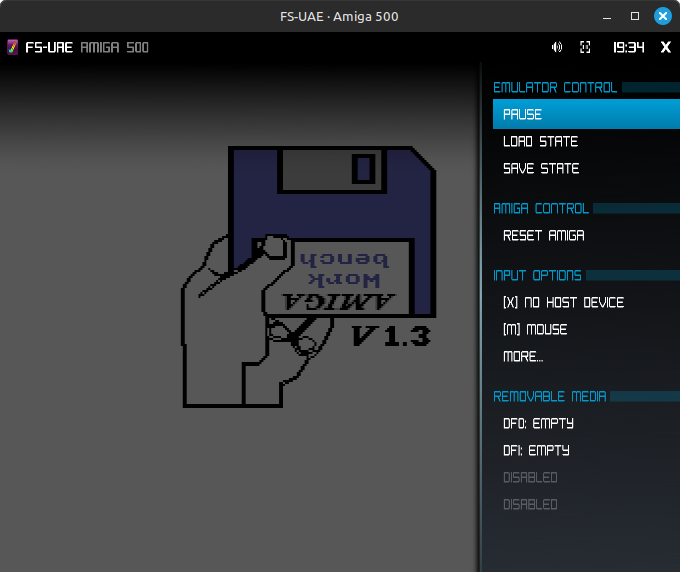 After starting the emulator with no disk in it just sits at kickstart and you'll have to hit F12 to get to the side menu where you can arrow-key around. Top right X exits.
Not knowing this, you might find yourself stuck in the emulator window. To free up the mouse, use F12, or middle mouse click, or use alt-tab.
You can use alt+w to toggle a speed-up during loading. Personally I find disk loading times part of the charm and it's not nearly as trudging as 8-bit era tape loading. I don't recommend savestate jumping into Workbench just to skip it as this can mess up file systems. Loading Workbench 1.3 from floppy takes around 60 seconds, and perhaps 15 seconds with alt+w. Remember to turn it off after loading is done.
Hit the Print Screen key to screenshot. My config is set up to only save cropped 1:1 pixel frames and not the stretched view.
There's a whole lot of Amiga software and, uh, not all of it is good or relevant, so here's my curated list of programs and games which doesn't need a joystick.
Get first for testing:
Workbench 1.3 and 3.1
Deluxe Paint III (This version has most things and boots standalone
...sometimes later Amiga software became... tedious.
...also, if you want to save in OCS 444 RGB, DPIII is nice.
X-Copy (A few different versions perhaps, I'd prefer to have it
...on a selfbooting mixed utility disk.)
Lemmings (Truly THE Amiga classic. It was really only missing an editor.)
Frontier:Elite II (A top-5 Amiga game for me. Can be HD installed.
...slow on an A500 but fast enough on an A1200 with fastmem.)
Pinball Dreams/Fantasies (So much better than dark PC-era Space Cadet.
...dark PC-era started with early IBM compats, and never ended.)
After starting the emulator with no disk in it just sits at kickstart and you'll have to hit F12 to get to the side menu where you can arrow-key around. Top right X exits.
Not knowing this, you might find yourself stuck in the emulator window. To free up the mouse, use F12, or middle mouse click, or use alt-tab.
You can use alt+w to toggle a speed-up during loading. Personally I find disk loading times part of the charm and it's not nearly as trudging as 8-bit era tape loading. I don't recommend savestate jumping into Workbench just to skip it as this can mess up file systems. Loading Workbench 1.3 from floppy takes around 60 seconds, and perhaps 15 seconds with alt+w. Remember to turn it off after loading is done.
Hit the Print Screen key to screenshot. My config is set up to only save cropped 1:1 pixel frames and not the stretched view.
There's a whole lot of Amiga software and, uh, not all of it is good or relevant, so here's my curated list of programs and games which doesn't need a joystick.
Get first for testing:
Workbench 1.3 and 3.1
Deluxe Paint III (This version has most things and boots standalone
...sometimes later Amiga software became... tedious.
...also, if you want to save in OCS 444 RGB, DPIII is nice.
X-Copy (A few different versions perhaps, I'd prefer to have it
...on a selfbooting mixed utility disk.)
Lemmings (Truly THE Amiga classic. It was really only missing an editor.)
Frontier:Elite II (A top-5 Amiga game for me. Can be HD installed.
...slow on an A500 but fast enough on an A1200 with fastmem.)
Pinball Dreams/Fantasies (So much better than dark PC-era Space Cadet.
...dark PC-era started with early IBM compats, and never ended.)
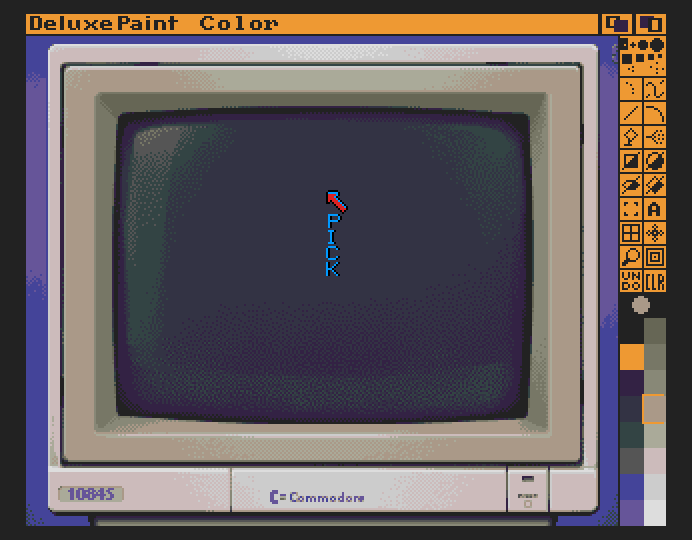 Deluxe Paint III in action. The remap feature is useful. Just swap the colour around in the palette until they are in a good order (the image look corrupted), then look for Remap in one of the menus. It'll repixel the image and fix it.
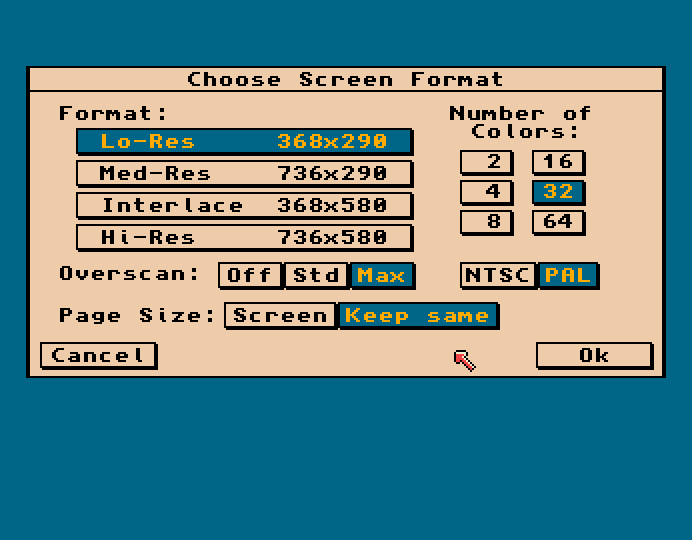 The Amiga's Original ChipSet wasn't just limited to 320x256 in lowres mode, but could do narrower and wider in multiples of 16. This means that an emulator window set to 640x512 won't be able to show off software running in Hi-Rez overscan (Also note that Lo-Res is doubled by the emulator). I run my real A1200 in overscan for Workbench 3.1 and my Scart TV nicely flickerfixes.
Additional classic dev stuff:
Amiga E (Preferable syntaxwise over similar languages.)
AMOS The Creator / Pro (I still use my copy. Great for testing concepts.
...but not so good for larger projects.)
Music Tracker (For playing and making music modules, which was huge then.
NoiseTracker, StarTrekker, etc.
...and sample disks like ST-??
...If I had time I'd curate a disk.)
Cygnus editor (Alright for larger raw-text documents.)
Note: One probably wouldn't be doing DTP, spreadsheet or 3D renders nowadays. I did check out some of the programs but they're not something I'd use. Technically the Amiga could do nice spreadsheet, database and text editors and the features are there, it's just that with a few modern UI features missing one starts feeling the usage friction right away.
Casual games and Strategy games you can supposedly HD install:
Dune II (Classic early RTS game. Acknowledged.)
3D Construction Kit (Technically a game maker)
Worms (Fun for 1 or 2 players. You can make 8 colour levels in DP!)
Sim City & expansion (SNES version is cooler, but hey, it's SimCity.)
Wing Commander (I owned this back in the day and played it a lot...
...perhaps less tolerable nowadays.)
Additionally:
K240
Scorched Tanks (Like Scorched Earth but better, or worse.)
Star Control 1
Exile (I prefer the 8-bit versions though.)
Castle Master (...are you a boy or a girl?
... Amiga Format #14 1990 September has a walkthru.)
Oil Imperium (Joy for drilling sequence?)
Stunt Track Racer (Joy, great feeling 3D racer.)
Volfied (Joy, great looking Qix game.)
Wings (Joy, 3D WW1 dogfighting.)
Gravity Force I & II (Joy, Thrust-type melee games.)
Oids (Joy? New port of an Atari classic.)
Civilization? (Like x-com, maybe this is best played elsewhere.)
Defender of the Crown (The best looking early Amiga game. Okayish strategy.)
Floppydisk bootable mouse and keyboard games:
Utopia (Strategy.)
Mega lo Mania (Strategy.)
Settlers (I like Strategy games.)
Sierra adventure games (these are often in the ugly DOS palette :/ )
Syndicate (Probably better elsewhere though.)
Space Crusade (A 40K troop tactics game.)
Laser Squad (I prefer the 8-bit versions though)
And some joystick games:
SuperCars I & II (Great looking, annoying edge-bump physics)
Paradroid 90 (Rarely seen game type)
The Killing Gameshow (Great looking, but very very hard.)
Sensible Soccer
Moonstone (Bloody sword fighting game.)
Another World
Ruff'n'Tumble (Great looking, but never played.)
Shadow of the Beast (Historically important but not so good...
...Looks a lot better with dark TV gamma,
...just like most MAME games.)
Fighter Bomber? (Flightsim with nice pixel art, but aged gameplay.)
Silkworm and maybe Silkworm IV
IK+ (Karate fighting game)
Barbarian (Sword fighting game)
Wings of Fury (Sidescrolling WW2 dogfighting)
Alien Fish Finger (Interesting tiny-man game, never played though.)
Gods (Great art, so-so play.)
Utils and PD (can be found on Aminet):
Say / Speech (Get from WB1.3)
FED / Font Editor (Get from WB1.3)
lha extractor (You can just extract in linux though!)
lzh
Fixdisk (For fixing physical corrupted floppies, so not in emu I suppose.)
DiskSalv (A similar utility.)
VirusChecker
The 16 colour palette thing for WB3.1.
Directory Opus (Get an mid-older directory ver. which doesn't mess with WB?)
Scenery (Fun little landscape generator.)
Colonial Conquest (AMOS strategy game.)
- Not MagicWB icons
- I don't care about whdload and AGA era much.
I may have forgotten some important top games, but some I excluded because I don't like playing them, like Monkey Island, Chaos Engine, Flashback, Cannon Fodder, EotB, Lotus, Superfrog.
For games, you can check out the Top-100 list on sites like Lemon Amiga. Personally I think the Amiga did mouse software the best--the one button joystick and limited sprite capability really held back some games. Meanwhile, the screen system was good for games like Lemmings and GUI stuff.
Some games might look a bit washed out, like most MAME games do. It can be partially addressed by adding shader = test-gamma to the config. Shader effects won't show up in the "raw" cropped screenshots. It seems like the gamma is hardcoded to 0.85 and not adjustable. It should make Shadow of the Beast and Super C look a tiny bit better though I'm not sure if you'd like to play the latter. If you look at some magazine screenshot photos of SotB it looks much nicer, but photos off a monitor are is a different... beast than digital emulation.
The Amiga's Original ChipSet wasn't just limited to 320x256 in lowres mode, but could do narrower and wider in multiples of 16. This means that an emulator window set to 640x512 won't be able to show off software running in Hi-Rez overscan (Also note that Lo-Res is doubled by the emulator). I run my real A1200 in overscan for Workbench 3.1 and my Scart TV nicely flickerfixes.
Additional classic dev stuff:
Amiga E (Preferable syntaxwise over similar languages.)
AMOS The Creator / Pro (I still use my copy. Great for testing concepts.
...but not so good for larger projects.)
Music Tracker (For playing and making music modules, which was huge then.
NoiseTracker, StarTrekker, etc.
...and sample disks like ST-??
...If I had time I'd curate a disk.)
Cygnus editor (Alright for larger raw-text documents.)
Note: One probably wouldn't be doing DTP, spreadsheet or 3D renders nowadays. I did check out some of the programs but they're not something I'd use. Technically the Amiga could do nice spreadsheet, database and text editors and the features are there, it's just that with a few modern UI features missing one starts feeling the usage friction right away.
Casual games and Strategy games you can supposedly HD install:
Dune II (Classic early RTS game. Acknowledged.)
3D Construction Kit (Technically a game maker)
Worms (Fun for 1 or 2 players. You can make 8 colour levels in DP!)
Sim City & expansion (SNES version is cooler, but hey, it's SimCity.)
Wing Commander (I owned this back in the day and played it a lot...
...perhaps less tolerable nowadays.)
Additionally:
K240
Scorched Tanks (Like Scorched Earth but better, or worse.)
Star Control 1
Exile (I prefer the 8-bit versions though.)
Castle Master (...are you a boy or a girl?
... Amiga Format #14 1990 September has a walkthru.)
Oil Imperium (Joy for drilling sequence?)
Stunt Track Racer (Joy, great feeling 3D racer.)
Volfied (Joy, great looking Qix game.)
Wings (Joy, 3D WW1 dogfighting.)
Gravity Force I & II (Joy, Thrust-type melee games.)
Oids (Joy? New port of an Atari classic.)
Civilization? (Like x-com, maybe this is best played elsewhere.)
Defender of the Crown (The best looking early Amiga game. Okayish strategy.)
Floppydisk bootable mouse and keyboard games:
Utopia (Strategy.)
Mega lo Mania (Strategy.)
Settlers (I like Strategy games.)
Sierra adventure games (these are often in the ugly DOS palette :/ )
Syndicate (Probably better elsewhere though.)
Space Crusade (A 40K troop tactics game.)
Laser Squad (I prefer the 8-bit versions though)
And some joystick games:
SuperCars I & II (Great looking, annoying edge-bump physics)
Paradroid 90 (Rarely seen game type)
The Killing Gameshow (Great looking, but very very hard.)
Sensible Soccer
Moonstone (Bloody sword fighting game.)
Another World
Ruff'n'Tumble (Great looking, but never played.)
Shadow of the Beast (Historically important but not so good...
...Looks a lot better with dark TV gamma,
...just like most MAME games.)
Fighter Bomber? (Flightsim with nice pixel art, but aged gameplay.)
Silkworm and maybe Silkworm IV
IK+ (Karate fighting game)
Barbarian (Sword fighting game)
Wings of Fury (Sidescrolling WW2 dogfighting)
Alien Fish Finger (Interesting tiny-man game, never played though.)
Gods (Great art, so-so play.)
Utils and PD (can be found on Aminet):
Say / Speech (Get from WB1.3)
FED / Font Editor (Get from WB1.3)
lha extractor (You can just extract in linux though!)
lzh
Fixdisk (For fixing physical corrupted floppies, so not in emu I suppose.)
DiskSalv (A similar utility.)
VirusChecker
The 16 colour palette thing for WB3.1.
Directory Opus (Get an mid-older directory ver. which doesn't mess with WB?)
Scenery (Fun little landscape generator.)
Colonial Conquest (AMOS strategy game.)
- Not MagicWB icons
- I don't care about whdload and AGA era much.
I may have forgotten some important top games, but some I excluded because I don't like playing them, like Monkey Island, Chaos Engine, Flashback, Cannon Fodder, EotB, Lotus, Superfrog.
For games, you can check out the Top-100 list on sites like Lemon Amiga. Personally I think the Amiga did mouse software the best--the one button joystick and limited sprite capability really held back some games. Meanwhile, the screen system was good for games like Lemmings and GUI stuff.
Some games might look a bit washed out, like most MAME games do. It can be partially addressed by adding shader = test-gamma to the config. Shader effects won't show up in the "raw" cropped screenshots. It seems like the gamma is hardcoded to 0.85 and not adjustable. It should make Shadow of the Beast and Super C look a tiny bit better though I'm not sure if you'd like to play the latter. If you look at some magazine screenshot photos of SotB it looks much nicer, but photos off a monitor are is a different... beast than digital emulation.
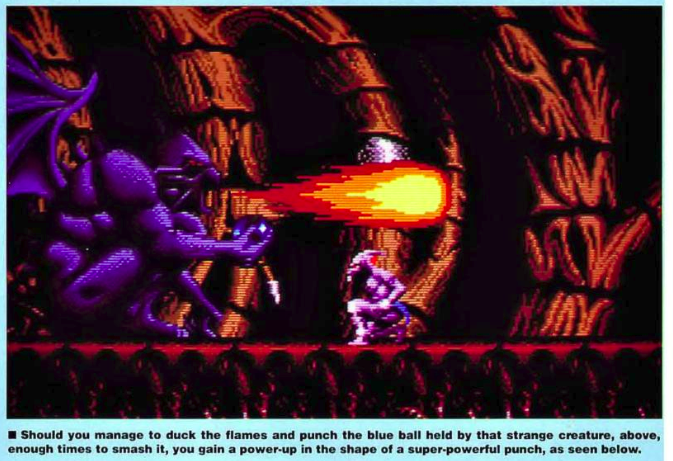 A screenshot of a scan of a magazine reprinting a chemical photo of a phosphorous screen. Okay, so it's kinda dark. But look at the emulator screenshot below and the distance of the blackpoint to the rest. Now it looks comparatively washed out.
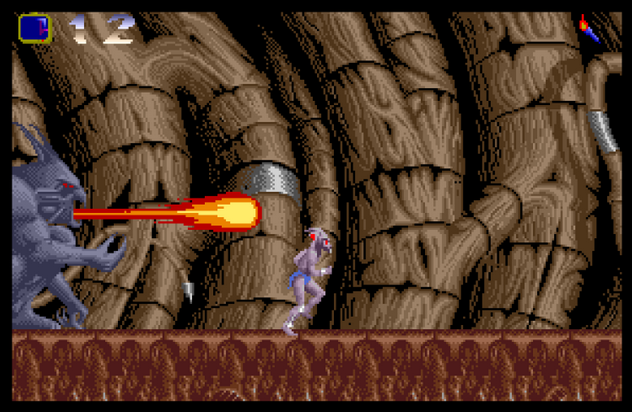 Raw shot from an emulator.
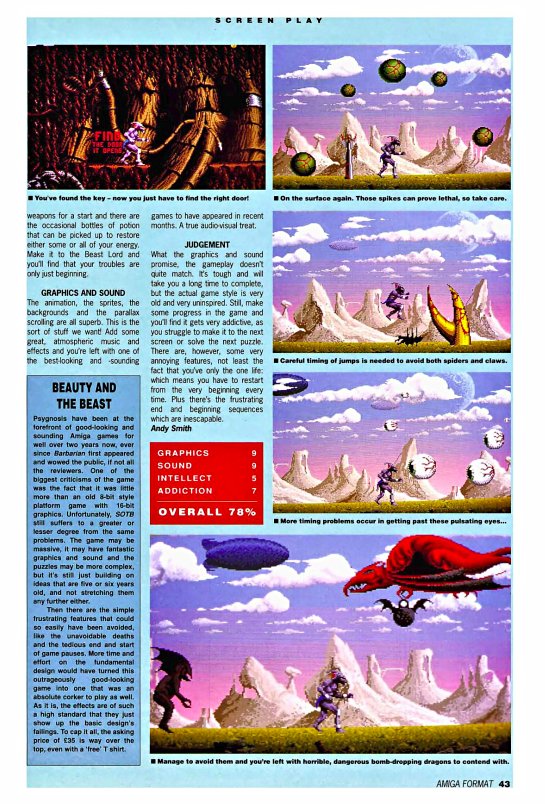 Colourful overworld shots.
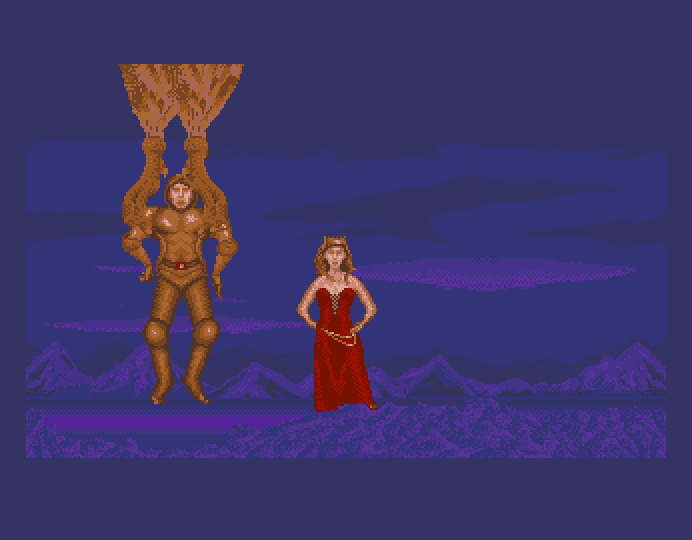 Ah, that golden armour proved absolutely useless and now it's up to the fair maiden to step up and... master the castle.
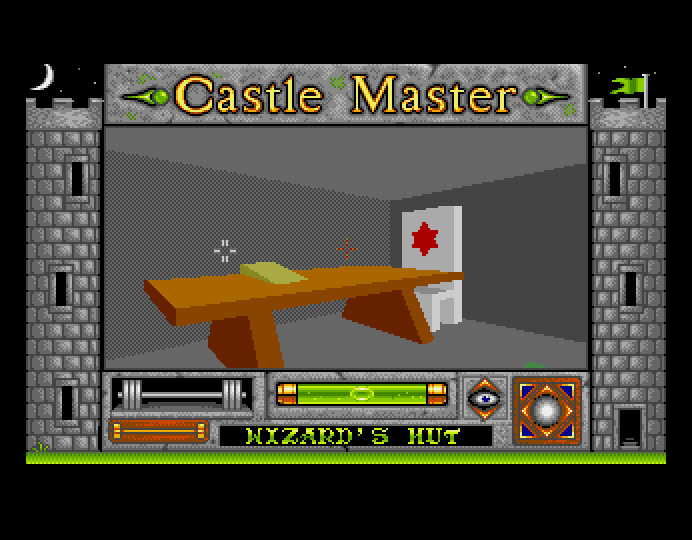 Castle Master (£25, 89% reviewed in Amiga Format #11, June 1990) can be seen as one of the early FPS games. It was full 3D, with looking and shooting. It just ran rather slowly despite being extremely low-poly, and they hadn't considered stuff like mouselook so you had to press buttons. It was released for many platforms and the DOS version looked like absolute garbage.
Wolfenstein 3D was '92 and Doom was '93 and those weren't even 3D. Quake was '96.
Incentive Software later released the engine as 3D Construction Kit in 91. I actually bought that and don't regret it. It was very interesting to develop 3D games then and when actual 3D games came out I kind of felt they were old hat as I had already imagined what could be done, I guess.
Castle Master (£25, 89% reviewed in Amiga Format #11, June 1990) can be seen as one of the early FPS games. It was full 3D, with looking and shooting. It just ran rather slowly despite being extremely low-poly, and they hadn't considered stuff like mouselook so you had to press buttons. It was released for many platforms and the DOS version looked like absolute garbage.
Wolfenstein 3D was '92 and Doom was '93 and those weren't even 3D. Quake was '96.
Incentive Software later released the engine as 3D Construction Kit in 91. I actually bought that and don't regret it. It was very interesting to develop 3D games then and when actual 3D games came out I kind of felt they were old hat as I had already imagined what could be done, I guess.
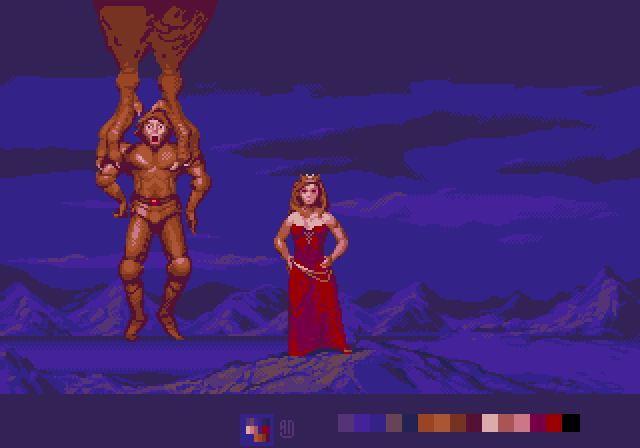 I roughly started repixeling this scene a bit just for fun, separating ground and background, reshading the "pillow shaded" forms, and unifying the colour temperatures in the FG and BG. Princess got some muscles so she can bash those polygonal baddies proper.
-------------------------------------------------------------------------------
On Memory and Prices
-------------------------------------------------------------------------------
The Amiga 1000 came with 256 kilobytes of memory, which doesn't sound like a lot, but remember that this was only a few years after the Commodore 64. It feels to me that the Amiga 500 had gained a lot of momentum by 1989-1990, which was when my machine was made. As implied by the name, a stock Amiga 500 came with 512K, but typically it was expanded by an extra half a meg--something you'd perhaps had to pay some £30-40 for in 1991, when games had begun making demands. I remember Paradoid 90 (1991) detected the memory on boot and used to preload the droid library database. Utopia (1991) also detected expansion memory. It doesn't seem to matter what type of extra memory it is, be it chip, slow or fast.
Let's take a look at the cost of things in 1991, using UK prices because I was browsing Amiga format and some UK catalogs. The inflation figure for 1991-2025 is x2.3. Looking at Real net disposable national income per capita, it seems to be below 2.0 according to UKEA (1995 = 4287, 2024 = 7897)... but hmmm... averages don't take wealth transfer/divide into account? Anyways:
I roughly started repixeling this scene a bit just for fun, separating ground and background, reshading the "pillow shaded" forms, and unifying the colour temperatures in the FG and BG. Princess got some muscles so she can bash those polygonal baddies proper.
-------------------------------------------------------------------------------
On Memory and Prices
-------------------------------------------------------------------------------
The Amiga 1000 came with 256 kilobytes of memory, which doesn't sound like a lot, but remember that this was only a few years after the Commodore 64. It feels to me that the Amiga 500 had gained a lot of momentum by 1989-1990, which was when my machine was made. As implied by the name, a stock Amiga 500 came with 512K, but typically it was expanded by an extra half a meg--something you'd perhaps had to pay some £30-40 for in 1991, when games had begun making demands. I remember Paradoid 90 (1991) detected the memory on boot and used to preload the droid library database. Utopia (1991) also detected expansion memory. It doesn't seem to matter what type of extra memory it is, be it chip, slow or fast.
Let's take a look at the cost of things in 1991, using UK prices because I was browsing Amiga format and some UK catalogs. The inflation figure for 1991-2025 is x2.3. Looking at Real net disposable national income per capita, it seems to be below 2.0 according to UKEA (1995 = 4287, 2024 = 7897)... but hmmm... averages don't take wealth transfer/divide into account? Anyways:
1060 Swedish Krona:£100 (SEK *9.4%,  UKprice *10.6 ignoring other market factors.)
170 US Dollar:_____£100 (USD *58.8%, UKprice *1.7 Varies. Source: BoE.)

MF2DD(DSDD) Floppies ==========================================================
x10 SONY:________£10    -Half if bought in bulk (100+) and split with friends.
x10 Noname:______£6     -Floppies would drop much further by 1994, like 25p each.
PD disk:_________£2.5   -Stuffed with Public Domain software, e.g. Fred Fish.
Disk box (80):___£10

SOFTWARE ======================================================================
Turrican:________£16    -By the way, I haven't adjusted these prices for 2025.
AMOS:____________£35	-They're from Spring 1991.
DPIII:___________£60
Amiga Hardware Reference Manual (book): £22

REFERENCE =====================================================================
PhiliShave:_________________________________£16.50 (Source: Argos spring 1991)
GB / NES / SMS:_____________________________£70 / £80 / £75  (US$ 90 / 90 / ?)
14" Remote controlled colour budget TV:_____£150
VHS player, Hitachi VT-M722:________________£320
Budget hair curler brush (with steam):______£5.95
Automatic Kettle / electric water boiler:___£20
Newfangled Microwave oven:__________________£120
Okay budget pillow:_________________________£4
SONY D22 Discman CD player:_________________£130
SONY Walkman SPORTS (WM AF58):______________£50 (a tenner for a budget) (US$ 80)
LEGO Dark Shark Pirate Ship:________________£53
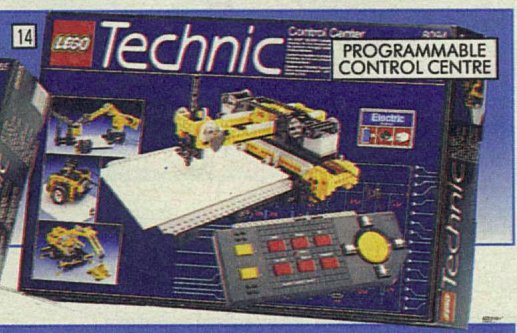
LEGO Programmable Control Centre (plotter):_£89
Space Crusade or HeroQuest board game:______£22.75

Basic cotton bikini briefs/panties, 6 pack:_£7-8 (1.25 each, i.e. two floppies!)
C64C + 13"Mon + 1541 II + TankMouse:________US$ 150+250+200+40 (Sears)
SEGA Genesis:_______________________________US$ 150
Capsela 400 Science Discovery System:_______US$ 30

HARDWARE ======================================================================
Stock Amiga 500:_£320   -Was probably £100 more a year or two earlier.
Extra drive:_____£55    -Shows up as DF1:
1084S Monitor:___£240   -Few owners had one as the RF modulator -> TV kind of worked.

Naksha mouse
 + mouse mat:____£30

512K with RTC:___<£40   -Trapdoor Slowmem.
Fatter Agnus:____£60    -Makes 1MB chip possible, turning that Slowmem into Chipmem?
256x4 RAM ICs/MB:£40    -Some memory boards came without ICs. 256x4 was common.
You wanted a hard drive? £280 for 20MB. But add £70 to that and you'd get 2MB extra memory. Hard drives would slot into the side of the Amiga 500, so maybe that memory counted as Fastmem?
Hold on, what's an RTC? Unlike with the A500+, the A500 didn't come with a battery backed Real Time Clock (though it does in FS-UAE). This meant that unless you set time manually each time you started Deluxe Paint or Workbench, the computer would tag files with the factory-set time. The Varta battery sitting next to the RTC IC would eventually leak and ruin PCBs.
The A500+ has the ECS (Enhanced Chip Set), and its Agnus can use the extra 512K as Chipmem.
Alright, let's take a break and look at this LEGO technic plotter.
 Ok. Now I'll try to explain the Amiga's memory as I understand it (and I may be wrong). The Amiga 500 had two places for memory--a right-side slot and a trapdoor/belly slot underneath (I won't talk about cramming mods into CPU sockets). Trapdoor expansion was originally limited to 512K and turned that into Slowmem, though the AVAIL command in WB1.3 actually lists it as Fastmem (adding to any actual Fastmem).
Side slot devices usually had a rather ugly looking case around them, vaguely mimicking the wedge shape of the Amiga. The Amiga's side slot was generally used for Fastmem memory expansions combined with bulky mechanical SCSI hard drives (and surrounding chips) so the extra wedge needed its own separate power supply. Not uncommon--the same was the case for external PC hard drives even after Y2K, but eventually those became smol and powerable within USB's 500mA limit.
Afaik, Fastmem can readily be used by the CPU for storage and programs whilst Chipmem is shared and in contention--it's used for graphics, sounds, AND programs. I guess if you store graphics in the expansion Fastmem then it has to be moved by the CPU into Chipmem before the Amiga's custom chips can display the stuff. As I understand it, because Fastmem is not in contention the CPU can fool around a bit there while the custom chips do their part in Chipmem.
Slowmem is slow because it unfortunately counts as being in contention mode while actually being CPU-only--the custom Chips can't pull stuff from it. Trapdoor Slowmem was common because side port expansions could be expensive and wasn't something a kid then would buy for their OCS Amiga 500. When the Amiga 600 and 1200 came Fastmem became more common. Afaik the Blizzard 1220/4 that I have in my A1200 trapdoor counts as Fastmem.
Some games (typically Frontier: Elite 2) will perform a bit better if you add a bit of Fastmem. Boot loading time is likely not affected, but some games will prompt less for disk swapping as they're able to stuff things right into memory. On the other hand, some older games get confused by extra memory, and this is why expansion memory had physical on-off switches. For a beefier yet realistic Amiga 500, try:
Ok. Now I'll try to explain the Amiga's memory as I understand it (and I may be wrong). The Amiga 500 had two places for memory--a right-side slot and a trapdoor/belly slot underneath (I won't talk about cramming mods into CPU sockets). Trapdoor expansion was originally limited to 512K and turned that into Slowmem, though the AVAIL command in WB1.3 actually lists it as Fastmem (adding to any actual Fastmem).
Side slot devices usually had a rather ugly looking case around them, vaguely mimicking the wedge shape of the Amiga. The Amiga's side slot was generally used for Fastmem memory expansions combined with bulky mechanical SCSI hard drives (and surrounding chips) so the extra wedge needed its own separate power supply. Not uncommon--the same was the case for external PC hard drives even after Y2K, but eventually those became smol and powerable within USB's 500mA limit.
Afaik, Fastmem can readily be used by the CPU for storage and programs whilst Chipmem is shared and in contention--it's used for graphics, sounds, AND programs. I guess if you store graphics in the expansion Fastmem then it has to be moved by the CPU into Chipmem before the Amiga's custom chips can display the stuff. As I understand it, because Fastmem is not in contention the CPU can fool around a bit there while the custom chips do their part in Chipmem.
Slowmem is slow because it unfortunately counts as being in contention mode while actually being CPU-only--the custom Chips can't pull stuff from it. Trapdoor Slowmem was common because side port expansions could be expensive and wasn't something a kid then would buy for their OCS Amiga 500. When the Amiga 600 and 1200 came Fastmem became more common. Afaik the Blizzard 1220/4 that I have in my A1200 trapdoor counts as Fastmem.
Some games (typically Frontier: Elite 2) will perform a bit better if you add a bit of Fastmem. Boot loading time is likely not affected, but some games will prompt less for disk swapping as they're able to stuff things right into memory. On the other hand, some older games get confused by extra memory, and this is why expansion memory had physical on-off switches. For a beefier yet realistic Amiga 500, try:
chip_memory = 1024
slow_memory = 0
fast_memory = 2
hard_drive_0 = Amiga500_40MB.hdf
There's a HDF creator thing somewhere in the Launcher. FS-UAE looks for .hdf files in FS-UAE/Hard Drives/ by default.
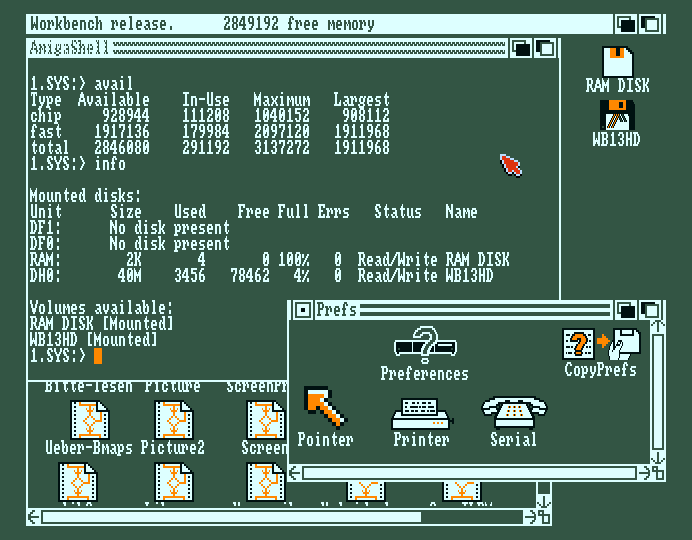 AVAIL and INFO. Starting from an Amiga 500 HD is actually quite slow. It's very fast on the Amiga 1200 though, both in emulation and real life using an old IDE drive.
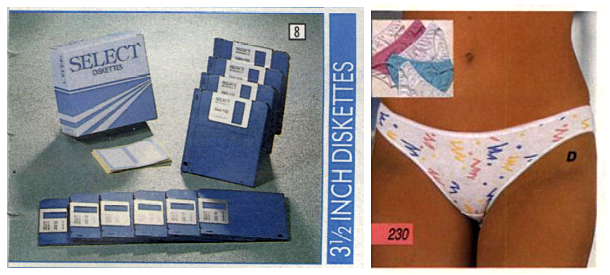 In spring 1991 the ratio of DSDD-to-ConfettiPanty was precisely 10-to-6 for the £7 budget pack range. Interesting huh? Now you can of course find neither of these extinct specimens in stores.
-------------------------------------------------------------------------------
Setting up Workbench 1.3
-------------------------------------------------------------------------------
Workbench 3.1 or the newer 3.2 is far more user friendly and I use it for my daily Amiga work, but there's something about 1.3's look and simplicity which draws me back. Having to use stand-alone floppies for everything is quite satisfying. If you wanted a slightly different Workbench or little custom work environment back then, you could just make a disk for it. That's not something you can do easily today as everything is "heavy" and precariously balanced on expensive drives. Fool around and perhaps you lose all of your files just like that. You're not going to arbitrarily install a custom boot routine on your main OS, or try out some shady utility. On the Amiga 500 however, your files were "airgapped" on floppies, with hardware copy protection if needed (the little black sliding tab on the disk). And it turns out 880KB MF2DDs kept data for decades even if "left unpowered". If they did lose data, it was just some of it.
880 kilobytes doesn't sound like a lot, but if you were producing content like text, source code, DP pixel art, then it could take a month to fill a disk, and in 1990 disks were then something like £5-10 depending. The Sony 3.5" floppydisk format became standard in the early '80s. The drives and disks had become quite affordable by 1991 and the MF2DD disks would drop to half again by 1995, just before fizzling out. Anecdotally, along that drop came a drop in quality... my 1997 brand MF2HDs certainly give me nothing but trouble now--even with fresh files, but my 1990 noname DDs work fine.
Another perk of floppies is label space. I won't pretend like my labels were always appropriately verbose or pretty, but as an artist I like having a bit of drawing space. A modern USB stick has no place to write unless you attach a label on a string (which I do)... still, even then, 8 gigs is so massive that the drive quickly becomes a messy miscellaneous dumping ground. And they die randomly after a few years, killing tons of data.
Anyways, back to the topic at hand--Workbench! One of the first things you might want to do after booting into WB1.3 is to set up the keyboard mapping, unless you're in the US--the US keymap is in the kickstart rom and set by default. Since I'm Swedish I have to use the "s" keymap (it matches a modern keyboard fairly well and only a few keys are off). Open CLI or Shell and type:
SETMAP s
Or SetMap s, or setmap s. Alternatively you can make the change permanent by editing the line in WB's boot script s/startup-sequence :
ED s/startup-sequence
To save, hit Esc and type "sa" at the * asterisk at the bottom, then quit with Esc and "q"
Additionally, the SetMap program icon in System/ takes KEYMAP=s as a ToolType. I guess this allows setting the keymap with a mouse click. It's not a thing you keep changing though so the idea is a bit strange.
In spring 1991 the ratio of DSDD-to-ConfettiPanty was precisely 10-to-6 for the £7 budget pack range. Interesting huh? Now you can of course find neither of these extinct specimens in stores.
-------------------------------------------------------------------------------
Setting up Workbench 1.3
-------------------------------------------------------------------------------
Workbench 3.1 or the newer 3.2 is far more user friendly and I use it for my daily Amiga work, but there's something about 1.3's look and simplicity which draws me back. Having to use stand-alone floppies for everything is quite satisfying. If you wanted a slightly different Workbench or little custom work environment back then, you could just make a disk for it. That's not something you can do easily today as everything is "heavy" and precariously balanced on expensive drives. Fool around and perhaps you lose all of your files just like that. You're not going to arbitrarily install a custom boot routine on your main OS, or try out some shady utility. On the Amiga 500 however, your files were "airgapped" on floppies, with hardware copy protection if needed (the little black sliding tab on the disk). And it turns out 880KB MF2DDs kept data for decades even if "left unpowered". If they did lose data, it was just some of it.
880 kilobytes doesn't sound like a lot, but if you were producing content like text, source code, DP pixel art, then it could take a month to fill a disk, and in 1990 disks were then something like £5-10 depending. The Sony 3.5" floppydisk format became standard in the early '80s. The drives and disks had become quite affordable by 1991 and the MF2DD disks would drop to half again by 1995, just before fizzling out. Anecdotally, along that drop came a drop in quality... my 1997 brand MF2HDs certainly give me nothing but trouble now--even with fresh files, but my 1990 noname DDs work fine.
Another perk of floppies is label space. I won't pretend like my labels were always appropriately verbose or pretty, but as an artist I like having a bit of drawing space. A modern USB stick has no place to write unless you attach a label on a string (which I do)... still, even then, 8 gigs is so massive that the drive quickly becomes a messy miscellaneous dumping ground. And they die randomly after a few years, killing tons of data.
Anyways, back to the topic at hand--Workbench! One of the first things you might want to do after booting into WB1.3 is to set up the keyboard mapping, unless you're in the US--the US keymap is in the kickstart rom and set by default. Since I'm Swedish I have to use the "s" keymap (it matches a modern keyboard fairly well and only a few keys are off). Open CLI or Shell and type:
SETMAP s
Or SetMap s, or setmap s. Alternatively you can make the change permanent by editing the line in WB's boot script s/startup-sequence :
ED s/startup-sequence
To save, hit Esc and type "sa" at the * asterisk at the bottom, then quit with Esc and "q"
Additionally, the SetMap program icon in System/ takes KEYMAP=s as a ToolType. I guess this allows setting the keymap with a mouse click. It's not a thing you keep changing though so the idea is a bit strange.
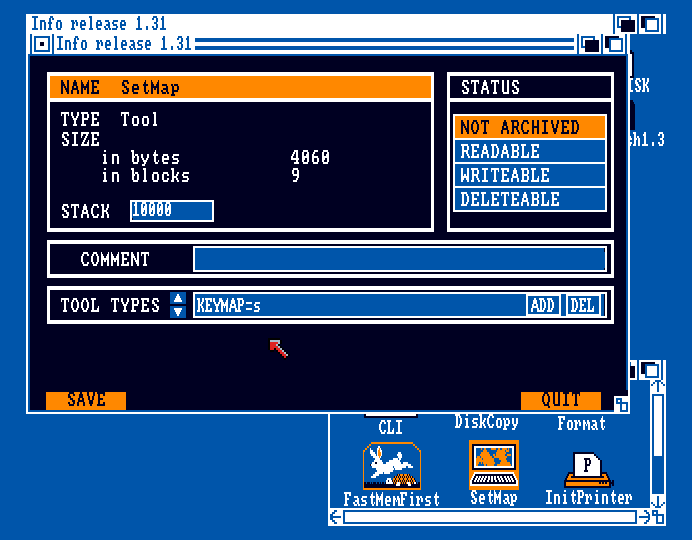 (The layout of this huge info window leaves some things to be desired. It uses Topaz 9 and 8 here and there. Well, that's okay. But it doesn't make it clear what is file system and .info stuff and leaves out some file information. Still, I really do like how it's unique looking--it makes it feel like a place. That's an area where the more polished generalized interface of 2.0+ fails... there we just get boring gray bevel boxes, though it does display the graphical icon and Last Changed date, and you can set Script and Archived flag bits.)
Mind, not all Workbench disks have all keymaps! I got my hands on a German WB with only a "d" keymap, (some WB disks you can find have been modified by their old owners, but for WB1.3 at least, additional keymaps are seemingly stored on the Workbench Extras disk). The keymaps directory can be checked out using either of:
LIST df0:devs/keymaps
LIST DEVS:keymaps/
While the Workbench 1.3 floppydisk is nearly full, it probably has room for another keymap and you can copy one over using the COPY command.
COPY "Extras 1.3:devs/keymaps/s" TO Workbench1.3:devs/keymaps/
Ah, yeah, the Extras 1.3 disk name has a space in it then you might need to add quotes like that, or you can use the drive name, like DF1:
The currently active keymap can be viewed using KeyToy. Afaik, a keymap is not a simple table, but a bit of custom code for deadkeys and such.
(The layout of this huge info window leaves some things to be desired. It uses Topaz 9 and 8 here and there. Well, that's okay. But it doesn't make it clear what is file system and .info stuff and leaves out some file information. Still, I really do like how it's unique looking--it makes it feel like a place. That's an area where the more polished generalized interface of 2.0+ fails... there we just get boring gray bevel boxes, though it does display the graphical icon and Last Changed date, and you can set Script and Archived flag bits.)
Mind, not all Workbench disks have all keymaps! I got my hands on a German WB with only a "d" keymap, (some WB disks you can find have been modified by their old owners, but for WB1.3 at least, additional keymaps are seemingly stored on the Workbench Extras disk). The keymaps directory can be checked out using either of:
LIST df0:devs/keymaps
LIST DEVS:keymaps/
While the Workbench 1.3 floppydisk is nearly full, it probably has room for another keymap and you can copy one over using the COPY command.
COPY "Extras 1.3:devs/keymaps/s" TO Workbench1.3:devs/keymaps/
Ah, yeah, the Extras 1.3 disk name has a space in it then you might need to add quotes like that, or you can use the drive name, like DF1:
The currently active keymap can be viewed using KeyToy. Afaik, a keymap is not a simple table, but a bit of custom code for deadkeys and such.
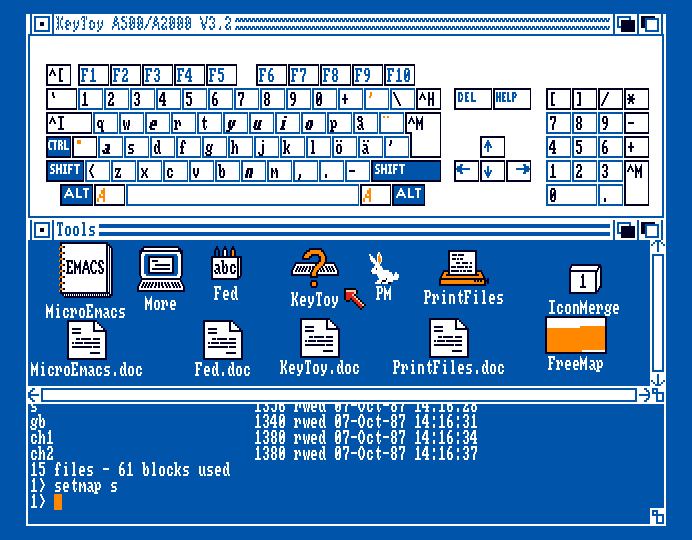
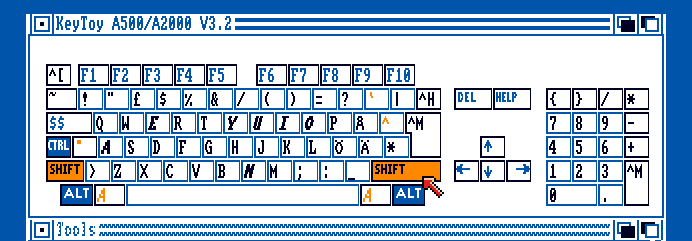
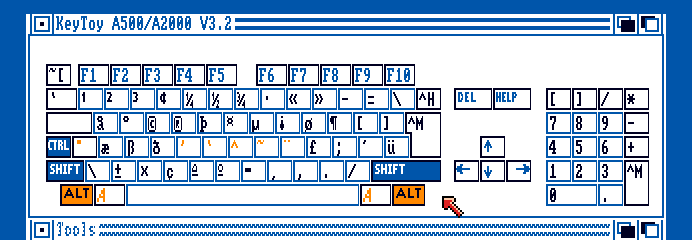
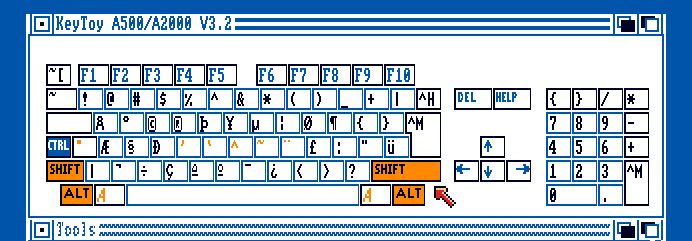 Most of the keys are still in the same place as on my modern Swedish keyboard, but the * and [] both mismatch. I don't have a numpad on this keyboard and even if I did I'm a leftie so it's real awkward to use.
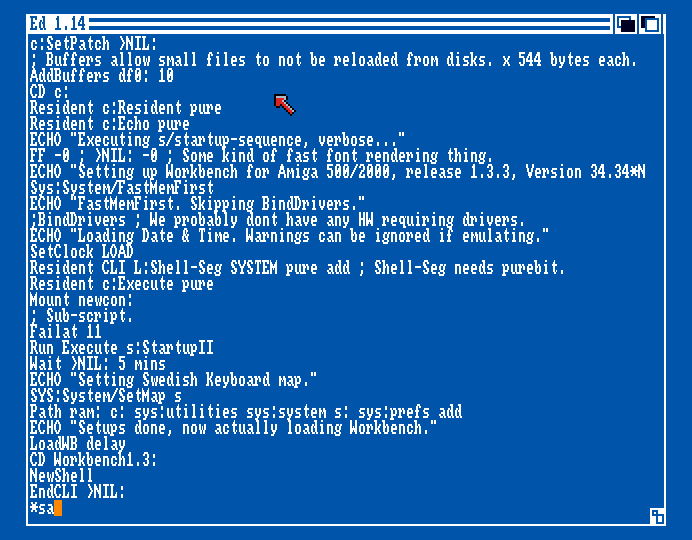 Here is my custom s/startup-sequence (which was initially in German). I cleaned it up and slightly rearranged things. Since my memory isn't tight I made more of the commands Resident--they're now kept in memory rather than constantly being reloaded from floppy.
WB1.3 isn't all that great at mouse-based file manipulation, so it's handy to have the script start a Shell right away. Unlike CLI in WB1.2, Shell supports "up-arrowing" to previous commands. This is seemingly only the case if you start it without plopping it into a CON:0/127/640/128/Name window though, unless there's some flag there I'm not aware of. I'm not sure if there's another way to position & size the window after start. Adding WINDOW=... to the .info window doesn't work. I don't like how it appears at the top over the disk icons by default.
LoadWB is a small program that goes near the end of s/startup-sequence. It doesn't contain Workbench, but rather makes the graphical window stuff "go", with the help of code in ROM and various libraries loaded from disk. Workbench is a mixture of things in the Kickstart ROM and stuff on disk. There's a software patch for the ROM at the top of WB's s/startup-sequence, then the script does quite a bit of optional stuff: ECHO, RESIDENT, SETCLOCK, SETMAP. What's more important is setting up the environment with PATH, ASSIGN, MOUNT and MAKEDIR.
Games use a custom bootblock and don't really need to follow the OS rules--they can even establish their own file system and such, which is why if you insert the disk from a non-HD-installable game while in Workbench, the disk probably be listed as Not a DOS disk or something. You can't even look at the files. This made some disks hard to make backup copies of... which is why special copy utilities like X-COPY came into being.
Here is my custom s/startup-sequence (which was initially in German). I cleaned it up and slightly rearranged things. Since my memory isn't tight I made more of the commands Resident--they're now kept in memory rather than constantly being reloaded from floppy.
WB1.3 isn't all that great at mouse-based file manipulation, so it's handy to have the script start a Shell right away. Unlike CLI in WB1.2, Shell supports "up-arrowing" to previous commands. This is seemingly only the case if you start it without plopping it into a CON:0/127/640/128/Name window though, unless there's some flag there I'm not aware of. I'm not sure if there's another way to position & size the window after start. Adding WINDOW=... to the .info window doesn't work. I don't like how it appears at the top over the disk icons by default.
LoadWB is a small program that goes near the end of s/startup-sequence. It doesn't contain Workbench, but rather makes the graphical window stuff "go", with the help of code in ROM and various libraries loaded from disk. Workbench is a mixture of things in the Kickstart ROM and stuff on disk. There's a software patch for the ROM at the top of WB's s/startup-sequence, then the script does quite a bit of optional stuff: ECHO, RESIDENT, SETCLOCK, SETMAP. What's more important is setting up the environment with PATH, ASSIGN, MOUNT and MAKEDIR.
Games use a custom bootblock and don't really need to follow the OS rules--they can even establish their own file system and such, which is why if you insert the disk from a non-HD-installable game while in Workbench, the disk probably be listed as Not a DOS disk or something. You can't even look at the files. This made some disks hard to make backup copies of... which is why special copy utilities like X-COPY came into being.
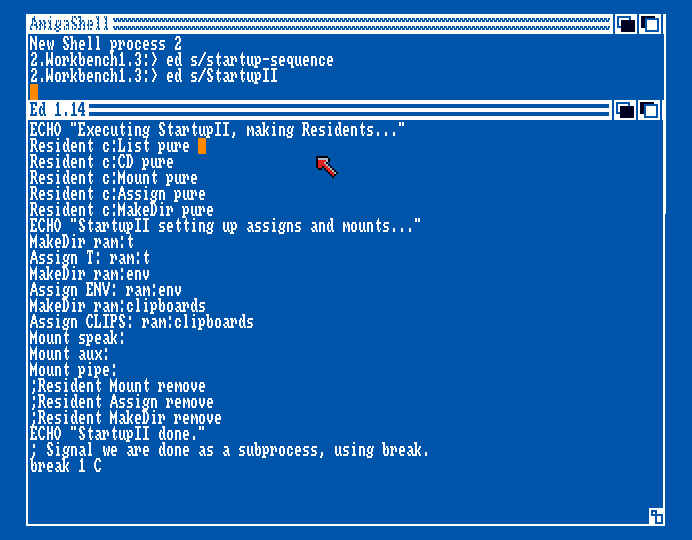 s/StartupII contains more boot script stuff. I don't know why they split it up with such fancy footwork.
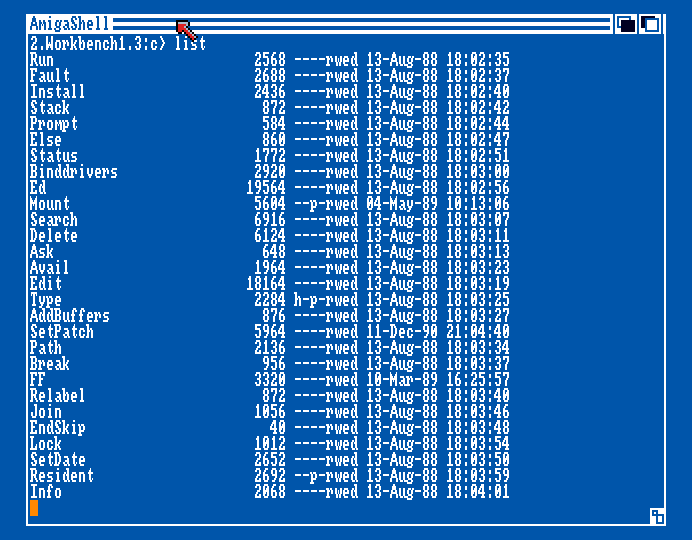 I set the pure flags set for some of the c/ commands--without there might be a warning on WB boot. More about this later in the PROTECT section.
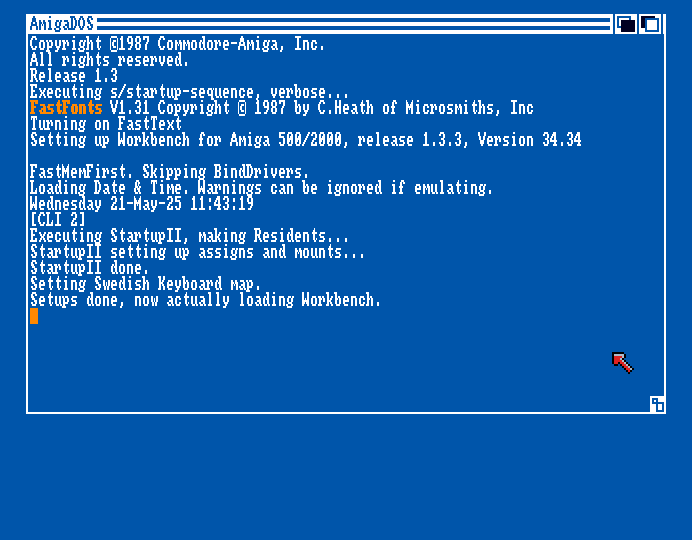 The boot procedure of WB1.3 is now more verbose. Normally the FastFont notice is sent to NIL: and not displayed. See that text in orange? It's done using escape characters. While a bit tedious to type, they can be used when displaying text menus and such.
ECHO " *E[42m Text on black background *E[0m and reset to normal text."
The boot procedure of WB1.3 is now more verbose. Normally the FastFont notice is sent to NIL: and not displayed. See that text in orange? It's done using escape characters. While a bit tedious to type, they can be used when displaying text menus and such.
ECHO " *E[42m Text on black background *E[0m and reset to normal text."
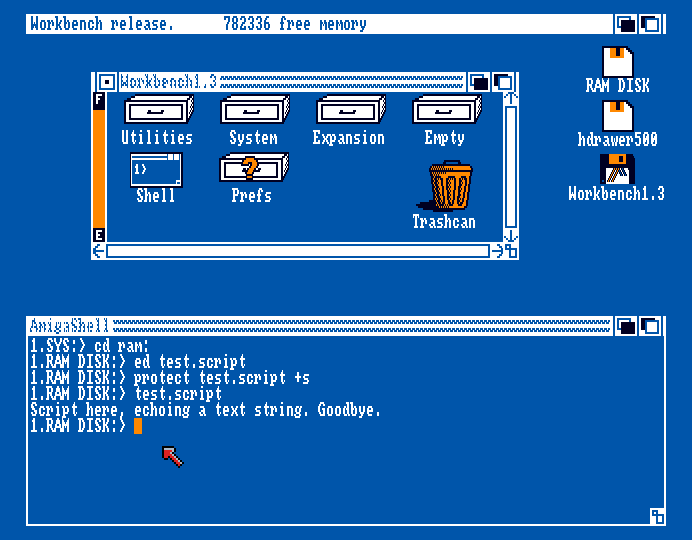 When listing files in WB1.3 you'll see a string looking like ----rwed. The letters are the protection flags Readable, Writable, Executable and Deletable. But what about the four dashes? You might not see them used often, but they're Hold, Script, Pure, Archived. If the script flag is set with PROTECT myscript +s (must be lower case afaik) then the script can be run by just typing its name. Neither of s/startup-sequence and StartupII have it set though.
If the file is a command, and pure, then it can be held automatically in memory after usage, i.e. made resident. This reduced disk access but eats memory.
When listing files in WB1.3 you'll see a string looking like ----rwed. The letters are the protection flags Readable, Writable, Executable and Deletable. But what about the four dashes? You might not see them used often, but they're Hold, Script, Pure, Archived. If the script flag is set with PROTECT myscript +s (must be lower case afaik) then the script can be run by just typing its name. Neither of s/startup-sequence and StartupII have it set though.
If the file is a command, and pure, then it can be held automatically in memory after usage, i.e. made resident. This reduced disk access but eats memory.
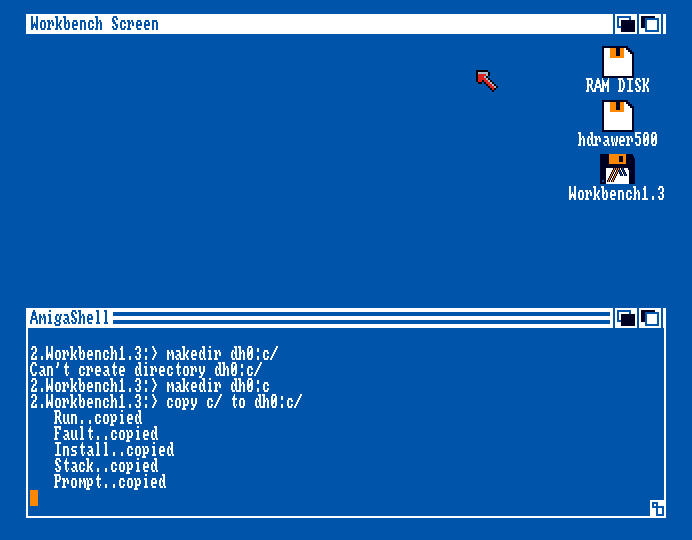 Using COPY to backup the commands to my hard drive folder (here mounted in WB as dh0:) outside of the emulator. Had to make a dir beforehand. Note that when making dirs there can't be a / in the name.
-------------------------------------------------------------------------------
AmigaDOS Introductory Ramble
-------------------------------------------------------------------------------
The Amiga has a Command Line Interface complimenting the windowed GUI, just like Linux and other operating systems. Before Workbench 2.0 you had to use CLI more frequently as WB1.3 and below wasn't yet fully featured as a mouse operated GUI.
IIRC, Commodore didn't actually make AmigaDOS--it's an adaptation of TRIPOS--the "Terrible Reliable Incerdibly Portable Operating System", initially made by undergraduates for the PDP-11's at Cambridge. Commodore got the rights to use it as AmigaDOS. WB sometimes included a bunch of third-party stuff and probably didn't have a huge in-house dev team. TRIPOS was written in BCPL and syntaxwise it looks quite pleasing to the eye. Has none of that semicolon or case sensitive C nonsense.
AmigaDOS commands evolved along with the Workbench releases and the ROM Kickstart over time, but the principle of operation remained the same: The Amiga's Kickstart (permanently stored in ROM) had useful functions for creating a basic window text and a mouse cursor, so it felt much more advanced than MS-DOS.
If you try to run a 3.1 script in a 1.2 environment it most likely wont work as the old commands will lack some of the arguments. An old script might work well enough on a new machine though.
Hard drives were quite expensive up until the early-mid '90s, so not many amateur users had them. This meant booting from individual floppy disks and Workbench was just one of them, and rarely required to run programs and games. Sometimes it was just in the way, eating memory. However, standalone program and utility disks sort of had various bits of Amiga Workbench on them, and you'd kind of need Workbench for setting disks up. Many program and utility disks presented a text window with some information and a menu--or perhaps even some windows with icons, and then the user could start programs from there.
Now, as a modern Amiga user, how could AmigaDOS be relevant?
Well, you can use something like Workbench's FORMAT (for initializing the file system) and INSTALL (for the bootblock), or a disk utility like X-COPY to make a bootable disk with your favourite programs and a nice menu, and then you can share it as an .adf file, or better yet--an actual physical floppy disk.
After using MAKEDIR to make s/ and c/ folders--sorry, drawers--on the custom disk, then you can place the Amiga DOS commands that you need into c/, and this gives a startup-sequence script file in s/ access to the commands. Basically it's a modular system, which helps to free up space--remember that MF2DD disks had a capacity of 880 kilobytes.
So, as a practical example, you could create a fancy "greetz.txt" file on the disk, then add the TYPE command into c/ and have s/startup-sequence do the TYPE greetz.txt after boot. If you wanted the user to be able to list files on the floppy, you could add DIR or LIST into c/. You could even show .iff images and such with the appropriate commands or a custom bootblock. Bootblocks sometimes had little virus-killer embedded.
One would often pack these disks full of useful or fun stuff, then list it with a custom menu. I don't think many of the "homebrew" disks survived in archives so they're a bit of lost history. At most they were shared between a few friends.
Using COPY to backup the commands to my hard drive folder (here mounted in WB as dh0:) outside of the emulator. Had to make a dir beforehand. Note that when making dirs there can't be a / in the name.
-------------------------------------------------------------------------------
AmigaDOS Introductory Ramble
-------------------------------------------------------------------------------
The Amiga has a Command Line Interface complimenting the windowed GUI, just like Linux and other operating systems. Before Workbench 2.0 you had to use CLI more frequently as WB1.3 and below wasn't yet fully featured as a mouse operated GUI.
IIRC, Commodore didn't actually make AmigaDOS--it's an adaptation of TRIPOS--the "Terrible Reliable Incerdibly Portable Operating System", initially made by undergraduates for the PDP-11's at Cambridge. Commodore got the rights to use it as AmigaDOS. WB sometimes included a bunch of third-party stuff and probably didn't have a huge in-house dev team. TRIPOS was written in BCPL and syntaxwise it looks quite pleasing to the eye. Has none of that semicolon or case sensitive C nonsense.
AmigaDOS commands evolved along with the Workbench releases and the ROM Kickstart over time, but the principle of operation remained the same: The Amiga's Kickstart (permanently stored in ROM) had useful functions for creating a basic window text and a mouse cursor, so it felt much more advanced than MS-DOS.
If you try to run a 3.1 script in a 1.2 environment it most likely wont work as the old commands will lack some of the arguments. An old script might work well enough on a new machine though.
Hard drives were quite expensive up until the early-mid '90s, so not many amateur users had them. This meant booting from individual floppy disks and Workbench was just one of them, and rarely required to run programs and games. Sometimes it was just in the way, eating memory. However, standalone program and utility disks sort of had various bits of Amiga Workbench on them, and you'd kind of need Workbench for setting disks up. Many program and utility disks presented a text window with some information and a menu--or perhaps even some windows with icons, and then the user could start programs from there.
Now, as a modern Amiga user, how could AmigaDOS be relevant?
Well, you can use something like Workbench's FORMAT (for initializing the file system) and INSTALL (for the bootblock), or a disk utility like X-COPY to make a bootable disk with your favourite programs and a nice menu, and then you can share it as an .adf file, or better yet--an actual physical floppy disk.
After using MAKEDIR to make s/ and c/ folders--sorry, drawers--on the custom disk, then you can place the Amiga DOS commands that you need into c/, and this gives a startup-sequence script file in s/ access to the commands. Basically it's a modular system, which helps to free up space--remember that MF2DD disks had a capacity of 880 kilobytes.
So, as a practical example, you could create a fancy "greetz.txt" file on the disk, then add the TYPE command into c/ and have s/startup-sequence do the TYPE greetz.txt after boot. If you wanted the user to be able to list files on the floppy, you could add DIR or LIST into c/. You could even show .iff images and such with the appropriate commands or a custom bootblock. Bootblocks sometimes had little virus-killer embedded.
One would often pack these disks full of useful or fun stuff, then list it with a custom menu. I don't think many of the "homebrew" disks survived in archives so they're a bit of lost history. At most they were shared between a few friends.
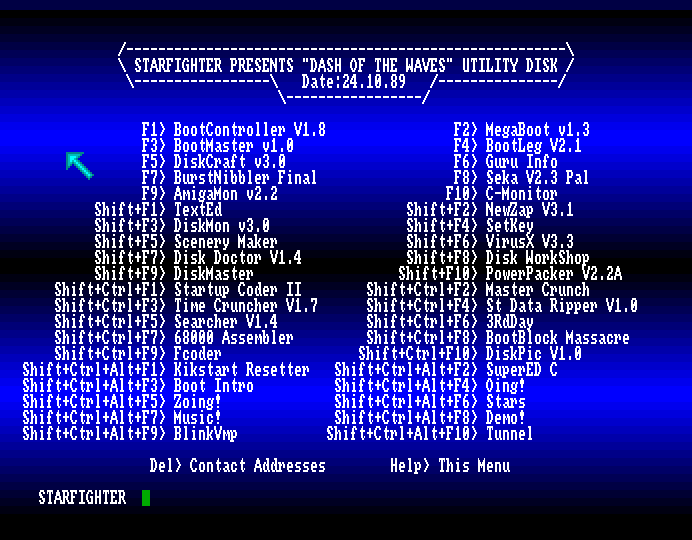 This utility disk dresses up AmigaDOS a bit with a copper effect, and hiding the window bar. It does a weird thing where it uses a custom keymap to print out the filename of the utility... and they're all renamed as numbers.
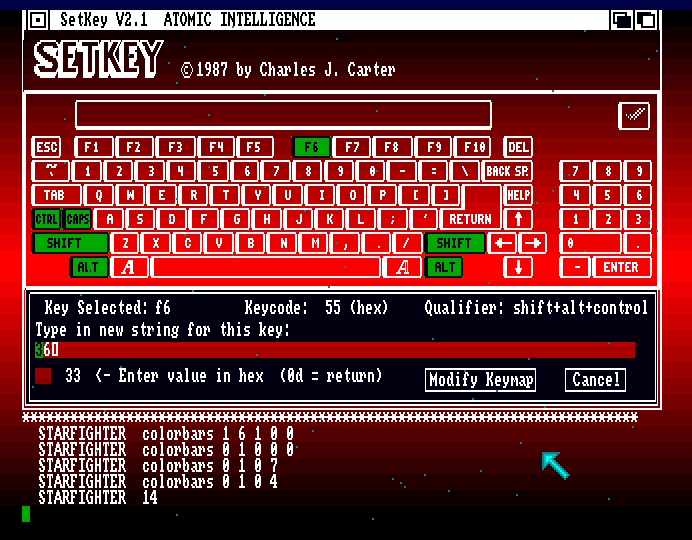 I used the supplied colorbars command to set up my own copper effect on the text. Found a keymap editor--36 here is the star scroller. I also activated a parallax star effect which keeps running in the background in the AmigaDOS window.
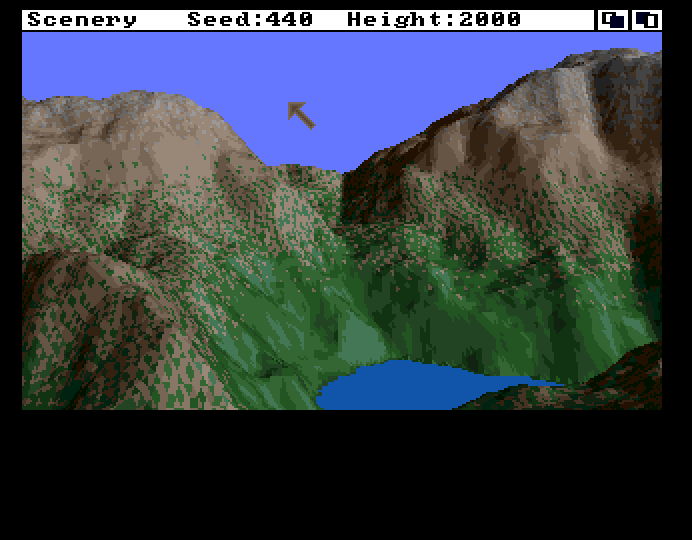 Scenery. I had a later version of this called Scene Generator. You can't really use it for anything, but it's still kind of neat. The Scene Generator version did sky and sea textures but that's missing here.
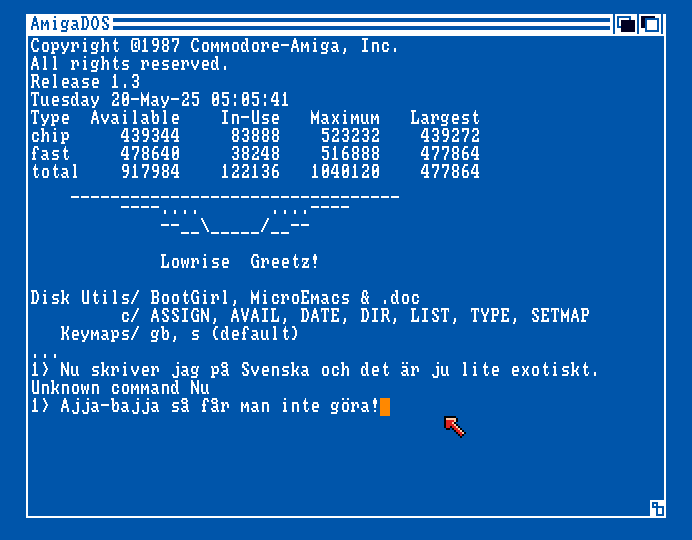 Ah, there's something odd going on here with my own utility disk... isn't the topaz font larger? 9? A WB1.2 thing? The disk is still very barebones. It does have a custom bootblock image I drew though (below).
I should use some text effects, though perhaps these only work when using ECHO, not TYPE. For reference, some escape codes (stackable):
*E[0m Reset all effects
*E[1m Bold (22 to turn off)
*E[3m Italics (23 to turn off)
*E[4m Underline (23 to turn off)
*E[30m Blue text
*E[31m White text
*E[32m Black text
*E[33m Orange text
*E[40m Blue BG
*E[41m White BG
*E[42m Black BG
*E[43m Orange BG
*EM Reverse Fine Feed (up, useful for negating extra lines)
*ED Line Feed only.
*EE Line Feed, Carrier Return.
Ah, there's something odd going on here with my own utility disk... isn't the topaz font larger? 9? A WB1.2 thing? The disk is still very barebones. It does have a custom bootblock image I drew though (below).
I should use some text effects, though perhaps these only work when using ECHO, not TYPE. For reference, some escape codes (stackable):
*E[0m Reset all effects
*E[1m Bold (22 to turn off)
*E[3m Italics (23 to turn off)
*E[4m Underline (23 to turn off)
*E[30m Blue text
*E[31m White text
*E[32m Black text
*E[33m Orange text
*E[40m Blue BG
*E[41m White BG
*E[42m Black BG
*E[43m Orange BG
*EM Reverse Fine Feed (up, useful for negating extra lines)
*ED Line Feed only.
*EE Line Feed, Carrier Return.
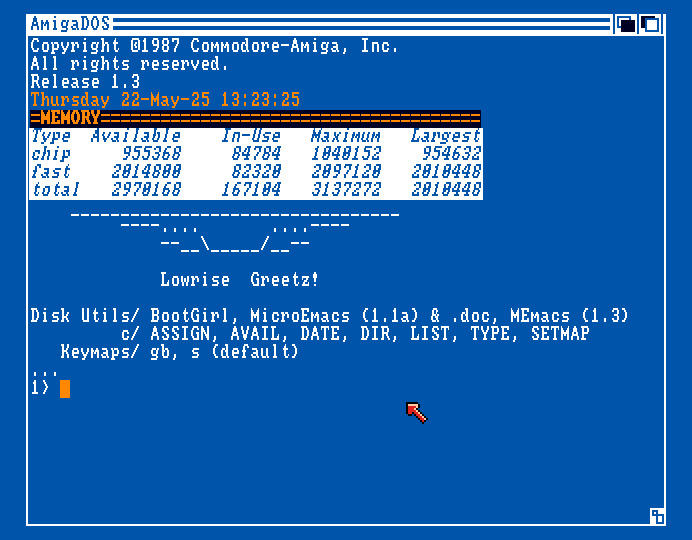 Simple text effects applied. Using the beefier memory setup here.
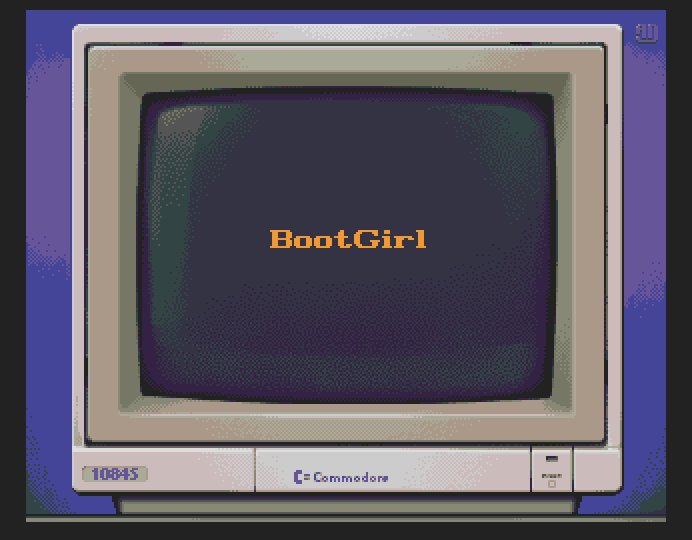 Did some pixel art (from reference). Commodore 1084S Monitor in 15+1 colours. Ruby 12 in faux-bold. 22KB or so due to the excessive dither, but I wanted some gradients to suggest light focus and curvature. One thing that's kind of neat about Amiga 444 RGB is that you get these tints to the colour ramps. When working in 24-bit you are less inclined to dare go for that and the ramps can become too smooth and monotone.
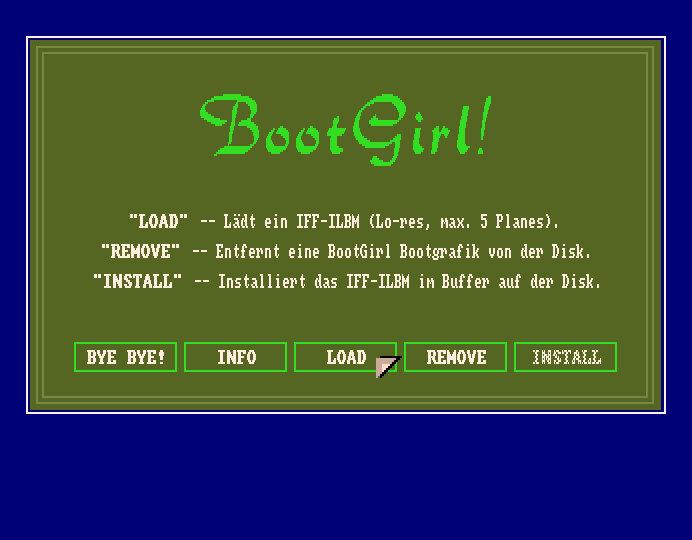 I used this German utility to make the picture bootblock go. You just load an .iff and then put the target disk in df0: It seemingly makes a copy of the pic and renames it to BootGirl.data. There's a sibling utility called BootBoy by the way. Many bootblock utilities were actually antivirus related. The advantage of using a bootblock (rather than loading stuff after boot) is that a bootblock is much faster--almost instant and you don't have to see the AmigaDOS screen if you boot directly into a game or cool lowres screen program.
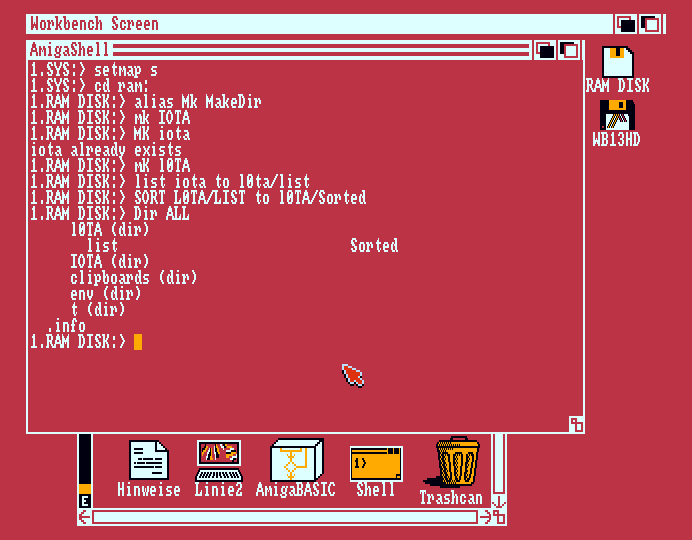 Casey Schmasey.
Amiga DOS commands aren't case sensitive, so "alias" is the same as "ALIAS". The same goes for parameters/arguments (except setmap?), and file name case is also just aesthetic. It's not like on linux there one has to be supercareful with filenames and adding -X or -x to a command does different things. Overall I think AmigaDOS is easier to understand due to naming conventions. It also has optional bits one can add, like FROM and TO for source and destination. For legibility's sake, I'm be using caps for command stuff here, and lower case for the variable file names. I don't like when syntax examples throw random characters in that don't belong in the actual phrase, so I won't be doing that.
There are already good resources for AmigaDOS syntax, but not so many with real-world example so I'll try to do that. I'm actually looking in my Swedish adaptation of the AmigaDOS Reference Guide, which is copyrighted 1986 & 1987 (Contemporary with Workbench 1.2?). While still valid, the various commands were later expanded. Most pages online will reference WB3.1 but perhaps I'll be different and mostly stick to 1.3 here.
-------------------------------------------------------------------------------
Basic Useful Commands
-------------------------------------------------------------------------------
LIST can give a detailed listing of files on the current drive or in the current directory, or any place you point it to. The prompt location is defaulting to the drive root that you started CLI or Shell from. You can change the current directory with CD, or supply LIST with a device name or relative path if you don't want to move from the spot.
LIST -Lists the current directory which can be changed using CD.
LIST ram: -Lists the contents of the RAM drive.
...the Amiga's memory can be used by WB as a storage device.
It is kind of the opposite of PC virtual/swap memory where the HD is
used as memory. On the Amiga, sometimes disk were full or just
too slow, so the RAM memory was used to store and shuttle files.
LIST dfO:c/ -Paths can point into directories and sub-directories.
...the c directory usually contains AmigaDOS commands.
CD MyFloppy: -Here the name of a disk is referenced rather than drive number.
...these kind of colon names can also be assigns, i.e. not real disks.
Let's say that you have backed up an old game from a floppy disk and now it sits deep the file structure of your main hard drive DH0: perhaps called something like Work: When you try to run the game it asks after images on the floppydisk. This can be avoided by making an assign label that the whole OS will see and use. Programs installed on a HD will often make a few assigns.
ASSIGN Tron: Work:Gamedev/1992/Tron/
LIST Tron:ReadMe.txt
Use ASSIGN LIST to just view all of the active assigns. This doesn't make an assign. INFO is neater but doesn't show assigns. INFO does show disk usage % though... WB1.3 only had the orange bar that's a tad abstract, though cool.
LIST can redirect the listing to a text file, or perhaps to speak: ...which is linked to the speech synth SAY. Additionally, LIST can be told to be less verbose by adding QUICK so SAY doesn't blab about file flags and dates.
LIST ram: TO speak: QUICK
LIST can filter out old or new files with SINCE and UPTO
LIST SINCE MONDAY
LIST UPTO 22-may-25
This will have to substitute not having a good text file listing like in later WBs. For viewing the programs on a busy utility disk in df0: alphabetically one can do:
CD ram: -Let's make the RAM DISK out work directory for some temp files.
LIST df0:c/ TO listing.txt -This will list all of the commands into a new text file in ram:
SORT listing.txt TO sorted.txt -Sorts alphabetically and saves to a new file.
MORE sorted.txt -Display using the More viewer. Backspace moves view up.
Sort can also sort text lines by looking at character starting at a column position (character x position):
SORT listing.txt TO * COLSTART 24
Casey Schmasey.
Amiga DOS commands aren't case sensitive, so "alias" is the same as "ALIAS". The same goes for parameters/arguments (except setmap?), and file name case is also just aesthetic. It's not like on linux there one has to be supercareful with filenames and adding -X or -x to a command does different things. Overall I think AmigaDOS is easier to understand due to naming conventions. It also has optional bits one can add, like FROM and TO for source and destination. For legibility's sake, I'm be using caps for command stuff here, and lower case for the variable file names. I don't like when syntax examples throw random characters in that don't belong in the actual phrase, so I won't be doing that.
There are already good resources for AmigaDOS syntax, but not so many with real-world example so I'll try to do that. I'm actually looking in my Swedish adaptation of the AmigaDOS Reference Guide, which is copyrighted 1986 & 1987 (Contemporary with Workbench 1.2?). While still valid, the various commands were later expanded. Most pages online will reference WB3.1 but perhaps I'll be different and mostly stick to 1.3 here.
-------------------------------------------------------------------------------
Basic Useful Commands
-------------------------------------------------------------------------------
LIST can give a detailed listing of files on the current drive or in the current directory, or any place you point it to. The prompt location is defaulting to the drive root that you started CLI or Shell from. You can change the current directory with CD, or supply LIST with a device name or relative path if you don't want to move from the spot.
LIST -Lists the current directory which can be changed using CD.
LIST ram: -Lists the contents of the RAM drive.
...the Amiga's memory can be used by WB as a storage device.
It is kind of the opposite of PC virtual/swap memory where the HD is
used as memory. On the Amiga, sometimes disk were full or just
too slow, so the RAM memory was used to store and shuttle files.
LIST dfO:c/ -Paths can point into directories and sub-directories.
...the c directory usually contains AmigaDOS commands.
CD MyFloppy: -Here the name of a disk is referenced rather than drive number.
...these kind of colon names can also be assigns, i.e. not real disks.
Let's say that you have backed up an old game from a floppy disk and now it sits deep the file structure of your main hard drive DH0: perhaps called something like Work: When you try to run the game it asks after images on the floppydisk. This can be avoided by making an assign label that the whole OS will see and use. Programs installed on a HD will often make a few assigns.
ASSIGN Tron: Work:Gamedev/1992/Tron/
LIST Tron:ReadMe.txt
Use ASSIGN LIST to just view all of the active assigns. This doesn't make an assign. INFO is neater but doesn't show assigns. INFO does show disk usage % though... WB1.3 only had the orange bar that's a tad abstract, though cool.
LIST can redirect the listing to a text file, or perhaps to speak: ...which is linked to the speech synth SAY. Additionally, LIST can be told to be less verbose by adding QUICK so SAY doesn't blab about file flags and dates.
LIST ram: TO speak: QUICK
LIST can filter out old or new files with SINCE and UPTO
LIST SINCE MONDAY
LIST UPTO 22-may-25
This will have to substitute not having a good text file listing like in later WBs. For viewing the programs on a busy utility disk in df0: alphabetically one can do:
CD ram: -Let's make the RAM DISK out work directory for some temp files.
LIST df0:c/ TO listing.txt -This will list all of the commands into a new text file in ram:
SORT listing.txt TO sorted.txt -Sorts alphabetically and saves to a new file.
MORE sorted.txt -Display using the More viewer. Backspace moves view up.
Sort can also sort text lines by looking at character starting at a column position (character x position):
SORT listing.txt TO * COLSTART 24
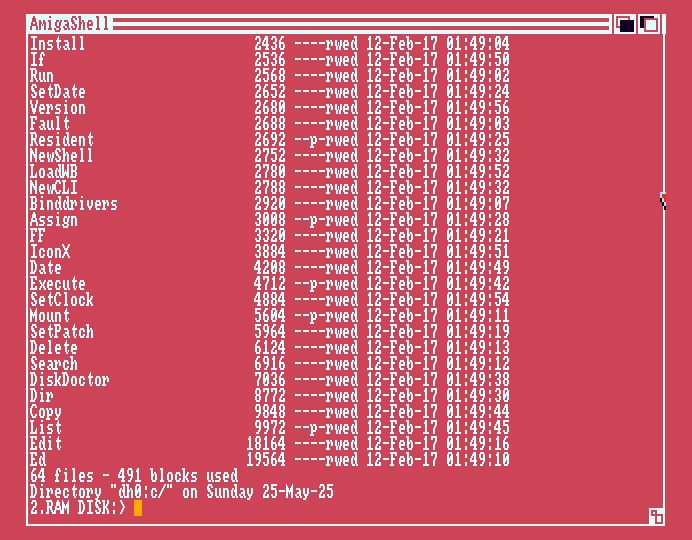 Here it will not sort to a file, but to * which is taken as the CLI window. 24-27 is about the space-out position where we can see file size size in bytes. That umber is actually right-edge aligned so I suppose a large file might go below column 24. We can see here that ED is the largest command program. LoadWB is only 2780 bytes, so it's not Workbench, but a loader for it (workbench.library is generally held in ROM though, but the icon library is on the WB disk).
DIR presentation is a bit different from LIST. With OPT A or ALL it can traverse folder structures and give a complete tree structure listing. DIR uses columns to save vertical space (Workbench ran in 640x256 or 200 if using a TV, so not a lot of line space).
DIR
DIR ram: OPT A
DIR ram: ALL -ALL can be used instead of OPT A in newer DIRs.
DIR > ram:filelisting.txt OPT A -The older DIR can't use TO for redirection and needs the >
If you are a unix/linux person and prefer typing "LS", then you can easily make an alias for LIST. To make it permanent you can add it to one of the startup scripts.
ALIAS LS LIST NODATES
Note that this will supply your LS the NODATES argument as default too. Now you can do:
LS df0:c
I omitted the forward slashes here. They appear to be optional when you finish the path with one, BUT, you can't add one when creating a dir with MAKEDIR or COPY as then it might be seen as part of the filename... or something? Anyways, a few other alias examples I found in an old Amiga mag:
ALIAS DEL DELETE
ALIAS MK MAKEDIR
While AmigaDOS is not case sensitive, filenames can contain a mixture of lower and upper case letters, and space. Use double quotes when dealing with spaced filenames. Single quote apostrophes just end being seen as part of the filename, so:
MAKEDIR 'Single Quotes' -...would create two directories,
...unlike...
MAKEDIR "Double Quote"
It seems you can't create a folder and then a folder inside in one go. Instead you must first create the parent folder.
MAKEDIR Games
MAKEDIR Games/PD
or:
MAKEDIR Games
CD Games
MAKEDIR Eroge PD Strategy
This will actually create three drawers inside Games/ in one go, which saves a lot of time.
But after using CD (Change Directory) like that you'll need to step back out again later. On the Amiga, stepping backwards is done using CD / or CD /// for three backward steps if you're inside Games/PD/2025 for example. Just typing CD alone will list the current place you're at, though the CLI prompt name also carry this information.
There are other ways to back out of a directory and into another. You can give CD an absolute path, e.g. CD df0:Pics/SamanthaFox or you can preface the path with an appropriate amount of slashes, like CD /Pics/SamanthaFox and CD will traverse in one go.
I previously mentioned optional words like FROM and TO. It appears you can reverse these, so they're not purely decorative. Adding these makes dangerous operations feel more safe. Consider we have an Important directory full of files to back up. Also, since we don't have to specify that it is a dir with a /, things can get a bit abstract.
COPY Important BackupJunk -Huh?
If the BackupJunk dir doesn't exist, copy will create it. If it exists, files inside will be replaced. Anyways. here we obviously want to backup the important files. But what if we get it wrong?
COPY BackupJunk Important
Oops, now we have potentially overwritten all the important files with the old one from backup. To avoid this risk we can specify source and destination and make sure to add the slashes.
COPY FROM Important/ TO BackupJunk/ -A bit easier to understand I think.
But if the BackupJunk dir doesn't exist here then COPY will protest. In WB1.3 you can skip the slash and the dir will be created at the destination, but this doesn't work in WB1.2.
Getting to the main point though--you can apparently safely reverse FROM and TO, like so:
COPY TO backupjunk FROM important
Useful for some commands where you have a file or drawer that could be overwritten if you forget the order.
Note that we were working with drawers here. Source and destination could be files, like so:
COPY DF0:Notes.txt TO RAM:TempCopy.txt
Adding the TO in the middle like this makes the order easy to remember for me. Here I left out FROM, which is fine since the first string is normally FROM. What's not fine however is:
-- COPY IntendedDestination FROM IntendedSource -- strike over red
...as COPY will just ignore FROM in this case and unfortunately write over the source with the destination! Then what about:
COPY TO dest.txt source.txt
Ah, here it appears that since TO is first, FROM is implied correctly. This behaviour is noted in the AmigaDOS Reference Guide. The reason for it is has to do with the inner working of ReadArgs() (presumably in ROM Kernel).
A drawback of COPY (and WB's drag-drop) is that it will replace the date of files. Some third party programs like DirOPUS and FixDisk clone the files properly. But wait--I've only been looking at the COPY entry in the old (1.2) AmigaDos Reference Guide here, and according to fresher sources, the newer COPY (1.3 onwards?) can indeed preserve dates by either adding CLONE. So a proper way to back up a while floppy disk to hard drive could be:
MAKEDIR WorkHD:DiskBackups
COPY MyFlop: TO WorkHD:DiskBackups/MyFlop ALL CLONE
I haven't mentioned this important bit yet: we also need to add ALL, otherwise subdirectory content won't be copied (dirs in root will be copied, but not their insides so they will be left empty).
~~~Special Notice~~~
If you are using FS-UAE, it has a quirk where it doesn't like write-touching .adf files. It'll look like it writes to them, until you change machine profile and you find that your .adf file hasn't kept any changes and might even be blank. What it actually does is saving separately in the savestates directory and you might be able to see some .sdf files in there. You can enable actually writing to .adf files using writable_floppy_images = 1 in the config file. But it's still a bit quirky.
I thought I had lost work before I spotted this, and thankfully I was able to make a few blank .adf disk matching the .sdf files and the .sdf data appeared on these disks. Then I copied the data over to yet another blank disk that has no .sdf and it got onto that .adf permanently.
It's a good idea to sometimes do a copy-paste of .adf files to back them up.
~~~End Special Notice~~~
Perhaps you want a PRINT to actually print stuff? It's possible by pointing TYPE to the printer. Though it's bloody unlikely that you have a compatible printer connected to your Amiga or Emulator nowadays!
ALIAS PRINTJOB TYPE [] TO PRT:
PRINTJOB s/startup-sequence
You can also point it to SPEAK: like mentioned earlier. Say was removed after WB1.3 though and SPEAK: won't be set up.
Amiga Workbench is kind of bad with identifying files (not the new 3.2x versions though). Part of this is because we didn't really use file extensions back in the day, and not all programs created icons with the appropriate tool strings. If you wonder what a file is, you might be tempted to peek at it using a hex editor. But Workbench doesn't come with one. Hold on, it actually does! TYPE can "type" a file to a e.g. Shell window as visible text, or to a file. We can set up a handy alias for it.
ALIAS DUMP TYPE [] HEX -HEX or OPT H works in WB1.3.
Normally one might prefer to just do:
TYPE huh TO ram:temp.hexdump OPT H -...and view it with a text editor that has scroll.
Here it will not sort to a file, but to * which is taken as the CLI window. 24-27 is about the space-out position where we can see file size size in bytes. That umber is actually right-edge aligned so I suppose a large file might go below column 24. We can see here that ED is the largest command program. LoadWB is only 2780 bytes, so it's not Workbench, but a loader for it (workbench.library is generally held in ROM though, but the icon library is on the WB disk).
DIR presentation is a bit different from LIST. With OPT A or ALL it can traverse folder structures and give a complete tree structure listing. DIR uses columns to save vertical space (Workbench ran in 640x256 or 200 if using a TV, so not a lot of line space).
DIR
DIR ram: OPT A
DIR ram: ALL -ALL can be used instead of OPT A in newer DIRs.
DIR > ram:filelisting.txt OPT A -The older DIR can't use TO for redirection and needs the >
If you are a unix/linux person and prefer typing "LS", then you can easily make an alias for LIST. To make it permanent you can add it to one of the startup scripts.
ALIAS LS LIST NODATES
Note that this will supply your LS the NODATES argument as default too. Now you can do:
LS df0:c
I omitted the forward slashes here. They appear to be optional when you finish the path with one, BUT, you can't add one when creating a dir with MAKEDIR or COPY as then it might be seen as part of the filename... or something? Anyways, a few other alias examples I found in an old Amiga mag:
ALIAS DEL DELETE
ALIAS MK MAKEDIR
While AmigaDOS is not case sensitive, filenames can contain a mixture of lower and upper case letters, and space. Use double quotes when dealing with spaced filenames. Single quote apostrophes just end being seen as part of the filename, so:
MAKEDIR 'Single Quotes' -...would create two directories,
...unlike...
MAKEDIR "Double Quote"
It seems you can't create a folder and then a folder inside in one go. Instead you must first create the parent folder.
MAKEDIR Games
MAKEDIR Games/PD
or:
MAKEDIR Games
CD Games
MAKEDIR Eroge PD Strategy
This will actually create three drawers inside Games/ in one go, which saves a lot of time.
But after using CD (Change Directory) like that you'll need to step back out again later. On the Amiga, stepping backwards is done using CD / or CD /// for three backward steps if you're inside Games/PD/2025 for example. Just typing CD alone will list the current place you're at, though the CLI prompt name also carry this information.
There are other ways to back out of a directory and into another. You can give CD an absolute path, e.g. CD df0:Pics/SamanthaFox or you can preface the path with an appropriate amount of slashes, like CD /Pics/SamanthaFox and CD will traverse in one go.
I previously mentioned optional words like FROM and TO. It appears you can reverse these, so they're not purely decorative. Adding these makes dangerous operations feel more safe. Consider we have an Important directory full of files to back up. Also, since we don't have to specify that it is a dir with a /, things can get a bit abstract.
COPY Important BackupJunk -Huh?
If the BackupJunk dir doesn't exist, copy will create it. If it exists, files inside will be replaced. Anyways. here we obviously want to backup the important files. But what if we get it wrong?
COPY BackupJunk Important
Oops, now we have potentially overwritten all the important files with the old one from backup. To avoid this risk we can specify source and destination and make sure to add the slashes.
COPY FROM Important/ TO BackupJunk/ -A bit easier to understand I think.
But if the BackupJunk dir doesn't exist here then COPY will protest. In WB1.3 you can skip the slash and the dir will be created at the destination, but this doesn't work in WB1.2.
Getting to the main point though--you can apparently safely reverse FROM and TO, like so:
COPY TO backupjunk FROM important
Useful for some commands where you have a file or drawer that could be overwritten if you forget the order.
Note that we were working with drawers here. Source and destination could be files, like so:
COPY DF0:Notes.txt TO RAM:TempCopy.txt
Adding the TO in the middle like this makes the order easy to remember for me. Here I left out FROM, which is fine since the first string is normally FROM. What's not fine however is:
-- COPY IntendedDestination FROM IntendedSource -- strike over red
...as COPY will just ignore FROM in this case and unfortunately write over the source with the destination! Then what about:
COPY TO dest.txt source.txt
Ah, here it appears that since TO is first, FROM is implied correctly. This behaviour is noted in the AmigaDOS Reference Guide. The reason for it is has to do with the inner working of ReadArgs() (presumably in ROM Kernel).
A drawback of COPY (and WB's drag-drop) is that it will replace the date of files. Some third party programs like DirOPUS and FixDisk clone the files properly. But wait--I've only been looking at the COPY entry in the old (1.2) AmigaDos Reference Guide here, and according to fresher sources, the newer COPY (1.3 onwards?) can indeed preserve dates by either adding CLONE. So a proper way to back up a while floppy disk to hard drive could be:
MAKEDIR WorkHD:DiskBackups
COPY MyFlop: TO WorkHD:DiskBackups/MyFlop ALL CLONE
I haven't mentioned this important bit yet: we also need to add ALL, otherwise subdirectory content won't be copied (dirs in root will be copied, but not their insides so they will be left empty).
~~~Special Notice~~~
If you are using FS-UAE, it has a quirk where it doesn't like write-touching .adf files. It'll look like it writes to them, until you change machine profile and you find that your .adf file hasn't kept any changes and might even be blank. What it actually does is saving separately in the savestates directory and you might be able to see some .sdf files in there. You can enable actually writing to .adf files using writable_floppy_images = 1 in the config file. But it's still a bit quirky.
I thought I had lost work before I spotted this, and thankfully I was able to make a few blank .adf disk matching the .sdf files and the .sdf data appeared on these disks. Then I copied the data over to yet another blank disk that has no .sdf and it got onto that .adf permanently.
It's a good idea to sometimes do a copy-paste of .adf files to back them up.
~~~End Special Notice~~~
Perhaps you want a PRINT to actually print stuff? It's possible by pointing TYPE to the printer. Though it's bloody unlikely that you have a compatible printer connected to your Amiga or Emulator nowadays!
ALIAS PRINTJOB TYPE [] TO PRT:
PRINTJOB s/startup-sequence
You can also point it to SPEAK: like mentioned earlier. Say was removed after WB1.3 though and SPEAK: won't be set up.
Amiga Workbench is kind of bad with identifying files (not the new 3.2x versions though). Part of this is because we didn't really use file extensions back in the day, and not all programs created icons with the appropriate tool strings. If you wonder what a file is, you might be tempted to peek at it using a hex editor. But Workbench doesn't come with one. Hold on, it actually does! TYPE can "type" a file to a e.g. Shell window as visible text, or to a file. We can set up a handy alias for it.
ALIAS DUMP TYPE [] HEX -HEX or OPT H works in WB1.3.
Normally one might prefer to just do:
TYPE huh TO ram:temp.hexdump OPT H -...and view it with a text editor that has scroll.
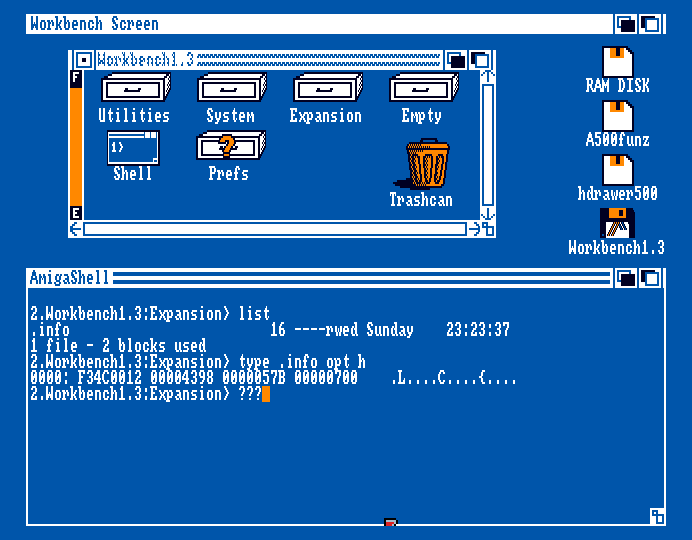 Found an orphaned 16 byte .info file in Expansion/ ... maybe it was left by some HW that once mounted there? Huh, it's there in WB1.2 as well. I'm sure there's an explanation.
-------------------------------------------------------------------------------
To Serve and PROTECT
-------------------------------------------------------------------------------
Sometimes Workbench gives pure bit errors on boot. This is due to a Pure bit flag not being set for the file. Normal wiles are usually ----rwed (Read Write Execute Delete), but the four dashes are flags too. To make the called commands pure in WB1.3, use:
CD c
PROTECT Echo +p
...for Execute, Resident, List, CD, Mount, Assign, and MakeDir. There's also a thing called L:Shell-Seg needing the bit.
It's apparently possible to tell WB to, uh, residentialize a command automatically by setting the hold flag bit.
PROTECT Echo ADD h
ADD here is the same as the +. Needless to say, to set h, p must also be there. Making lots of residentials might be inadvisable on a stock Amiga, but less so on e.g. an A500+ with 1MB chip and some expansion RAM. It's probably only worth doing if you boot off floppy though, as (re)loading commands from hard drive won't be much of an annoyance.
Note that WB's startup scripts add the PURE argument to RESIDENT. This actually allows the selected commands to skip right past the purity test with only a cryptic warning drifting in the breeze. A truly pure program can be used by multiple calling processes at the same time. If we circumvent the test using PURE then there might be a snafu when it turns out that the program can't walk the walk. Anyways, most of the c commands are pure--it's just that the flags are missing for some reason.
RESIDENT -...alone will produce a list of the current residents.
Found an orphaned 16 byte .info file in Expansion/ ... maybe it was left by some HW that once mounted there? Huh, it's there in WB1.2 as well. I'm sure there's an explanation.
-------------------------------------------------------------------------------
To Serve and PROTECT
-------------------------------------------------------------------------------
Sometimes Workbench gives pure bit errors on boot. This is due to a Pure bit flag not being set for the file. Normal wiles are usually ----rwed (Read Write Execute Delete), but the four dashes are flags too. To make the called commands pure in WB1.3, use:
CD c
PROTECT Echo +p
...for Execute, Resident, List, CD, Mount, Assign, and MakeDir. There's also a thing called L:Shell-Seg needing the bit.
It's apparently possible to tell WB to, uh, residentialize a command automatically by setting the hold flag bit.
PROTECT Echo ADD h
ADD here is the same as the +. Needless to say, to set h, p must also be there. Making lots of residentials might be inadvisable on a stock Amiga, but less so on e.g. an A500+ with 1MB chip and some expansion RAM. It's probably only worth doing if you boot off floppy though, as (re)loading commands from hard drive won't be much of an annoyance.
Note that WB's startup scripts add the PURE argument to RESIDENT. This actually allows the selected commands to skip right past the purity test with only a cryptic warning drifting in the breeze. A truly pure program can be used by multiple calling processes at the same time. If we circumvent the test using PURE then there might be a snafu when it turns out that the program can't walk the walk. Anyways, most of the c commands are pure--it's just that the flags are missing for some reason.
RESIDENT -...alone will produce a list of the current residents.
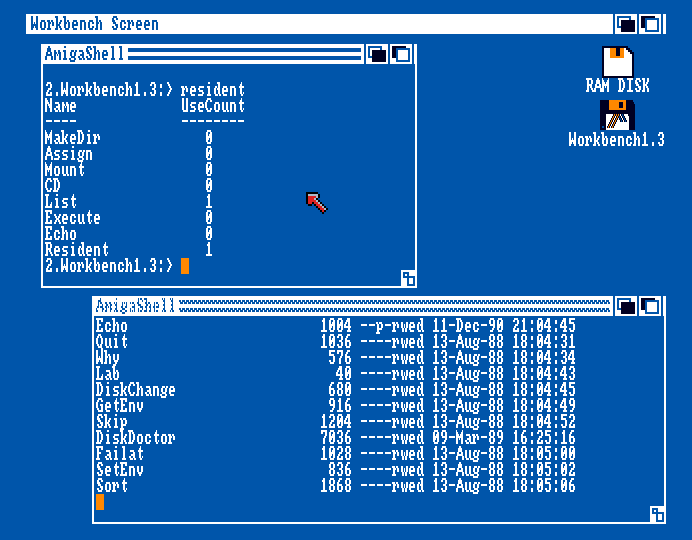 To clarify what's going on: If I start LIST in one Shell window then type RESIDENT in another, I can see that now LIST is being used by something and currently running. Theoretically I could have two Shells doing long listings and I'd see a 2 in the column. RESIDENT itself is always running so it's got a 1 there. The rest lie in wait.
There's also a script flag... it allows scrips to be executed without being prefaced by EXECUTE. Later WBs can do DIR OPT SHOWPROGRAMS and show text effects when listing scrips and executables, but since flags of saved project files, images, text, fonts etc. are generally ----rwed it doesn't work...?
As for archive flag... I suppose if it is set for for a backed up (archived) file and then document (project) editors (tools) will have to very responsibly refuse to alter this file, or at least warn the user.
-------------------------------------------------------------------------------
Quick on working with text in WB1.x
-------------------------------------------------------------------------------
The Amiga has a font embedded in the Kickstart ROM--1.3 uses a Topaz with serifs, and 2+ a sans serif. To be honest, while the Amiga could display legible 80-column text, the official editors were kind of jank.
More is just for viewing text. Unfortunately it's a bit of a black box and I never knew that you can scroll up with backspace and do other stuff. Notepad is a bit of an oddity. It's seemingly for taking simple notes, like a post-it pad, but it self-sabotages by bloating up with font loading. Seems like more of a demo program. The selected font and font effect is global for the whole document so it's not like a modern RTF-mode text editor.
ED, EDIT and MicroEmacs, and even third party editors like Cygnus Ed are made for keyboard people, and there is no useful mouse navigation or dragging text around. One weird feature not seen in modern editors is the ability to select text in tabbed columns. Some editors really like macros and bookmark systems for some reason. I never use them, but I suppose without fast scrolling (and mouse wheels), navigation needed a bit of help. There's no syntax highlighting. The Amiga does a thing where righ click activates the top program menu even if the mose is in the edit area, so right clicking as a tool isn't really a thing.
A magazine recommended a PD editor called JED, but I didn't like it.
I use ED most of the time because it's quick to start from Shell/CLI using:
ED s/startup-sequence
WB1.3's ED doesn't have a top menu for us mouse users, so we must use the Escape key interface. Upon hitting Esc, one gets a little asterisk at the bottom. To quit, type q and hit enter. But if you wanted to save, you instead type sa. To delete a line, type d. Yes, you can't delete lines using the delete and backspace keys. Consult a manual for more commands--some are sort-of useful.
Again, if you made a script, you can set the script flag from CLI with PROTECT my.script +s if you want to be able to run it by just using its name. It's sort of like naming a PC file coolscript.bat. I don't think Amiga scripts had a know file extension. .ini / .cfg or just .txt? Maybe .ads for AmigaDOS Script? Typing in extensions is sort of annoying tbh. It's no wonder modern save requesters handle it automatically and OSes hide the stuff. The Amiga had a sort of usable system for file types, flags and tooltypes, comments and FORM headers, but it never really got used consistently.
To clarify what's going on: If I start LIST in one Shell window then type RESIDENT in another, I can see that now LIST is being used by something and currently running. Theoretically I could have two Shells doing long listings and I'd see a 2 in the column. RESIDENT itself is always running so it's got a 1 there. The rest lie in wait.
There's also a script flag... it allows scrips to be executed without being prefaced by EXECUTE. Later WBs can do DIR OPT SHOWPROGRAMS and show text effects when listing scrips and executables, but since flags of saved project files, images, text, fonts etc. are generally ----rwed it doesn't work...?
As for archive flag... I suppose if it is set for for a backed up (archived) file and then document (project) editors (tools) will have to very responsibly refuse to alter this file, or at least warn the user.
-------------------------------------------------------------------------------
Quick on working with text in WB1.x
-------------------------------------------------------------------------------
The Amiga has a font embedded in the Kickstart ROM--1.3 uses a Topaz with serifs, and 2+ a sans serif. To be honest, while the Amiga could display legible 80-column text, the official editors were kind of jank.
More is just for viewing text. Unfortunately it's a bit of a black box and I never knew that you can scroll up with backspace and do other stuff. Notepad is a bit of an oddity. It's seemingly for taking simple notes, like a post-it pad, but it self-sabotages by bloating up with font loading. Seems like more of a demo program. The selected font and font effect is global for the whole document so it's not like a modern RTF-mode text editor.
ED, EDIT and MicroEmacs, and even third party editors like Cygnus Ed are made for keyboard people, and there is no useful mouse navigation or dragging text around. One weird feature not seen in modern editors is the ability to select text in tabbed columns. Some editors really like macros and bookmark systems for some reason. I never use them, but I suppose without fast scrolling (and mouse wheels), navigation needed a bit of help. There's no syntax highlighting. The Amiga does a thing where righ click activates the top program menu even if the mose is in the edit area, so right clicking as a tool isn't really a thing.
A magazine recommended a PD editor called JED, but I didn't like it.
I use ED most of the time because it's quick to start from Shell/CLI using:
ED s/startup-sequence
WB1.3's ED doesn't have a top menu for us mouse users, so we must use the Escape key interface. Upon hitting Esc, one gets a little asterisk at the bottom. To quit, type q and hit enter. But if you wanted to save, you instead type sa. To delete a line, type d. Yes, you can't delete lines using the delete and backspace keys. Consult a manual for more commands--some are sort-of useful.
Again, if you made a script, you can set the script flag from CLI with PROTECT my.script +s if you want to be able to run it by just using its name. It's sort of like naming a PC file coolscript.bat. I don't think Amiga scripts had a know file extension. .ini / .cfg or just .txt? Maybe .ads for AmigaDOS Script? Typing in extensions is sort of annoying tbh. It's no wonder modern save requesters handle it automatically and OSes hide the stuff. The Amiga had a sort of usable system for file types, flags and tooltypes, comments and FORM headers, but it never really got used consistently.