Left-handed Compact Keyboards
Sinister Thoughts
It's not too difficult to find left handed (or neutral) scissors, but as price goes up few bother to target the left handed market. If you walk into a general electronics store you won't find any left handed keyboards – especially not in your own language. Since laptops are even more expensive I doubt they even exist.
You'd think that since 10% of people are left handed, then 10% of products would be left handed, but instead it's often close to zero. I don't have a can opener I can use. Some power tools are a little awkward. Camera shutter buttons are on the wrong side. People insist on shaking with the wrong hand. I somehow learned to mouse with my right hand so I'm not as good at mouse control as I could've been. I don't mind joypads with the +pad on the left though.
Being left handed is not a huge handicap and nowadays (in the west) we aren't persecuted, or forcefully "re-educated" like in the '60s, but there's this insistent background of discomfort, not just product-wise. Writing cursive with an old style ink pen is rather difficult because of the way the school teaches stroke order, how the hand covers and travels and how the angled nib stabs the paper. Cursive script aside, even roman letters are right biased, e.g. L since starting with the vertical bar makes sense. So my handwriting is just tiny all-caps crows feet in narrow columns on the righthand side of the paper, then I add stuff to the left of that or leave the surface unused.
But as for typing, isn't is just a bunch of keys? How can a keyboard be "handed"? Well, I have several issues with the standard 104 key keyboard layout. When I play arrow-key + ZX games I have to cross my arms. I can't fluidly use the numpad with my right. The number row is way too too lateral with 1 and 0 in inconvenient positions. When editing code there's too much hand movement between delete, bs, tab, arrows, return, and +-*/.
So, every keyboard on this page is an experimental left handed variant. Completely untested. The spacebar is shortened so the Alt layer becomes available on either thumb. Possibly it's a good idea to place the arrow keys on the thumb-row for quick cursoring but I don't actually know. The keys are 1.8mm square and probably half-height like on my Logitech K120. I think I could probably go for slightly smaller keycaps (laptop sized) to minimise hand movement further. Because these keyboards are for fake/fantasy consoles, sometimes they don't makes sense with modern OSes and gaming which rely on numpads and F-keys.
C64
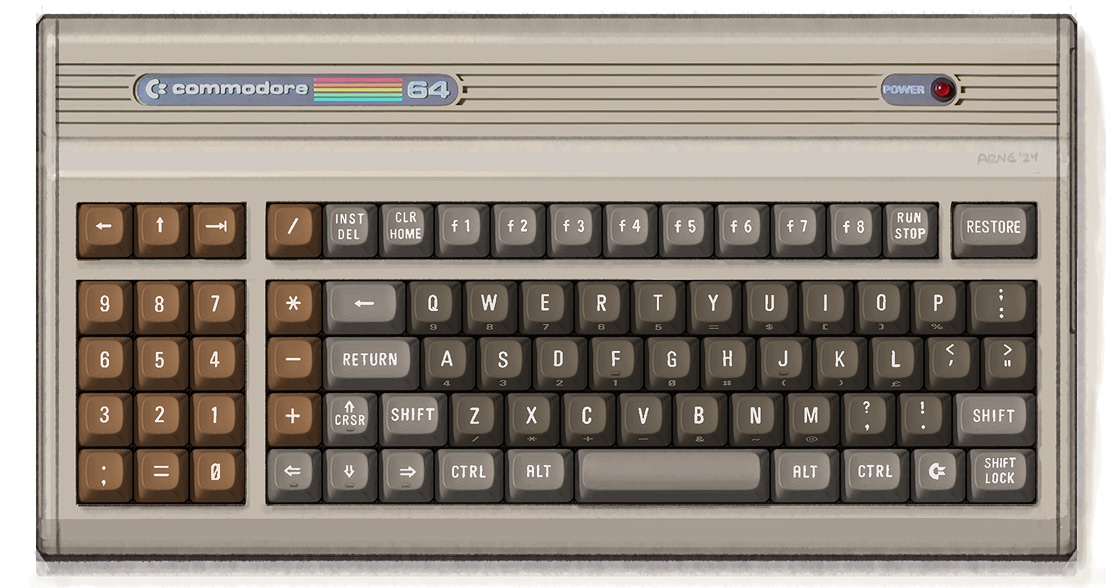
To start, here's a left-handed / mirrored C64 case. This is not for anything in particular, I was just goofing around. As a leftie using a traditional 104 key keyboard feels a bit like swinging a baseball bat with the off hand, hence the flip.
I have honestly forgotten what the special C64 keys do and had to look it up. It's apparently up to the editor in memory to interpret the keycodes, except for Restore which is not part of the keyboard but goes separately to an interrupt line – very useful for reliably interrupting/resetting bad code.
I've added a pair of Alt keys. I think the C= key is already basically Alt, but for the PETSCII symbol layer, which I omitted in favour of implementing one of my compact keyboard layouts. Technically the C= key should strictly be an OS shortcut key I think. The C64 had dedicated @ and £ keys... kind of strange? Since BASIC uses e.g. A$="" for strings you'd think a primary $ key would make more sense.
In Sweden the less used [,£,] were turned into ÄÖÅ. The ABC80 did something similar.
The leftie numpad is mirrored. One might think this causes confusion, but as a leftie I don't actually have any numpad muscle memory since I can't really use it, so a novel layout is alright. It makes more sense to put the very common 1 and 0 under the index finger. Left handed keyboards – the few that exist – sometimes mirror the entire numpad block. Arrow and page keys also go on the left.
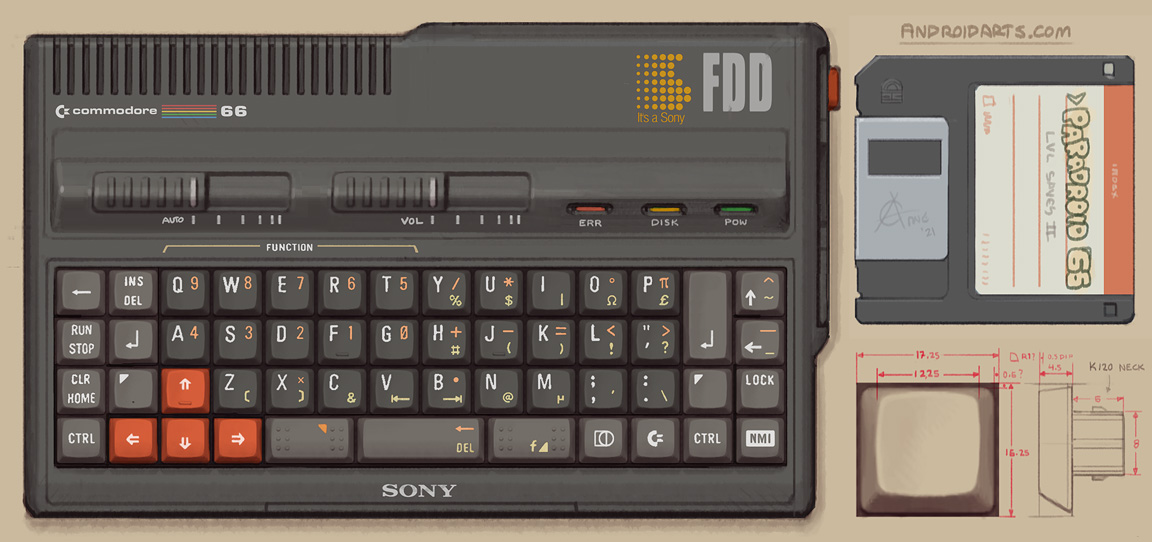
Matrix layout C66 keyboard with floppy, based on a certain Sony machine. The keys are a bit smaller on this, with Logitech K120 stems. Perhaps the hardware is an evolution of the C65, or entirely different. I don't actually like tall pixel resolution and 256 colour modes (which might just be useful for showing pixelated photos in this speed bracket). Another choice is to keep it distinctly C64 but add sprites, memory (REU but not 1-bit?) and some speed here and there. I'd probably go for my own C64 palette too. And a decent joypad and mouse. And a HiTBiT type menu allowing booting into an improved BASIC IDE or an updated GEOS (already supporting REU) in ROM? This concludes the fantasy.
Amiga 510c/Ranger
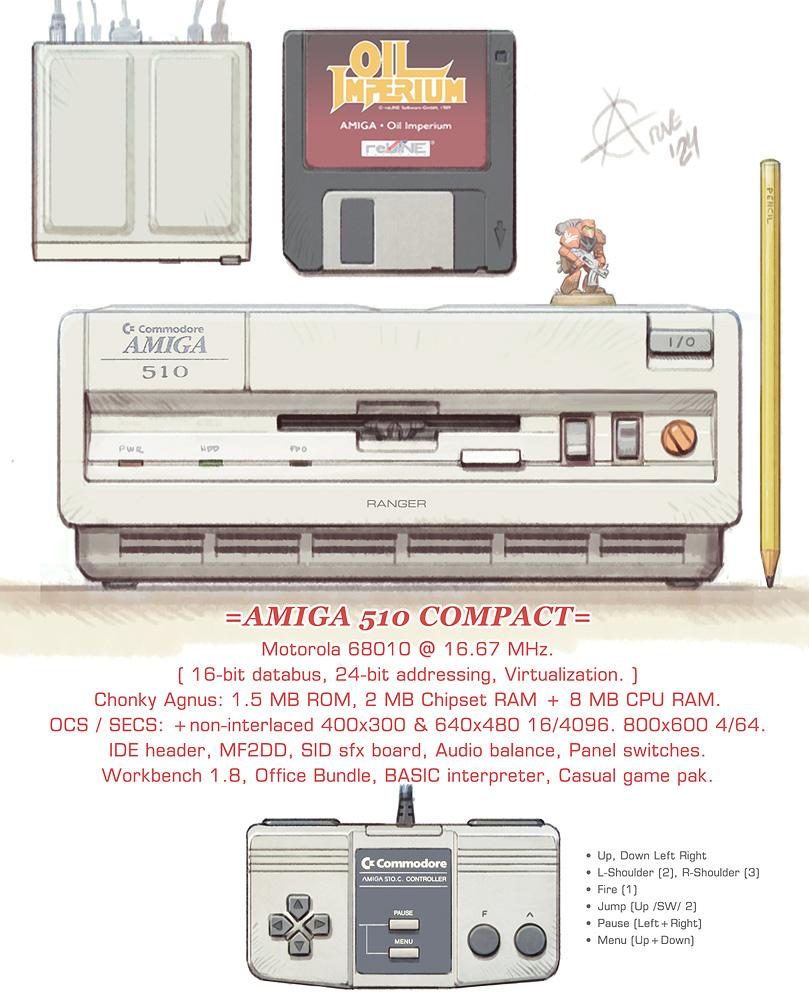
Amiga case variant (no keyboard). This one is based on the Ranger – an enigmatic, nebulous forerunner of AGA and perhaps what the Amiga lineup needed in the late '80s. The Ranger concept supposedly instead turned into ECS (or was ECS all along) which in turn turned into AGA. ECS is short for Enhanced Chip Set – an improvement over the Original Chip Set, but not many home users cared about the monitor-only resolutions or ultra-thin pixels. AGA was not up to snuff by the time it came out, and I think retro-restriction-wise it's less interesting to work with AGA than the more distinct OCS nowadays.
The Amiga 1000 and 500 used a regular Motorola 68000, which while internally a 32-bit chip, only exposed a 24-bit address bus. This still allowed it to address a whopping 16 MB though – far more than home users ever had. I had 6 MB in 93-94 and that was exceptional.
The later Motorola processors made it possible to use up to 4 GB of memory, but in 1992 that was quite overkill. The earlier Ranger project (mid-late '80s) however was probably utilizing the older 68010 which was more similar to the original 68000, except that it supported virtualization, vector offsets, allowing for some sandboxing and crash resilience. It was noticeably faster in certain kind of loops too. Anyways, I think it fits OCS era restrictions better, making it a good choice for an Amiga 500 era fantasy computer. I'm not sure if the 68EC020 and onward Amigas used the memory protection features.
The Ranger design is rumoured to have used 2 MB of faster VRAM (dual port?) and some C= engineers were eying the 881 MMU. I don't really know how it would've worked exactly, but it would have made flickerless high resolutions possible, and/or more colour depth.
Remnants of the high resolution modes can be seen in ECS and AGA where you can use strange RBG222 four colour modes. Here the RBG sliders are 2-bit each with 4 steps rather than 16, i.e. you can only use a palette of 64 pretty garish colours. And 4 colours total. This is actually sufficient for productivity software like CAD, Spreadsheet and and text editing. Some of the modes required a specific monitor type. The reason for the colour limitation was memory bandwidth. The more pixels a frame has, the more compact they have to be in memory in order to load in time. ECS has some greyscale modes and the saving there is probably not having to access the colour table – index is instead outputted directly as brightness. I suppose having a dedicated Palette DAC would be nice, but then it might be more difficult to manipulate the palette for neat flashing, cycling and copper effects.
Regardless, as things are, having both Chip and Fast RAM does speed things up. Chip RAM is used by the graphics and sound, whilst the CPU apparently benefits from Fast RAM. It might be possible to squeeze out some extra pixels by just using a higher clock and faster memory, with some changes in Agnus.
Personally I was never fond of the tall-pixel resolutions so I wouldn't support those. 400x300 might just be my favourite resolution (at 640x480 you kinda lose the pixels but it'd be nice for PC-98 ports). More sprites would have been nice too. More bitplanes (e.g. a 128 colour mode) isn't as interesting to me however – I think above 32 colours there are diminishing returns unless you're doing games with light-level effects.
My joypad here was based on the CD-TV one. The Amiga generally used one-button joysticks. The port kind of supported two or three buttons but in practice no one had any joysticks like that and many games were hardcoded for one button controls (plus keyboard). For my own keyboard a while back I just hooked the joypad into the keyboard matrix. A 3x4 matrix has to be scanned several times which makes polling slower (though free if the keyboard is already being polled), but one also gets 3x4=12 buttons out of 7 wires. No need to put shift registers in the pad or decoding logic in the computer. The disadvantage is needing to diode the entire keyboard, but that's not really a minus as it saves key ghosting headaches.
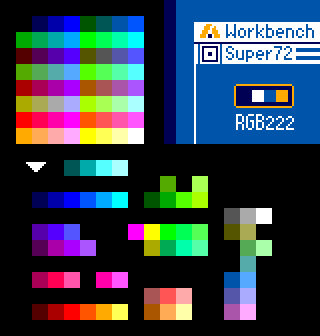
Amiga ECS had a strange RGB222 colour space which was perhaps intended for high resolution productivity modes, CAD and such. I approximated it here and laid out the 64 possible colours in a human-readable arrangement. Only 4 could be used at a time in e.g Super72 800x600.
Amiga Walker
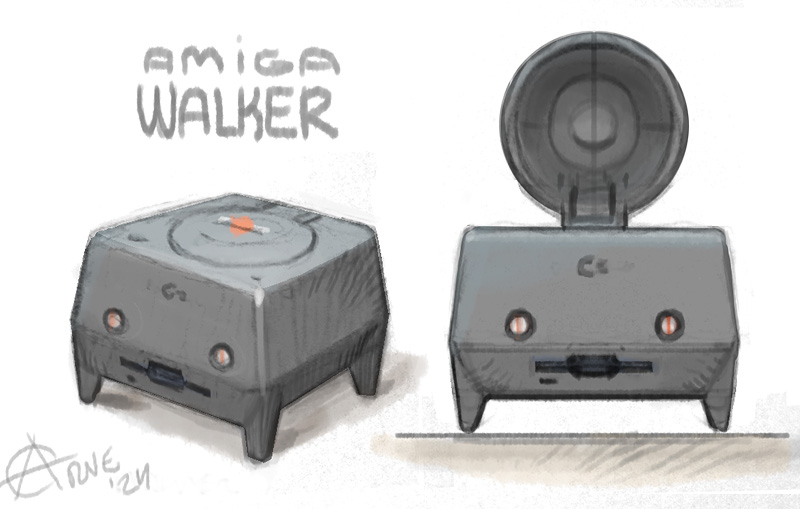
Amiga Walker or Balrog? This is my redesign of the Walker case. The Walker was a prototype machine supposedly featured the AGA chipset, 68030 @ 40 MHz (pretty nice), 1MB KS ROM, 2MB Chip + 4MB Fast memory (the latter actually sped up the processor further), MF2HD (less reliable than DD imo), a CD drive, and an RTC. Perhaps attractive in 1993 but not in 1996. But maybe pretty cool to have nowadays.
BBC Micro Compact-ish
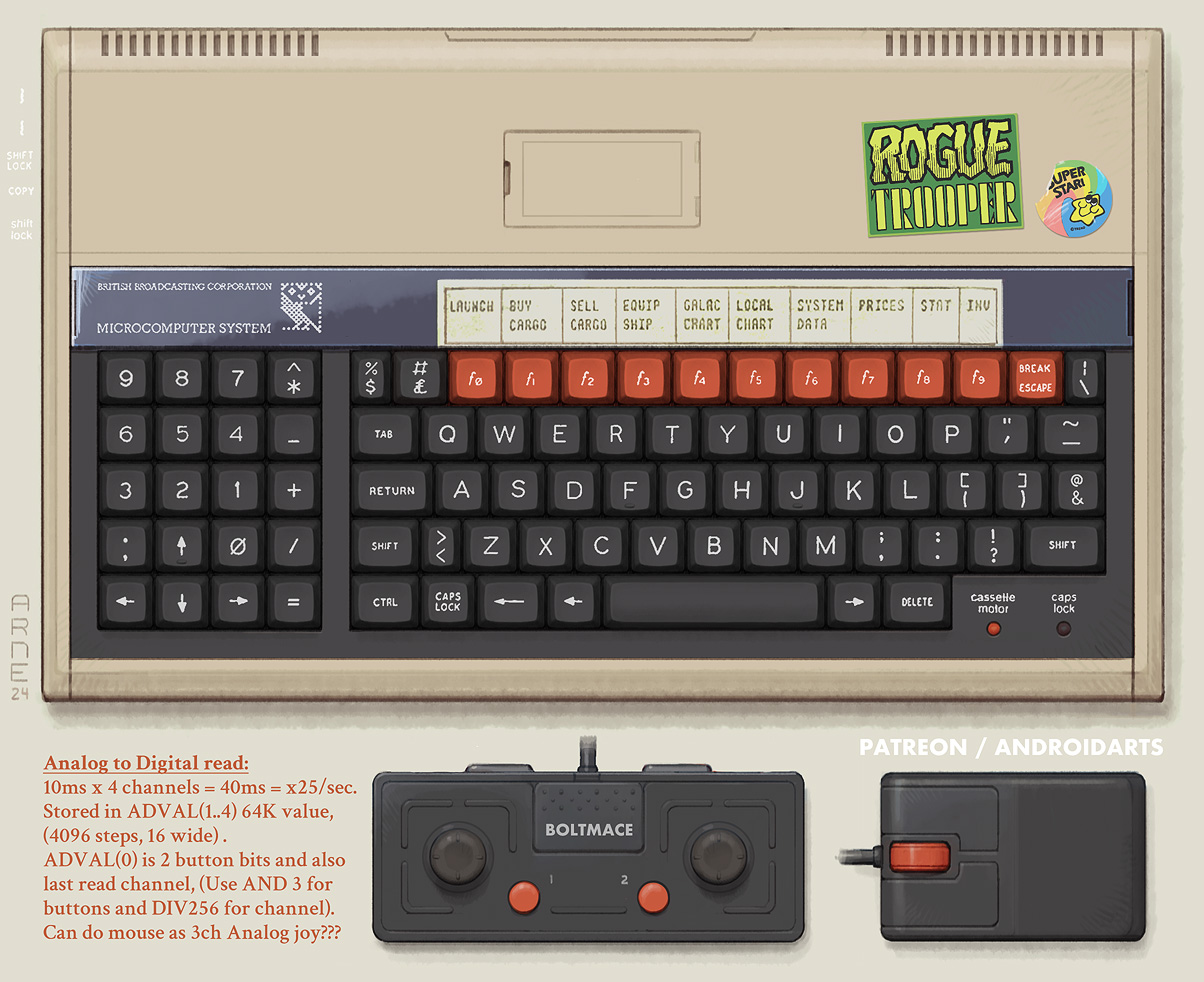
Another wacky keyboard. Number and currency stuff for completely left-handed entry. Experimental placement of BS, DEL and arrows on the spacebar row rather than the usual modifier keys. I put the more commonly used characters as primary (parenthesis is preferable over brackets). The Beeb had a clear plastic cover which could hold function key row papers (here for Elite). Love that dotty owl logo. Reminds me of the dotty "It's a Sony" one.
Interestingly the system's joystick port had two buttons and four analog channels (on a single connector). Analog was a bit tricky to implement on older hardware. Even on modern microcontrollers there's usually only one measurement thingy which is then redirected to the various analog pins to take voltage measurements. It seems on the Beeb the poll rate is practically 40ms or 25 times per second. Probably sufficient for games since they rarely ran at 50Hz. I don't think mice and joypads were at all common back in the early '80s for these machines (as many were found in British schools).
One might be able to implement a mouse as an analog device, but it would require a high frequency sensor to avoid lag, and three Digital to Analog Converters in the mouse (the benefit would be that analog joys would be pin compatible and usable directly as mice). Older mouse ports usually counted digital pulses instead, (4 quadratures), but didn't have pins for an additional mouse-wheel axis.
Atari RV (XE)
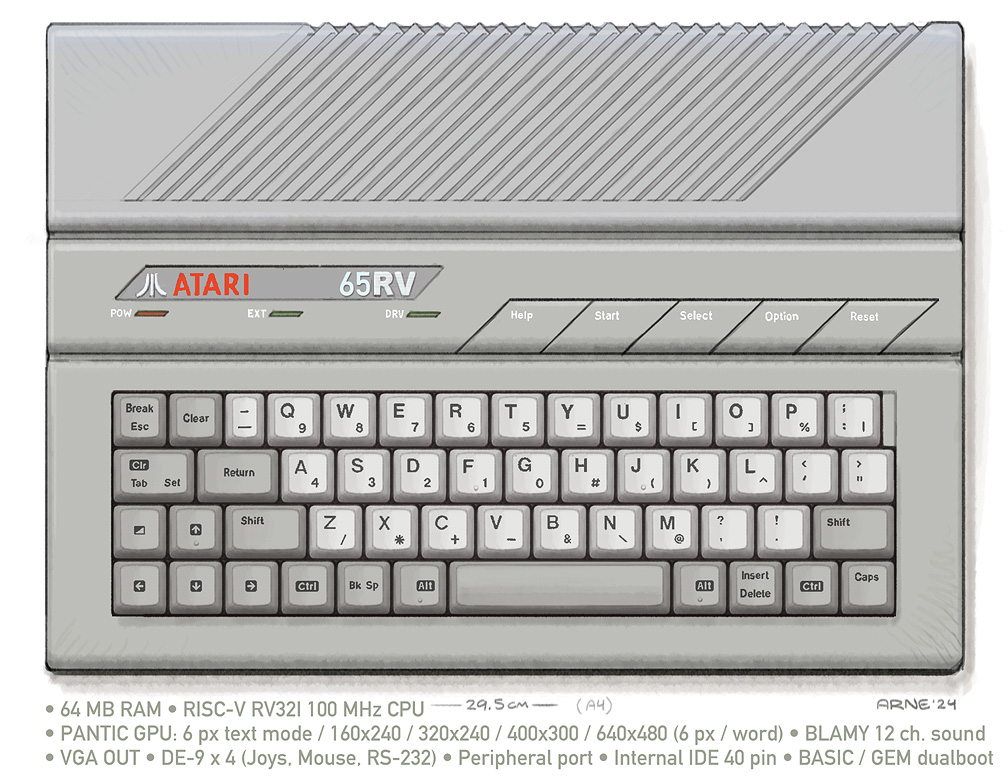
The Atari XE/ST cases were probably the best looking non-Japanese cases, aside from maybe the ZX Spectrum. I made this super compact version based on the Atari 65/130 XE. It was a C64-like machine (e.g. wide pixels) but capable of doing some copper/DisplayList effects, albeit with rather garish colours.
I don't really know much about the machine so I came up with some haphazard and generous specs for this instead. Went for low spec graphics and high end processing, a bit like with the Pico-8. 32 colours is a pretty nice restriction, whereas 256 feels like a bit of a burden to even set up well. However, since 32 colours is 5-bit it's tough to structure in memory without resorting to bitplanes... but I suppose one could pack/mask 6 pixels into a 32 bit word, with 2 bits probably wasted. This unfortunately means a bunch of coordinate division by 6 might happen (/8 is just a cheap bitshift). There's probably a reason why no one does things this way. Still, it might make sense to pull 32 bits over the databus and let the GPU quickly process the bits into a picture. If done a pixel at a time (beam racing) then memory latency is potentially an issue still. A second is thousand milliseconds, or a million microseconds, or a billion nanoseconds. If a PAL frame of 50Hz has 20 milliseconds to render say 640*480 (307.200) pixels, then that's, uh, 20.000.000ms / 307.200 = ~65ns per pixel if just pulled from a frame buffer. Memory access times seem to be in the 45ns and below range. Each portion of ASIC/FPGA/Gate logic done per pixel costs time of course.
The RISC-V processors are interesting because the Instruction Set Architecture (ISA) is open (unlike ARM, x86, etc), though I'd probably prefer to program them using something like Flat Assembler rather than using getting tangled with the raw confusing instruction names and syntaxes. Actually I'd rather avoid asm altogether.
Related or not, I came across the Kolibri OS (Menuet-based), which is a fully featured x86 OS (+productivity software and games) which fits compressed on a PC floppy and runs on old 8 MB PCs. A lot of enthusiast OSes are actually quite nice but sadly fail because the web has feature-creeped so far it's tough for a browser to even display basic text and images now without choking on scripts, effect layers and offsite trackers.
Dragon 32 (96)
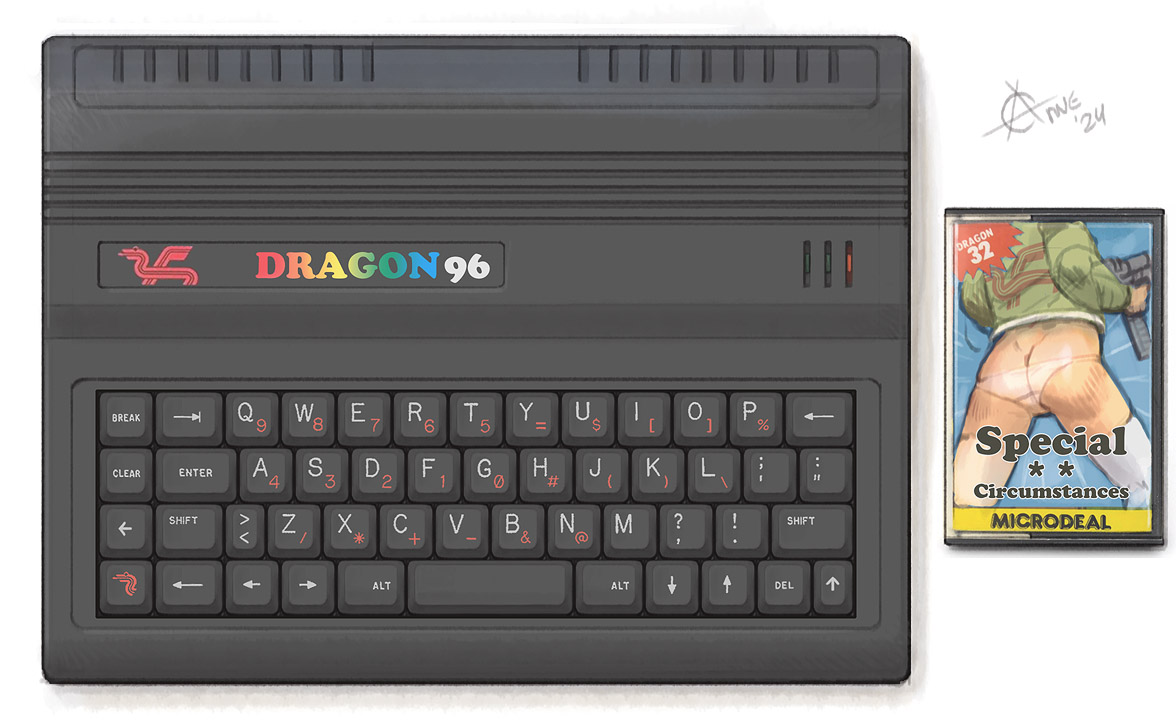
The most interesting thing about this machine is that there was a prototype version with a floppy drive.
Acorn Electra
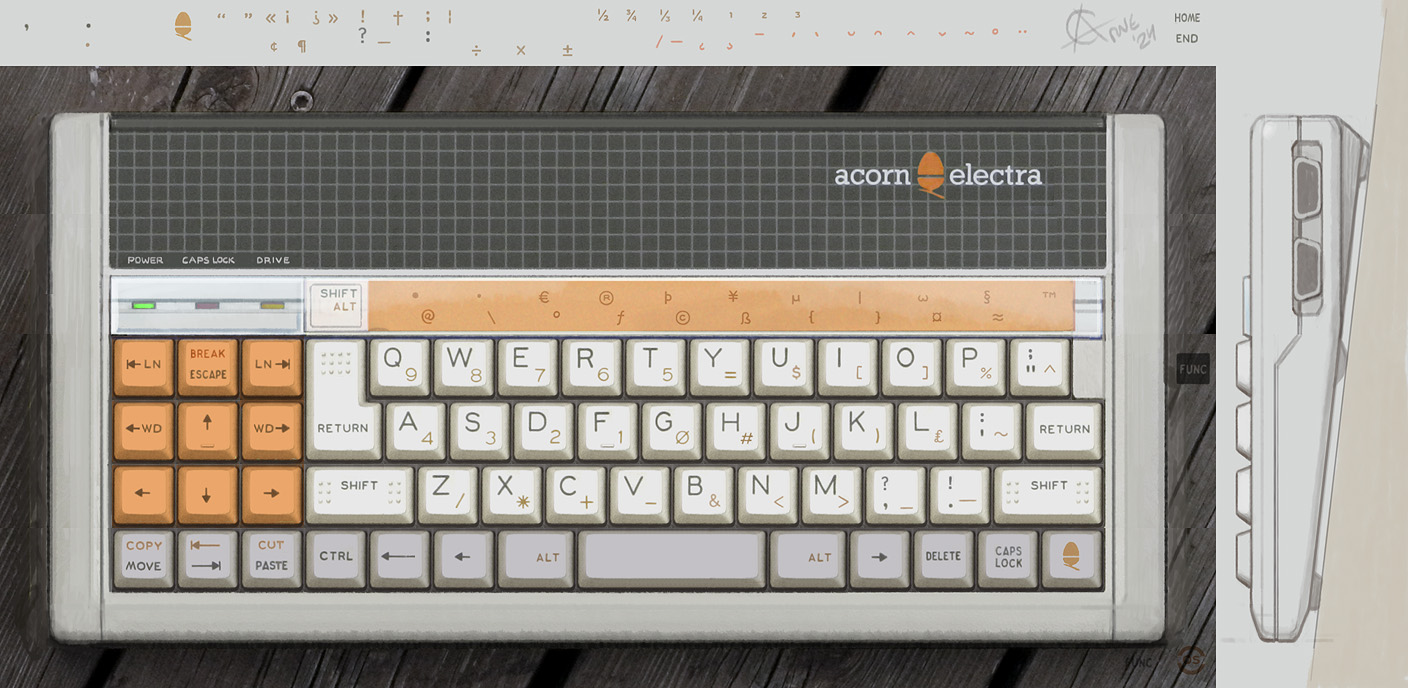
Yet another Acorn Electron variant, this time a left-handed compact "Electra". A clear plastic bracket appeared and can be used to hold a reminder key for mapping e.g. the ISO-8859 range onto the Shift+Alt layer.
Given the history of the Acorn company, this fantasy machine might actually be suitable for RPi/Arm innards. There are a few speed boosted BASIC images for RPi iirc. I tried one but didn't like the graphics coordinate system. Modern versions are SDL too, and the RPi RISC OS version lacks indexed modes, like 64 colours. I read that the developer is hostile towards indexed modes.
I tested my Electron yesterday and it boots and toots into BASIC instantly. The ULA socket is flakey due to corrosion though so I can't do much on it. Might be cool to load up Exile one day (i.e. play the tape file a laptop).
Tandberg / Norsk Data
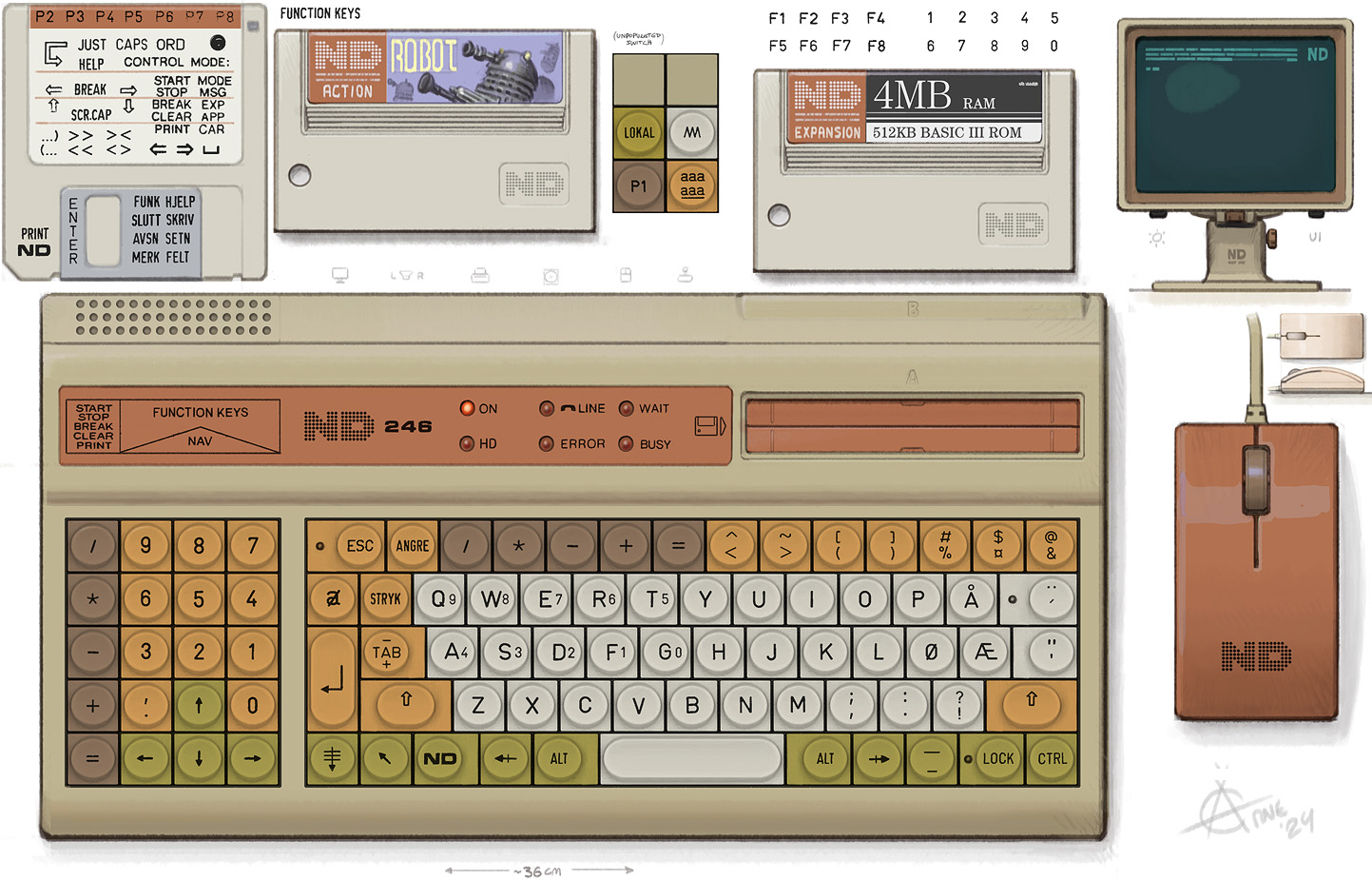
The Tandberg keyboard was actually a terminal keyboard thingy which connected to a central mini computer – and "mini" here actually meant the computer was about the size of a couple of side-by-side noisy fridges. My dad worked as a journalist back when computers arrived in homes and offices. The newspapers then had just moved off lead type printing and onto digital systems, so his workplace picked up a second hand Norsk Data (Norwegian Data) system... which was already dated – tech moved rather quickly in the late '70s and early '80s. As the '90s drew close it made more sense to use actual desktop computers (i.e. Macs) in DTP environments.
I don't know much about the actual hardware specs of the ND mini computers. They were rack and module based with multiple processors, so perhaps quoting specs is pointless. I only know that by the mid '80s these machines had just a few megabytes of work memory and by then even silly home computers like the Amiga would get you there with a much smaller investment. Of course, the main feature of the ND systems was being able to handle multiple terminals (using proprietary gate arrays and PALs).
At the newspaper, articles were saved on these massive tape storage units. I remember going into the server room seeing them spin and whir while a Reuters teleprinter clattered in the background. People were still banging on typewriters too, and if not, they were loudly stabbing the terminal keyboards because of lingering typewriting habits. typewriters then had round keys, but nowadays it might feel odd to type on...?
The keyboards used decent switches, likely with space for diodes and LEDs. With the typing speed in this environment I wouldn't be surprised if the keyboard matrix was fully dioded. A microcontroller was used too, so they weren't uncommon in keyboards even back then. The keyboards I saw came in with either mid-dark brown or olive tertiary keys. So, very late '70s coupled with the orange. The layout could be customized a bit, with unused switches being replaced by blank covers.
ND machines used an OS called Sintran. It was console only, for managing terminals and stuff. It had a sort of scalable syntax where one could abbreviate or fully type out the commands. Or use the special keys on the terminal keyboards. As for games, there were the types a engineer might cobble together while bored. I remember playing a variant of Dalek/Robot on the green monochrome screen. To make this a cartridge console out of this is complete nonsense (Perhaps the dual cartridge slots could be for RAM and Storage). I don't remember seeing a mouse used with these systems. Anyways, I just wanted to draw something using the Tandberg aesthetics.
ABC80
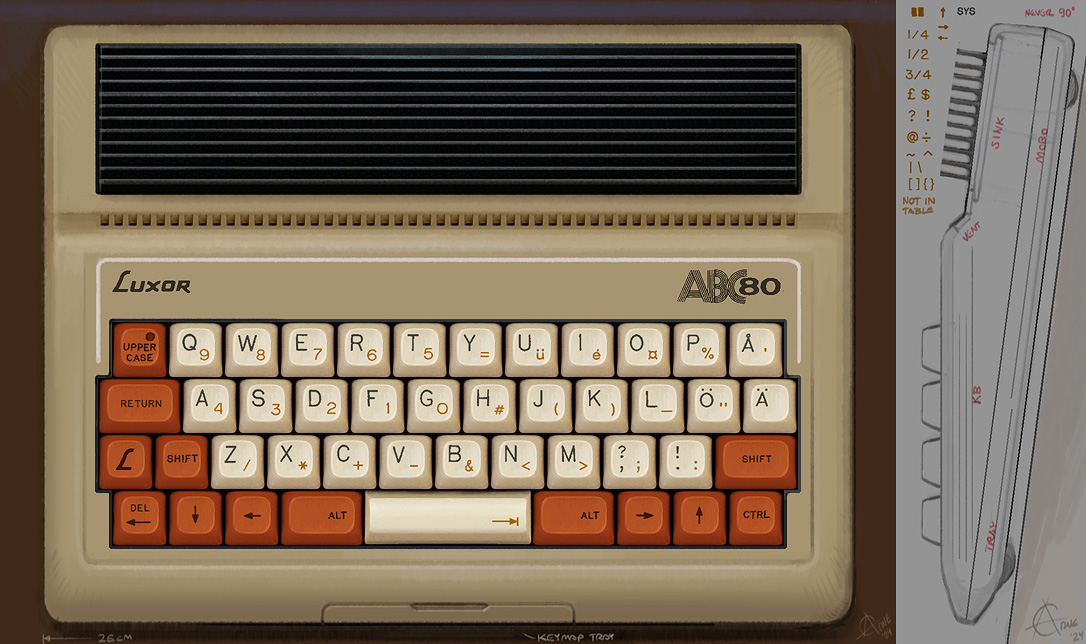
I saw this "Advanced Basic Computer for the 1980s" computer in use as a kid. It was made in collaboration with a local TV set maker called Luxor, so it came with a little TV-monitor that actually supplied power. The ABC80 served as a Swedish office/school type PC and was around in the Vic-20 and C64 days (in production 1978-1985). Kids in the '80s used the C64 while these rotted though.
The BASIC was faster than that of other contemporaries, but the display was limited to 40x24 characters, 6x10 pixels (pretty decent font). However, there was a special graphics mode where the character font did all combinations of 2x3 big-pixels/squares (kinda like the PET squares). And no, 10/3 is not an whole number so the middle big-pixels were seemingly 3x4. Most home computers at the time opted for 8x8 characters so this is all a bit unusual. While the output was 240x240 pixels or so, there was no way to set individual actual pixels (though demo coders figured out a way to do 3x1 pixels, probably swapping out partially drawn characters with exact scanline timing).
The ABC80 case was painted a beige-olive-grey (aka horrible PC colour) and many specimens now look heavily chipped. Repainting it removes the pad printed logos and decor line. The case had a little pullout tray (like on old rotary phones) where you could put reference stuff. And that's a giganormous black heatsink... attached to maybe just the pair of 12V regulators sitting on an umbilical daughter board.
Later variants like the ABC802 had a pretty unique design worth checking out!
I found a book (Mikrodatorns ABC / Swedish only) going into some detail about the ABC80 construction. Video memory access is pipelined & latched for semi-concurrent access. There are some pretty schematics in the service manual, including a PCB with traces and all.
The Bill of Materials looks to be completely off-the-shelf so the machine could probably be built today (like the ZX80). No ULAs or ASICs – just a few ROMs. The "GPU" is built entirely using various counters, PROMs and gates and this is what enabled going for the unusual 6x10 font.
With modern chips one can probably move from sensitive LS to HC. ROM, Char VRAM and RAM could seemingly be consolidated - back then they had to use 4x 4KB ROMs (16KB), 2x 4-bit SRAM (1KB), and 8x 1-bit DRAM (16KB). This resulted in extra MUXes and stuff being needed. It was possible to hack in 64KB of RAM and the improved BASIC II.
The keyboard uses capacitive touch, n-key rollover, and a (buffered) MCU for 2.5ms matrix scanning. It puts a 7-bit ascii code (latched) on data bus, plus strobe (key hit) bit. The character map is not quite ascii but a Swedish offshoot ("SIS 636127/662241") – we needed to fit our precious umlauts and borrowed french accent... ÅÄÖåäöÜüÉé.
So gone are the brackets, curlybraces, backlash, pipe, tilde, exponent, at (aka "cinnamon bun"), accent. Honestly, good riddance to some of those... who likes backslash? And pipe is just for terrorizing people in command line. And curlybrace is just for horrible programming languages.
Strings used the more culture-neutral currency symbol "¤", aka "Rogue turtle", aka "the sun". We don't have a Swedish currency symbol other than :-
Ctrl was used for an Alt layer, but I did regular Alts on mine here, and I changed the layout as usual.
Is it a fun computer? Probably not. The font is interesting, the BASIC (especially version 2) seems noteworthy. But the graphical mode is underwhelming. Sound is better than beeps, but being single channel limits it a lot.
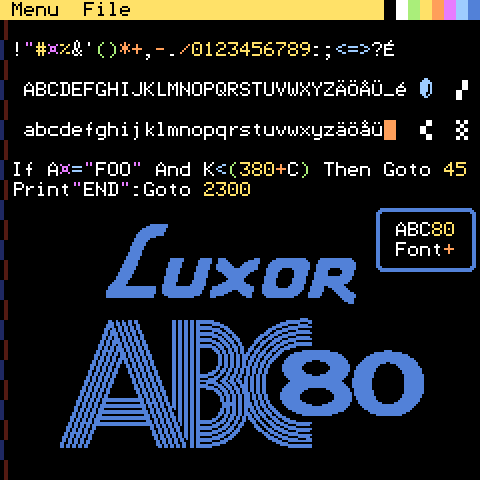
My variant of the ABC80 font. It could theoretically be in colour, with colours locked to certain characters to make BASIC slightly more legible and happy. The originally supplied TV was B&W though. Perhaps the font is stored in the "Texas Instruments SN74S263N Row Output Character Generator"... says it's a 5-bit width 10240 bits ROM but I can't find it.
The ascii table is kinda trash to be honest, but I've ranted about that elsewhere. Tech is the tower of babel built out of trash and exploitation on a foundation of shortsights. And we're all locked inside the rickety thing.
MSX
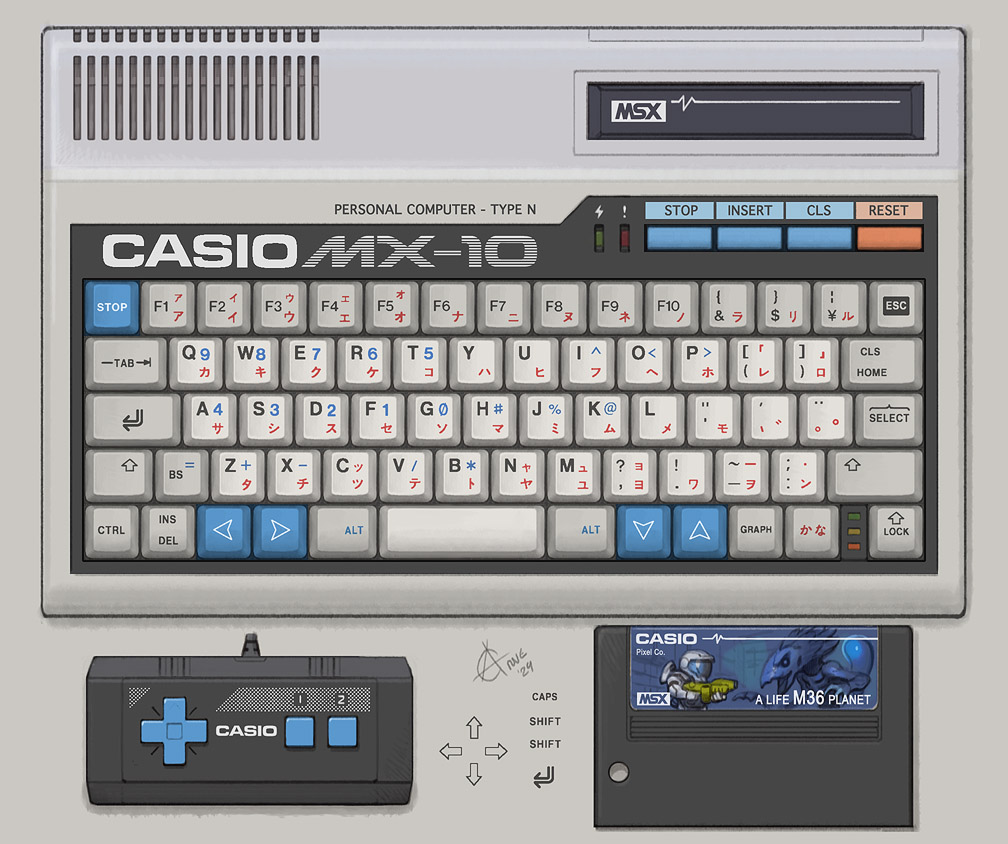
A very different CASIO MX-10. It would need a proper joystick. It uses in-order katakana lettering, which is not modern, but easier to learn for me. I guess to use the function keys the keyboard must be in romaji mode. The Graph and Kana keys are used to access the Kanji and Hiragana/Katakana layers. The current locking could be indicated by the LEDs.
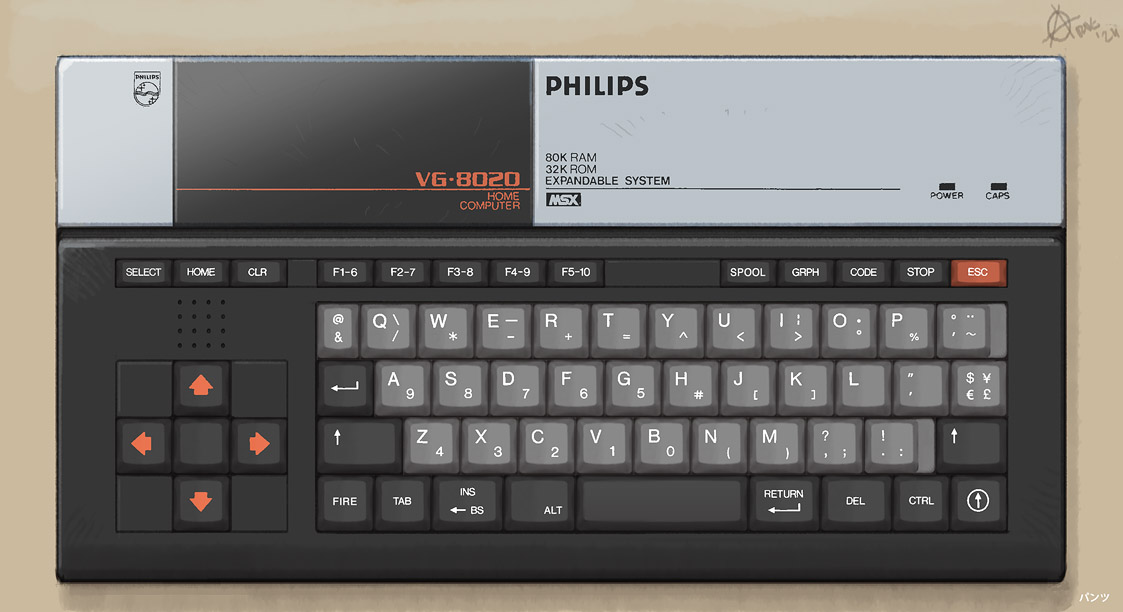
I liked the contrast with the gloss black cartridge hatch and the silver flats on the Phillips VG-8020 MSX, so I drew a slim version with one of my unorthodox leftie key layouts. Blank center arrow key might have to be an additional U/D key... just wanted a + formation for once. I don't know how good a + formation is for gaming but many MSXes insisted on it. Some MSX machines wired a joypad into certain keys. Had to look up again what some of the other keys do.
CODE is for certain diacritics. Could possibly be replaced by deadkeys, or be turned into a character combine key. Circled arrow is just caps lock. Graph is for petscii-like stuff which I've never really been into. Select is software contextual. Stop is for BASIC program break.
Two cart slots hide under a stylish black flip-up hatch. The hatch actually leads straight to the connectors on the PCB, so that was covered up with some black material. I think the silver was spray-painted because I've seen it worn off.
Misc
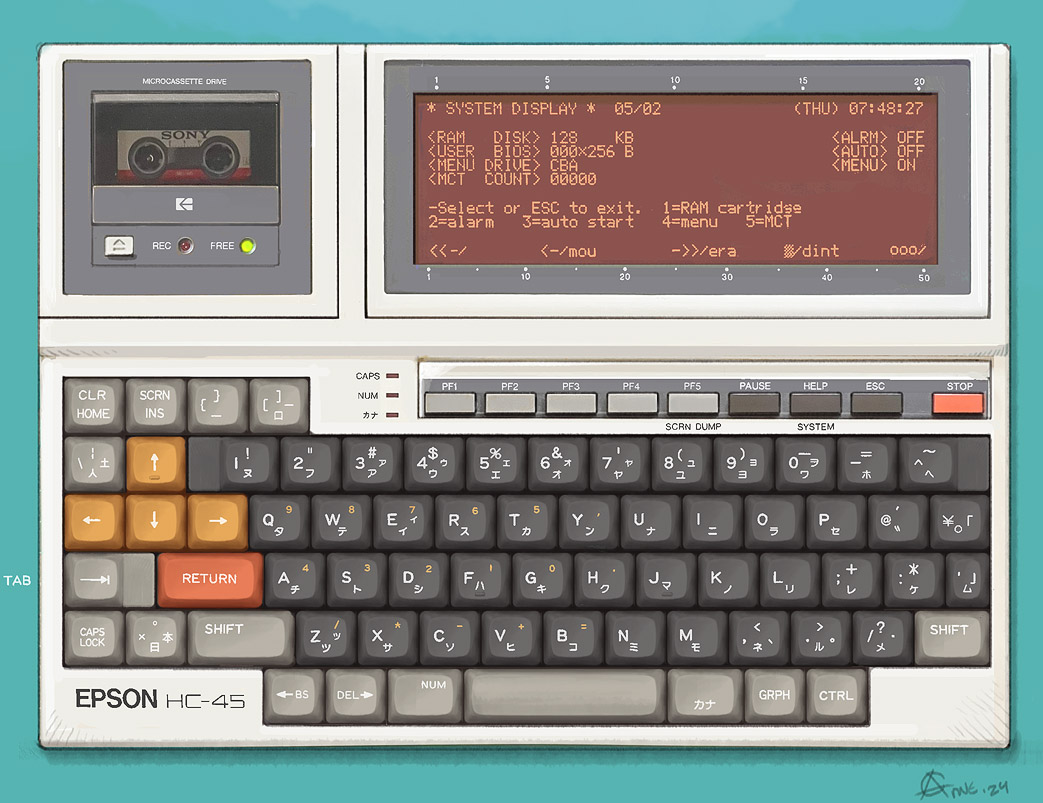
The Epson HC series has interesting designs with built-in screens, speakers, receipt printers, and micro-cassette drives. Sometimes the screen can be flipped up, revealing devices underneath. Having a receipt printer in a computer might actually be useful for taking down notes, like codes, passwords, pastebin urls, and small figures and reference pictures.
I rearranged the layout here, flipping it to be left handed. The screen is larger (50x11 characters, 6x8 each, so 300x88) and inverted to red. Modern LCD screens can be a bit more legible, unless I misremember because old screens have faded over time.
Note that these machines had a clear plastic bracket over the F-keys, useful for mounting a small strip of paper, like on the Beeb.
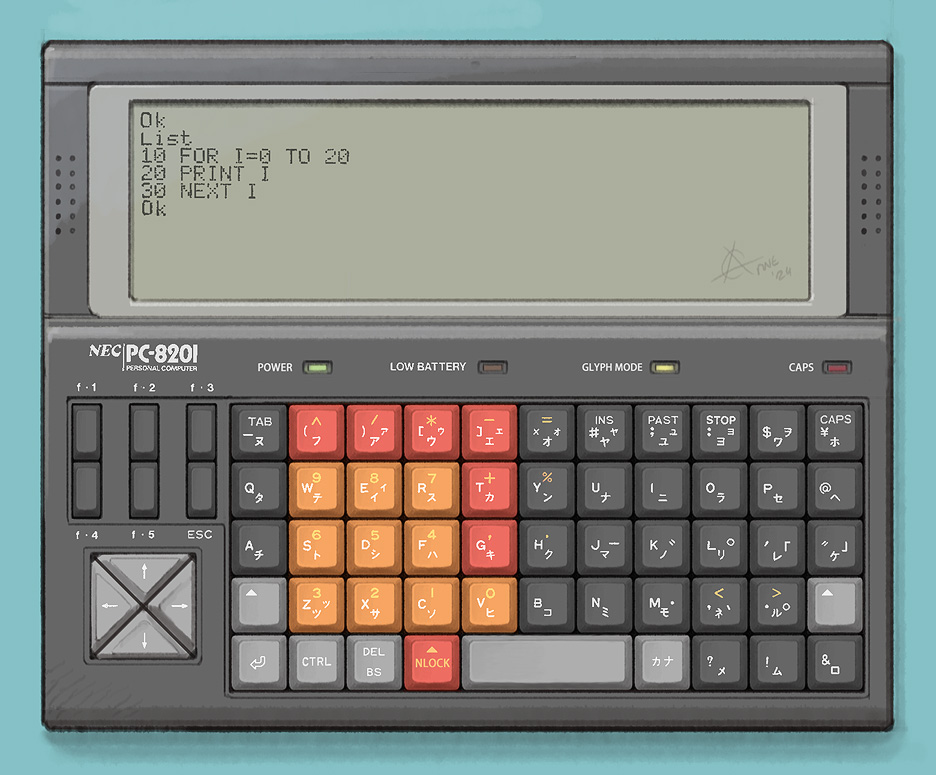
How about a big key array? You kinda need the num row when doing the entire kana set. Even on full 104 key keyboards, me mu ro often end up in spare positions it seems, often in a corner. Originally on this computer (NEC PC-8201) I think the F-keys aligned with information on the display, but I wanted to do something different and did vertical keys, which looks kinda neat. This whole look gives me drum machine/synth vibes.
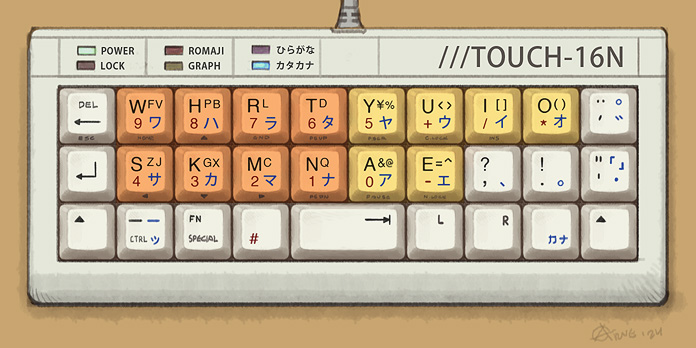
Experimental tiny keyboard, using a variant of the タッチ16 (touch16) consonant+vowel layout only ever seen on the Epson HC-88 afaik. When typing in Japanese on my Swedish keyboard I just spell out the character syllables and this compact version works similarly except for the extra layer keys. The han/dakuten is on a deadkey but one can also use the shift layers to type the right romaji (like ZI, PA, GA). I suppose Chi would have to go on either "S"+[L]+[R] or on the C key (M). I had to squeeze in C and Q somewhere... Some symbols are not marked, like colons, some diacritics, but there is plenty of layer space available, especially if combining layers.
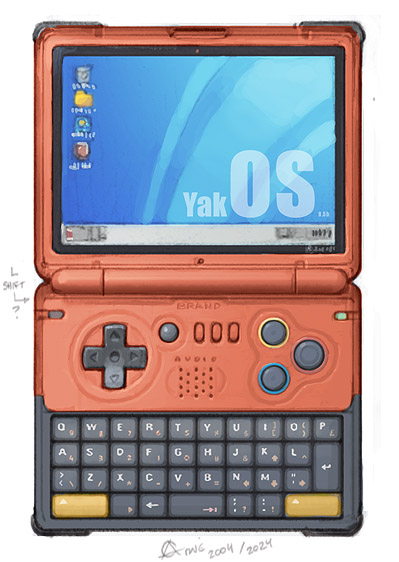
Here I quickly retouched my old palmtop concept from 2004 (contemporary to the Nintendo DS). I vaguely recall that back then there were no full OS machines like this (maybe the Sony Clié?), just a few organizers, dictionaries and pure gaming devices.
Shift and alt key could be shoulder buttons for the index fingers, if thumb-typing. I don't think I'd like to use this keyboard for anything producive though, if the size of a floppy. The screen was supposed to be a touch screen for OS stuff. In retrospect this is pretty much the pocketchip form factor, and I didn't use that one at all...
More Pixel Art
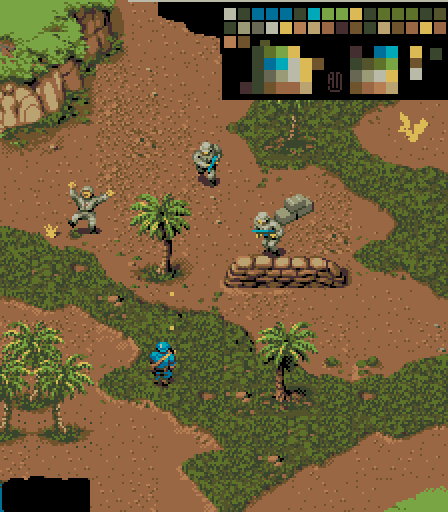
Partial arcade Commando pixel-over in 16 colours. I wonder how it would play with dual analog sticks and a more agile Joe strafing about. There's no graphics dump for this game so I probably won't continue. The Amiga and ST version made up some new wider graphics.
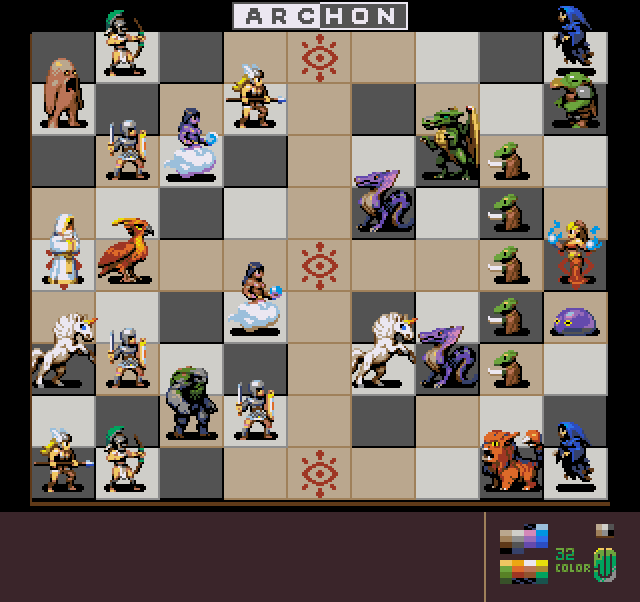
Amiga Archon, PAL, 32 colours. I wouldn't want to animate all this.